GB
GB
·
·
·
·
·
·
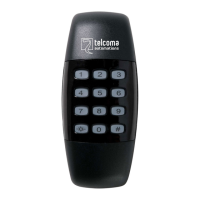
press and hold the key for approx. 2 seconds until the keypad be-
eps once.
introduce the MASTER code followed by , the LED emains on.
enter to memorise codes for channel 1 of the receiver or to me-
morise codes for channel 2 of the receiver, the LED starts to flash.
enter the code to be introduced followed by . The buzzer confirms
with a beep.
Proceed as above for any additional codes.
To exit the programming, press and hold the key until the keypad
emits a long beep followed by a double beep.
The keypad exits automatically from programming after a few seconds
of inactivity.
- Each user code can only control one output relay.
- The user codes can be made up from 1 to 8 numbers.
- Codes of different lengths can be memorised on the same
system.
- A code cannot start with 0.
- The confirmation time of the codes introduced may increase
as the number of user codes memorised increases.
I want to introduce the user code 12390 that will activate relay 1 of the
receiver
2 sec. MASTER code command new USER 2 sec. End of
programming
I want to introduce the user codes 456 and 789 that will activate relay 2
of the receiver
2 sec. MASTER command new new 2 sec.
code USER (1) USER (2) End
#
#
01# 02#
#
#
NOTE:
# 2233# 01# 12390# #
# 2233# 02# 456# 789# #
Example 1
Example 2
☼
☼
·
·
·
·
·
·
press and hold the key for approx. 2 seconds until the keypad be-
eps once.
introduce the MASTER code followed by , the LED emains on.
enter to memorise codes for channel 1 of the receiver or to me-
morise codes for channel 2 of the receiver, the LED starts to flash.
enter the code to be introduced followed by . The buzzer confirms
with a beep.
Proceed as above for any additional codes.
To exit the programming, press and hold the key until the keypad
emits a long beep followed by a double beep.
The keypad exits automatically from programming after a few seconds
of inactivity.
- Each user code can only control one output relay.
- The user codes can be made up from 1 to 8 numbers.
- Codes of different lengths can be memorised on the same
system.
- A code cannot start with 0.
- The confirmation time of the codes introduced may increase
as the number of user codes memorised increases.
I want to introduce the user code 12390 that will activate relay 1 of the
receiver
2 sec. MASTER code command new USER 2 sec. End of
programming
I want to introduce the user codes 456 and 789 that will activate relay 2
of the receiver
2 sec. MASTER command new new 2 sec.
code USER (1) USER (2) End
#
#
01# 02#
#
#
NOTE:
# 2233# 01# 12390# #
# 2233# 02# 456# 789# #
Example 1
Example 2
☼
☼
PROGRAMMING – INTRODUCTION OF THE USER CODE
PROGRAMMING – INTRODUCTION OF THE USER CODE
51
51
Via Soldati, 14 - 31040 SALGAREDA (TV)
Telefono/Fax 0422 80 76 45
E-mail: stampa@marpress.net - www.marpress.net
TIPOGRAFIA DIGITALE
Manuali e fogli istruzione
Listini prezzi
Presentazioni
Volantini
Giornaletti
Depliant
ecc...
Libri a bassa tiratura
Via Soldati, 14 - 31040 SALGAREDA (TV)
Telefono/Fax 0422 80 76 45
E-mail: stampa@marpress.net - www.marpress.net
TIPOGRAFIA DIGITALE
Manuali e fogli istruzione
Listini prezzi
Presentazioni
Volantini
Giornaletti
Depliant
ecc...
Libri a bassa tiratura


 To Next Page