EasyManua.ls Logo

Teldat M2 - User Manual

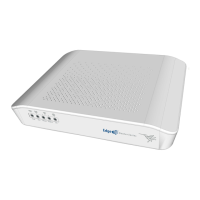
Teldat M2
33 pages
Print Icon
To Next Page IconTo Next Page
Loading...
Teldat M2/M2L
Installation Manual
Copyright© Teldat Dm1035-I Version 1.3 02/2023 Teldat S.A.
Teldat S.A.
Manual
Teldat M2/M2L 1

Table of Contents

Questions and Answers

  • A
    Anthony RichardsonAug 11, 2025
    Why none of the LEDs light up on my Teldat Network Router?
    • L
      Lawrence NorrisAug 11, 2025
      If none of the LEDs light up on your Teldat Network Router, check the power supply to the router, including the power source, the ON/OFF switch, and the main power outlet.
  • N
    Nancy RodriguezAug 19, 2025
    What to do if the WAN connector LED never lights up on Teldat Network Router?
    • J
      Jennifer StewartAug 19, 2025
      If the WAN connector LED on your Teldat Network Router never lights up, check the Ethernet cable and the connection to the network. Also, verify that the appropriate license is available for use. For further details, consult the manual “Teldat Dm709-I LAN Interfaces.”
  • A
    Ann MarshAug 27, 2025
    What to do if the LAN connector LED never lights up on Teldat M2 Network Router?
    • L
      Louis DawsonAug 27, 2025
      If the LAN connector LED on your Teldat Network Router never lights up, check the Ethernet cable and the connection to the network. Consult the manual “Teldat Dm709-I LAN Interfaces” for more information.
  • C
    Charles MurphySep 2, 2025
    How to fix Wi-Fi LED if it never lights up in green on Teldat M2 Network Router?
    • D
      Dawn MoonSep 2, 2025
      If the Wi-Fi LED never lights up in green on your Teldat Network Router, check the router configuration and that of the remote station(s). Consult the manual “Teldat Dm771-I WLAN Interfaces” for further information.

Summary

About this Guide

Technical Support Information

Provides contact details and information for obtaining technical assistance.

Teldat M2; Teldat M2 L Devices Overview

Available Device Models

Lists the available Teldat M2/M2L device models and their sales codes.

Device Characteristics and Monitoring

Details device features, power supply, and hardware monitoring via LEDs.

Components and Installation

Wall Mounting

Steps and recommendations for securely mounting the device on a wall.

Power Source and Reset Functionality

Explains power connection, rebooting, and default configuration via the RST button.

Data Connections and Configuration

Compliance and Regulatory Information

Manufacturer, Safety, and Environmental Data

Covers manufacturer info, risk identification, safety warnings, WEEE, REACH, and usage.

Technical Information and Troubleshooting

Troubleshooting and Software Updates

Guidance for resolving issues and updating the device's software.

Teldat M2 Specifications

General IconGeneral
BrandTeldat
ModelM2
CategoryNetwork Router
LanguageEnglish

Related product manuals