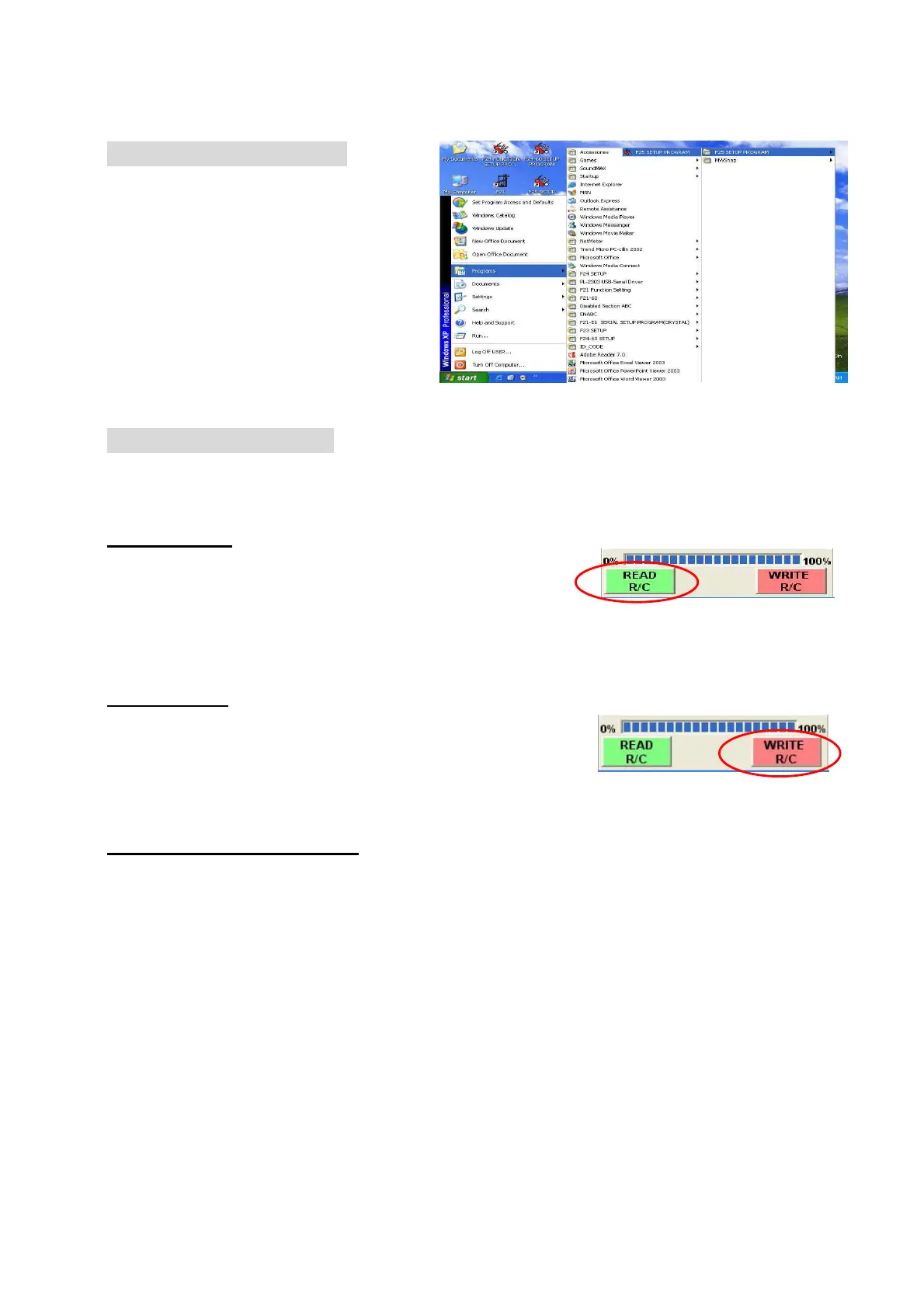
How to start F25 Program
1. Press “Start” button
2. Select
“
Programs
”
3. Select
“
F25 SETUP PROGRAM
”
4. Then select
“
F25 SETUP
PROGRAM
”
How to use F25 Program
Note:
Make sure both power of transmitter and receiver is remaining OFF when
reading or writing the data.
Reading Data
1. Connect program Interface Cable (USB) into
transmitter or receiver.
2. Press “Read R/C”.
3. Press “OK” when finish.
Writing Data
1. Connect program Interface Cable (USB) into
transmitter or receiver.
2. Press “Write R/C”.
3. Press “OK” when finish.
Pushbutton function setting
1. Read data from Transmitter (Receiver).
2. From main (Function-Setting) page, press any button group you would like to
program. The pushbutton function table will be pop up immediately. Select any
function block from the table (as shown on the figure). Return to main page
automatically when finish the selection.
3. Repeat the above procedure 1~3 if you wish to make any other function changes
on the pushbutton.
Remark:
(1) For further information about the function definition, please refer to the
annex 1 for more detail.
(2) Press “EXIT” to close function table without change



 To Next Page