36
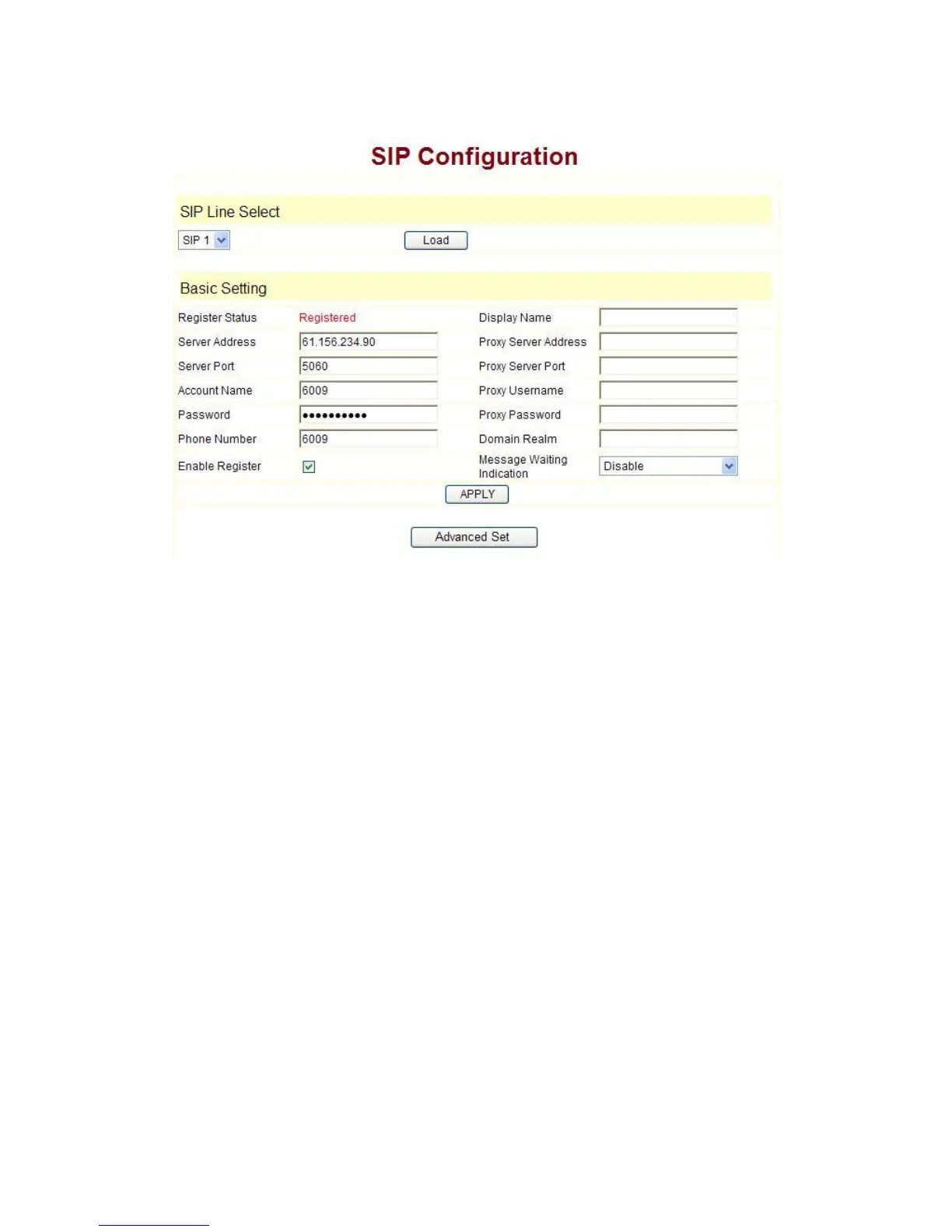
4.2.2 SIP setting:
Enter into the VoIP à SIP Config to set the layout config and sip account
information:
Register Server Addr: Register address of public SIP server
Register Server Port: Register port of public SIP server,default port is 5060.
Register Username: Username of your SIP account (Always the same as the
phone number)
Register Password: Password of your SIP account.
Phone Number: Phone number of your SIP account
----choose Enable Register;
You can dial VoIP phone when the WAN interface and IAX protocol are being set
correctly.
Message Waiting Indication:Set Disable/Enable message waiting through
Pull-down menu, including:
Disable:MWI is disabled, even if received NOTIFY message from the server
indicating new voicemail, phone will not prompt.;
Enable (Subscribe): MWI is enabled and SUBSCRIBE will be sent, if the server
sends NOTIFY message indicating new voicemail received, MWI LED will blink to
prompt.
Enable(No Subscribe):MWI is enabled, but phone will not send SUBSCRIBE, if
the server sends NOTIFY message indicating new voicemail received, MWI LED will
also blink to prompt.
SIP1 Subscribe will still be used in config file: config option “0” means “Disable”,
“1” means “Enable (Subscribe)”, “2” means “Enable (No Subscribe)”.



 To Next Page