EasyManua.ls Logo

Teledyne MX300 - User Manual

Teledyne MX300
41 pages
Print Icon
To Next Page IconTo Next Page
Loading...
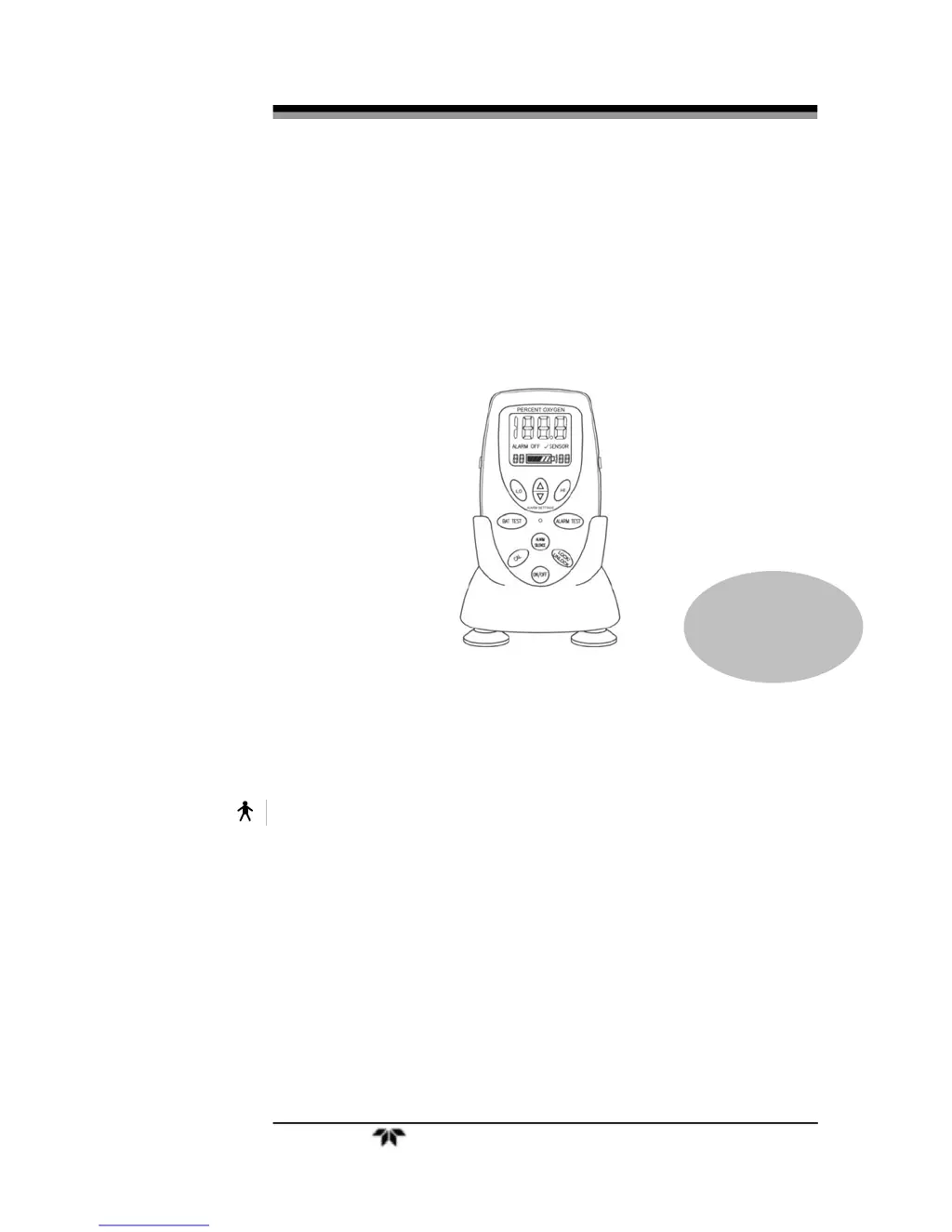
Portable Oxygen Monitor
Teledyne Analytical Instruments i
OPERATING & SERVICE INSTRUCTIONS FOR
MX300
PORTABLE OXYGEN MONITOR
TYPE B APPLIED PART:
Equipment provides a degree of protection against electric shock,
particularly regarding—
Allowable Leakage Current
Reliability of the protective earth connection (if present).
P/N M75387
Sep 18, 2009
ECO 09-0158

Questions and Answers

  • D
    dclarkJul 29, 2025
    What to do if Teledyne MX300 unit has stopped working and the LCD is displaying alphanumeric characters?
    • B
      benjamin98Jul 29, 2025
      The MX300 unit includes an electronic "watch dog" feature that monitors the internal circuitry for potential issues, which can cause the unit to become inoperable. This can be triggered by events like dropping the unit, poor battery connections, or radio frequency interference. To resolve this: * First, disconnect the batteries and check the contacts for any corrosion. Then, reconnect them. If the unit starts working correctly, calibrate it and reset the alarm values. * If that doesn't work, try using a new set of batteries. * Also, try moving the unit away from any sources of radio frequency interference. The sensor cable can act as an antenna, so repositioning it or changing its coiled length might help.
  • T
    Thomas WuAug 2, 2025
    Why does the oxygen reading fluctuate or appear to be incorrect on Teledyne MX300 Oxygen Equipment?
    • D
      David NewmanAug 2, 2025
      The oxygen reading may fluctuate or appear incorrect on your Teledyne Oxygen Equipment due to several reasons: * The sample pressure might be changing. Ensure there are no restrictions on the exhaust side of the sensor during calibration. If the reading varies with flow, the sensor may be pressurized, or there could be a leak in the system. * For high accuracy, especially when analyzing O2 concentrations above 40%, calibrate with 100% oxygen. * If humidified gas is used, remember that water vapor can dilute the gas. * If using a blender, verify its calibration.
  • E
    Eric MackAug 6, 2025
    What to do if the display is flashing '? SENSOR' on Teledyne MX300?
    • J
      John ElliottAug 6, 2025
      If the display of your Teledyne Oxygen Equipment is flashing '? SENSOR', it indicates a fault in the signal from the sensor. This could be due to several reasons: * Check the sensor cable connections to ensure they are fully inserted into the connector and the capture nut is secure. * Expose the sensor to 100% O2 and check the calibration. * It's also possible that the sensor output has degraded to a level where it's no longer usable, meaning the sensor needs replacement.
  • A
    Ann JonesAug 10, 2025
    How to fix Teledyne Oxygen Equipment sensor that does not react to changes in oxygen concentration, or the readings are unstable and drifting?
    • E
      Erica CollinsAug 10, 2025
      If the sensor in your Teledyne Oxygen Equipment isn't reacting to changes in oxygen concentration, or if the readings are unstable and drifting, it could be due to: * Water condensation on the sensing surface or electrical interference disrupting the electronics. Remove the sensor from the tee adapter and unscrew the plastic flow diverter. Gently wipe the sensing surface inside the threaded portion of the sensor assembly with absorbent tissue or a cotton swab. Be careful not to damage the sensing surface or leave any residue on the sensing membrane. * Also, relocate the unit away from sources of electrical noise like cauterizing equipment and two-way radios.
  • B
    Barbara SmithAug 15, 2025
    What to do if Teledyne MX300 Oxygen Equipment sensor will not read below 22 % after calibration in 100% O2?
    • C
      Christine FriedmanAug 15, 2025
      If your Teledyne Oxygen Equipment sensor won't read below 22% after calibration in 100% O2, it could be due to a few reasons: * The calibration in 100% oxygen might have been invalid, or the room air could be enriched with excess oxygen. Recalibrate using dry gas. * Ensure that at least 6" (30 cm) of tubing is attached to the exhaust side of the tee adapter to prevent back filling, and the O2 flow rate should not exceed 5 l/min. * The oxygen concentration at the sensor might be significantly higher than 21%. Move the monitor to a well-ventilated area and check the reading again. * Try calibrating with a known good sensor. If this doesn't work, contact customer support.
  • J
    Jennifer ShahAug 19, 2025
    How to troubleshoot no display on Teledyne MX300 Oxygen Equipment?
    • M
      Melissa KimAug 19, 2025
      If you're experiencing a 'No display' issue with your Teledyne Oxygen Equipment, check the following: * The batteries may be expired. Check and replace them if necessary. * There may be a bad battery connection. Check the battery connections to ensure they are secure.
  • M
    Monica LopezAug 23, 2025
    Why does new Teledyne Oxygen Equipment sensor respond slow or drifts?
    • A
      Ashley RogersAug 23, 2025
      If a new sensor for your Teledyne Oxygen Equipment responds slowly or drifts, it might need some time to stabilize. If the sensor was just removed from its sealed bag, allow it to run for several hours. Wait 1–2 hours and then recalibrate.

Summary

Safety Messages

Introduction to MX300 Oxygen Monitor

Operating Instructions

MX300 Setup Procedures

Guides the user through the initial setup process for the MX300 Monitor.

R17 MED Sensor Installation and Replacement

Provides step-by-step instructions for installing and replacing the R17MED oxygen sensor.

MX300 Mounting Options

Explains the various methods for mounting the MX300 Monitor using optional accessories.

Battery Installation for MX300

Provides instructions for correctly installing AA alkaline batteries into the MX300.

MX300 Calibration Procedure

Outlines the procedure for calibrating the MX300 Oxygen Monitor to ensure accuracy.

MX300 Alarm Configuration

Explains how to set and configure the high and low oxygen concentration alarms.

MX300 Operation

MX300 Measurement Procedure

Step-by-step guide on how to perform measurements using the MX300 Monitor.

Factors Affecting Sampling Accuracy

Service Instructions

MX300 Calibration Importance

Reiteration of calibration importance for accuracy and proper operation.

MX300 Troubleshooting Guide

Describes how to identify and resolve common issues with the MX300 Monitor.

Appendix

MX300 Technical Specifications

Lists the technical specifications of the MX300 Portable Oxygen Monitor.

Teledyne MX300 Specifications

General IconGeneral
BrandTeledyne
ModelMX300
CategoryOxygen Equipment
LanguageEnglish