Portable Oxygen Monitor Operating Instructions
Teledyne Analytical Instruments 15
2.1.6 Output 0-1 VDC or RS232
The MX300 Portable Oxygen Monitor comes with optional 0-1 VDC and
RS232 signal outputs for use with compatible external recording, indicating or
computing equipment.
An optional 0-1 VDC Interface Cable (P/N B-75554) is available from Te-
ledyne for accessing the voltage output.
To connect the Monitor to an analog recording/indicating device:
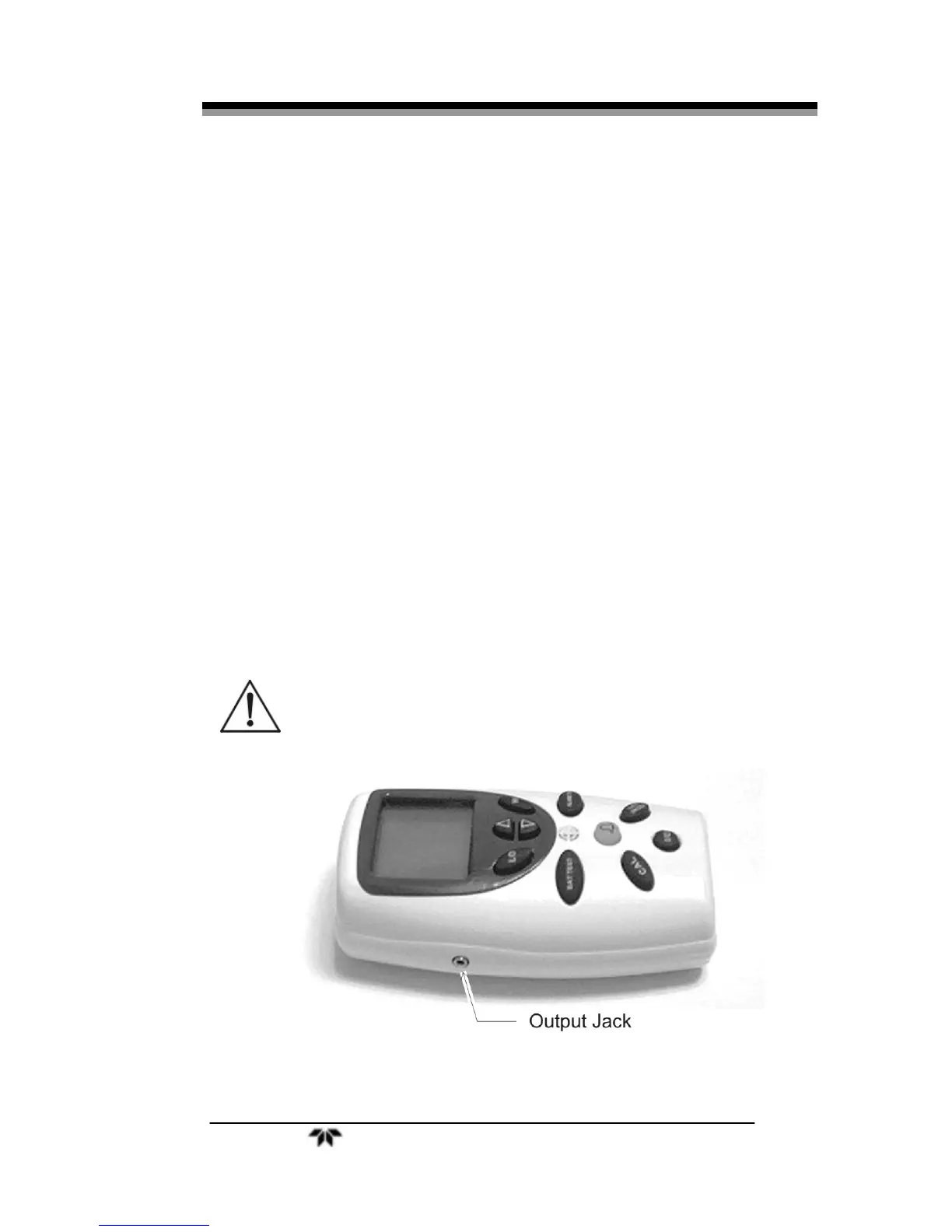
1. Insert one end of the interface cable into the output port on the side of
the Monitor. See Figure 2-9.
2. Insert the other end into the analog recorder/indicator device
equipped to handle a 0-1 VDC signal.
When properly calibrated, the output signal generated by the Monitor is li-
near and proportional to the oxygen concentration.
If you requested Option-B (RS 232 digital output) at the time of purchase, a
digital RS 232 signal is output from the output port shown in Figure 2-9. Use the
optional RS 232 Interface Cable (P/N B-75555) available from Teledyne for
connection to a standard RS 232 port on a computer or other suitably equipped
digital device.
CAUTION: MX300 MONITOR SHOULD ONLY BE CONNECTED TO AN
EN60601-1/IEC60606-1 APPROVED DEVICE.
Figure 2-9: 0-1 VDC or RS 232 Digital Output Port


 To Next Page