Chapter 17 Troubleshooting 261
17.10.2 WinX Applications
Perform the following procedure to install necessary drivers for WinX applications:
1. Locate the EbDriverTool32.exe file.
• Download the
EbDriverTool32.exe file to the host computer from ftp://
ftp.princetoninstruments.com/public/Software/Official/WinX32/GigE/
• Or open the default Pleora directory. Typically it is located at C:\Program
Files\Common Files\Pleora.
The EbDriverTool32.exe (or
EbDriverTool.exe) file may be in a subdirectory.
2. Double-click on the file to launch the driver installation tool.
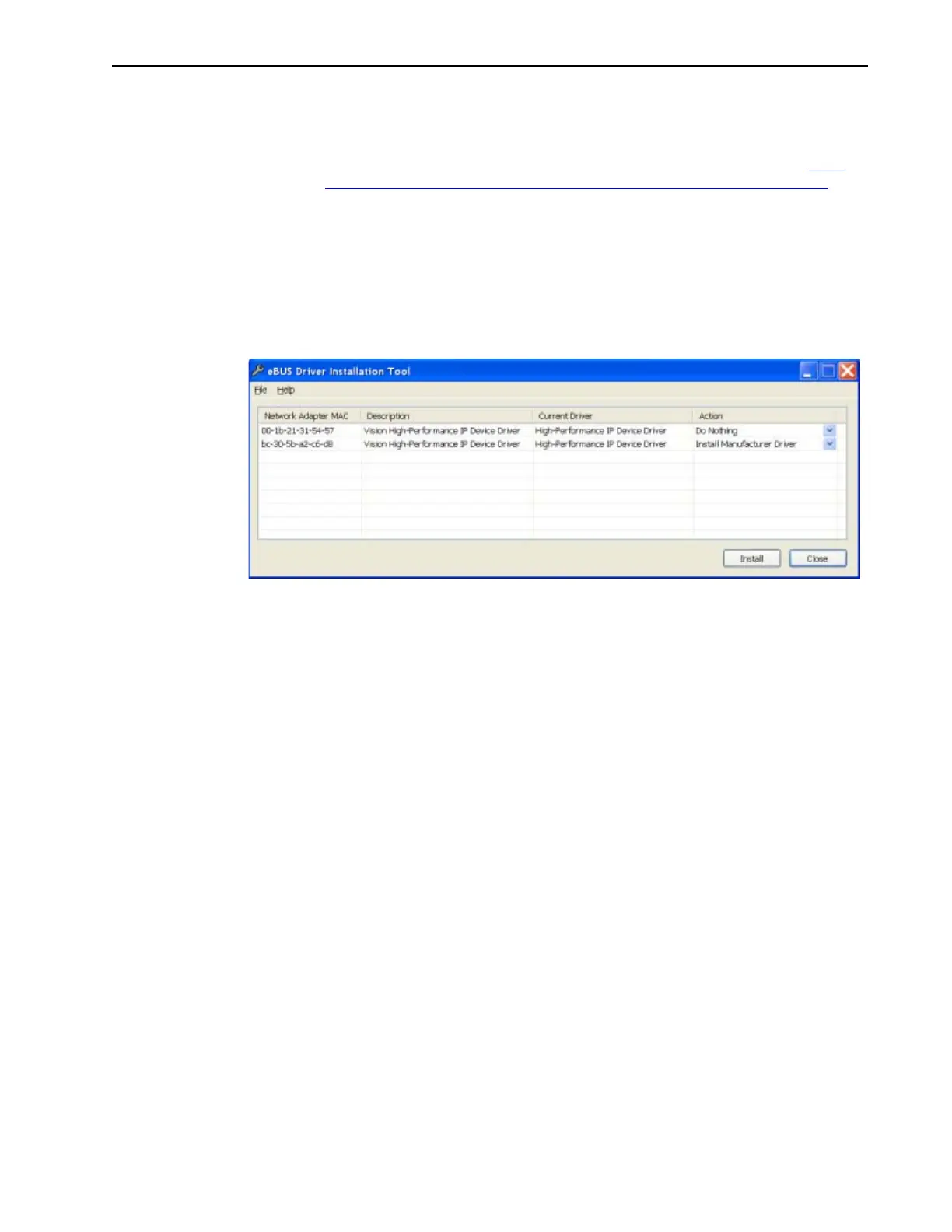
The eBUS Driver Installation Tool dialog is displayed, similar to that shown in
Figure 17-5.
Figure 17-5: eBUS Driver Installation Tool Dialog for WinX
3. From the list of devices, identify the appropriate Ethernet card. Within the Action
column, select Install Manufacturer Driver from the appropriate pull-down menu.
4. Click Install to load the selected driver.
5. After the installation it may be necessary to reboot the computer. If prompted to do
so, either:
• Click Yes to initiate the reboot.
• Click No to delay the reboot.
When delaying the reboot, it may be necessary to manually close the eBUS
Driver Installation Tool dialog. Reboot the computer when convenient.
6. Verify that the network connection has been re-established. If a reboot was
required, wait until the reboot has occurred before verifying the connection.
17.11 Excessive Readout Noise
Excessive readout noise with the intensifier off indicates possible moisture
accumulation in the CCD. This should be corrected promptly or permanent damage not
covered by the Warranty could occur.
Normal camera noise is a function of the gain setting and temperature as well as CCD
type, but is typically in the range of 1-50 ADU
rms
(6 -300 ADU
p-p
.) This is in addition to
offset that typically is about 600 counts. Moisture accumulation produces a coarser
noise with many spikes 300 ADU. If these types of spikes occur, especially after the
camera has been in use for an extended period, turn off the system immediately. Have
the unit serviced by Teledyne Princeton Instruments or an authorized service facility of
Teledyne Princeton Instruments.




 To Next Page