Teledyne API – T200 NO/NO
2
/NO
X
Analyzer Operation Manual Communications Setup and Operation
141
6.7.2.4. SETTING THE HESSEN PROTOCOL RESPONSE MODE
The Teledyne API's implementation of Hessen Protocol allows the user to choose one of
several different modes of response for the analyzer.
Table 6-5: Teledyne API's Hessen Protocol Response Modes
This is the Default Setting. Reponses from the instrument are encoded as the traditional
command format. Style and format of responses depend on exact coding of the initiating
command.
Responses from the instrument are always delimited with <STX> (at the beginning of the
response, <ETX> (at the end of the response followed by a 2 digit Block Check Code
(checksum), regardless of the command encoding.
Responses from the instrument are always delimited with <CR> at the beginning and the end of
the string, regardless of the command encoding.
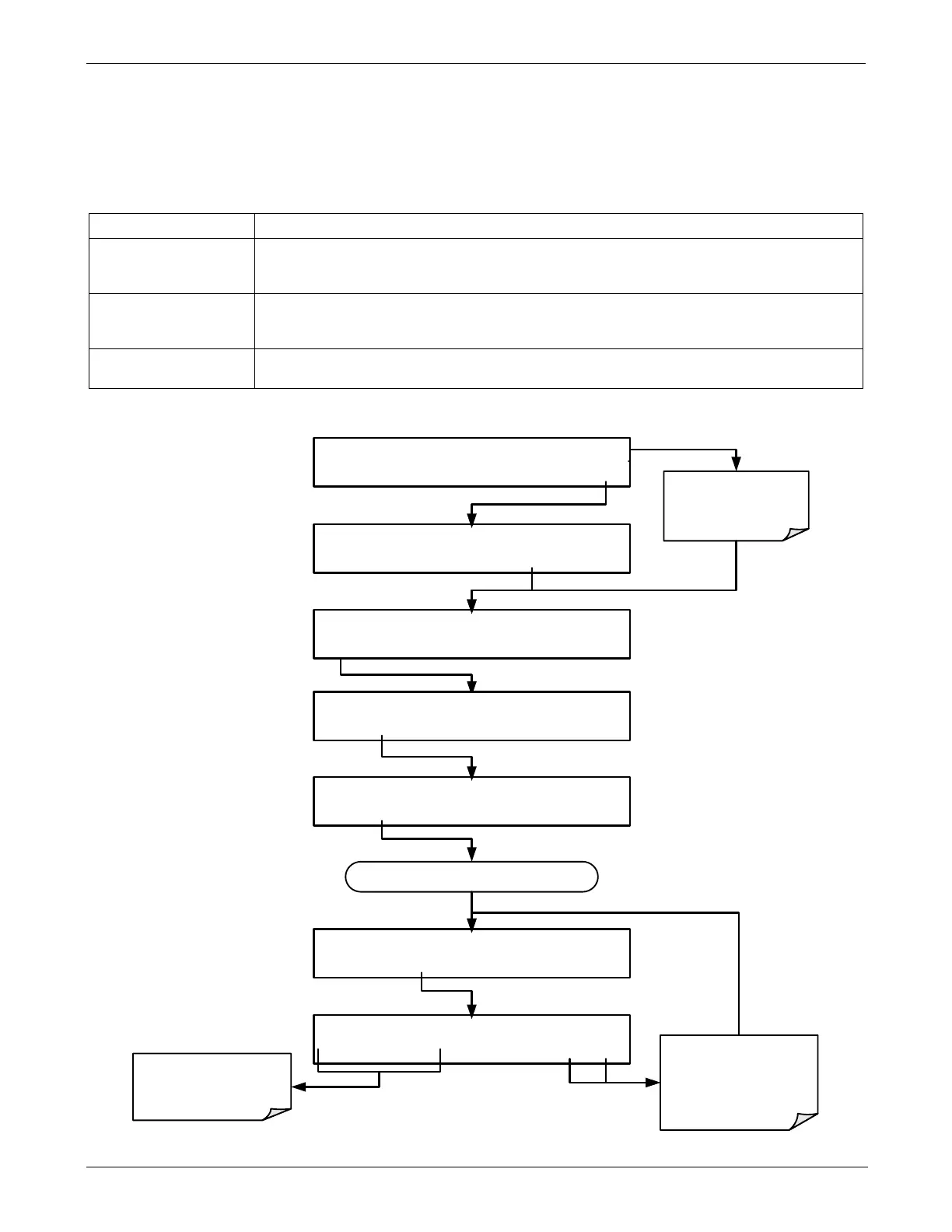
To Select a Hessen response mode, press:
Concentration field
displays all gases.
SAMPLE RANGE=500.0 PPB NOX= XXXX
<TST TST> CAL SETUP
SETUP X.X HESSEN RESPONSE MODE:CMD
<SET SET> EDIT EXIT
SETUP X.X COMMUNICATIONS MENU
ID HESN COM1 COM2 EXIT
SETUP X.X HESSEN VARIATION:TYPE1
<SET SET> EDIT EXIT
SETUP X.X PRIMARY SETUP MENU
CFG DAS RNGE PASS CLK MORE EXIT
SETUP X.X SECONDARY SETUP MENU
COMM VARS DIAG EXIT
SETUP X.X HESSEN RESPONSE MODE:CMD
BCC TEXT CMD ENTR EXIT
EXIT discards the new
setting.
ENTR accepts the
new setting.
Use these buttons to
choose the Hessen
Response type.
Continue pressing NEXT until ...





 To Next Page