2828
2828
28
2929
2929
29
DOMO DOMO
DOMO DOMO
DOMO
MessaMessa
MessaMessa
Messa
gg
gg
g
es Hands Fes Hands F
es Hands Fes Hands F
es Hands F
rr
rr
r
eeee
eeee
ee
DOMO DOMO
DOMO DOMO
DOMO
MessaMessa
MessaMessa
Messa
gg
gg
g
es Hands Fes Hands F
es Hands Fes Hands F
es Hands F
rr
rr
r
eeee
eeee
ee
Activating Text Messaging Service
With the handset down and the hands
free function disabled, press the
Mensajes/Aceptar key (3) to view the
text messaging menu. Next press the
cursor keys p and q (20) until in the
viewer the following message is
displayed -
Only on the first occasion that you
press the Mensajes/Aceptar key (3)
will you be offered this option.
To activate the Service, press the
Mensajes/Aceptar key (3) and you will
be requested to type the extension
number of the terminal.
During this request, the last stored
extension number will be displayed. If
a terminal with that number already
exists the terminal will suggest another
number. Press the Mensajes/Aceptar
key (3) and a message will be
displayed showing the proposed
extension number.
To confirm this extension number,
press the Mensajes/Aceptar key (3)
again to continue.
Wait until the viewer displays this
message –
This message will remain displayed for
several seconds.
In the case of a problem that doesn’t
allow to activation of the service, an
error message (see page 39) will be
displayed for several seconds. You will
then be able to retry the operation by
pressing the Mensajes/Aceptar key (3).
To
ACTIVATE
or DISABLE
the Text
Messaging
Service
(SMT)
If at any time before confirming the
activation (detailed below), you want
to stop the process, press the
Desactivar/Salir key (4).
If you want to connect your
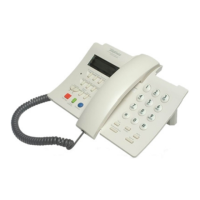
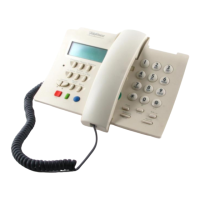
DOMO Free Hands Messages
telephone to the Text Messaging
Service (SMT) to a different
telephone extension number, it
must first be disconnected from
the previous extension number.
Deactivation of Service of
Messages of Text (SMT)
With the handset down and the hands
free function disabled, press the
Mensajes/Aceptar key (3). Next press
the cursor keys p and q (20) until
the viewer displays this message -
If you want to disable the Service,
press the Mensajes/Aceptar key (3).
Wait until the viewer displays this
message -
This message will remain for several
seconds.
In the case of a problem that doesn’t
allow you to activate the service, the
viewer will show an error message
(page 39) for several seconds,
followed by this message -
You can retry the operation by pressing
the Mensajes/Aceptar key (3).
If you use more than one extension
on the same telephone line for Text
Messaging, each extension must have
a different extension number, between
1 and 9.
CHANGING
THE
EXTENSION
NUMBER
ç è
ACTIVAR SMT
ACTIVAR EXT (1)
ESPERE
ACTIVADO
TELEFONICA (1)
ACTIVAR (1)
EXTENSION: ¿1?
DESACTIVAR SMT
ESPERE
DESACTIVADO
ç è
DESACTIVAR SMT


 To Next Page