Operation
7
7
Operation
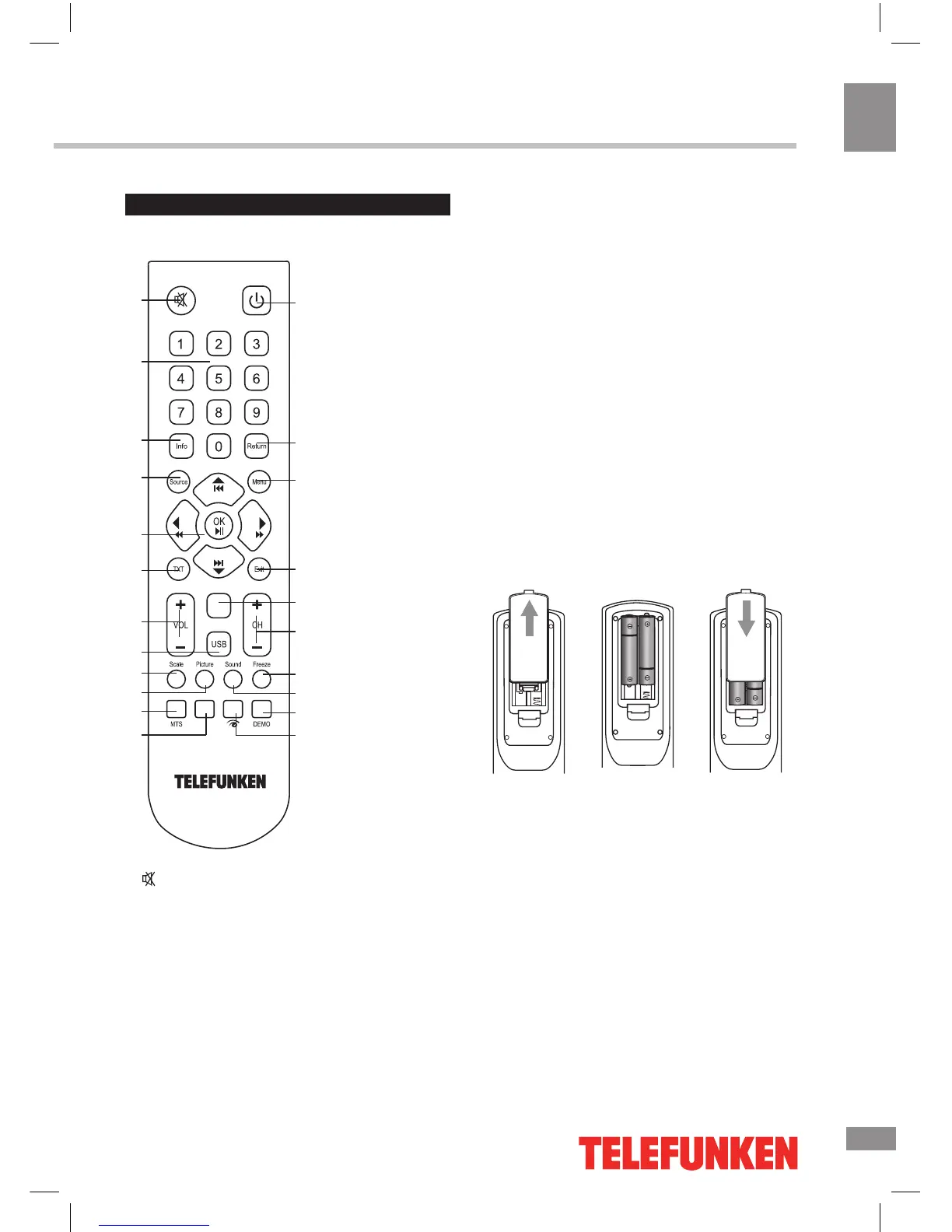
Remote controller (RC)
1
2
3
4
5
6
7
8
9
10
11
12
13
14
15
16
17
18
19
20
21
22
Index
Size Rev. Hold. Sub
1. button
2. Number buttons
3. INFO button
4. SOURCE button
5. Cursor (UP/DOWN/LEFT/RIGHT) buttons/
OK button
6. TXT button
7. VOL+/VOL- buttons
8. USB button
9. SCALE/SIZE button
10. PICTURE/REV button
11. MTS button/Red button
12. Green button
13. POWER button
14. RETURN button
15. MENU button
16. EXIT button
17. INDEX button
18. CH+/CH- buttons
19. FREEZE/SUB button
20. SOUND/HOLD button
21. Blue button
22. Yellow button
Changing the battery
1. Remove the battery compartment cover
on the back of the RC.
2. Insert the batteries into the battery
compartment making sure that the correct
polarity is observed.
3. Install the cover back.
• Use two AAA batteries for the RC. The RC
should be pointed at remote sensor within 8
meters and within 30 degrees at the left or the
right side.
• Take the battery out of the RC if it is not
used for a long time.
• Do not mix new and used batteries or
different types of batteries. Weak batteries can
leak and severely damage the RC.
• Do not expose the RC to shock, liquids,
and do not place it in an area with high
humidity.
1 2








 To Next Page