ECLIPSE 8/16/32/99 Series – User Operation Manual
21
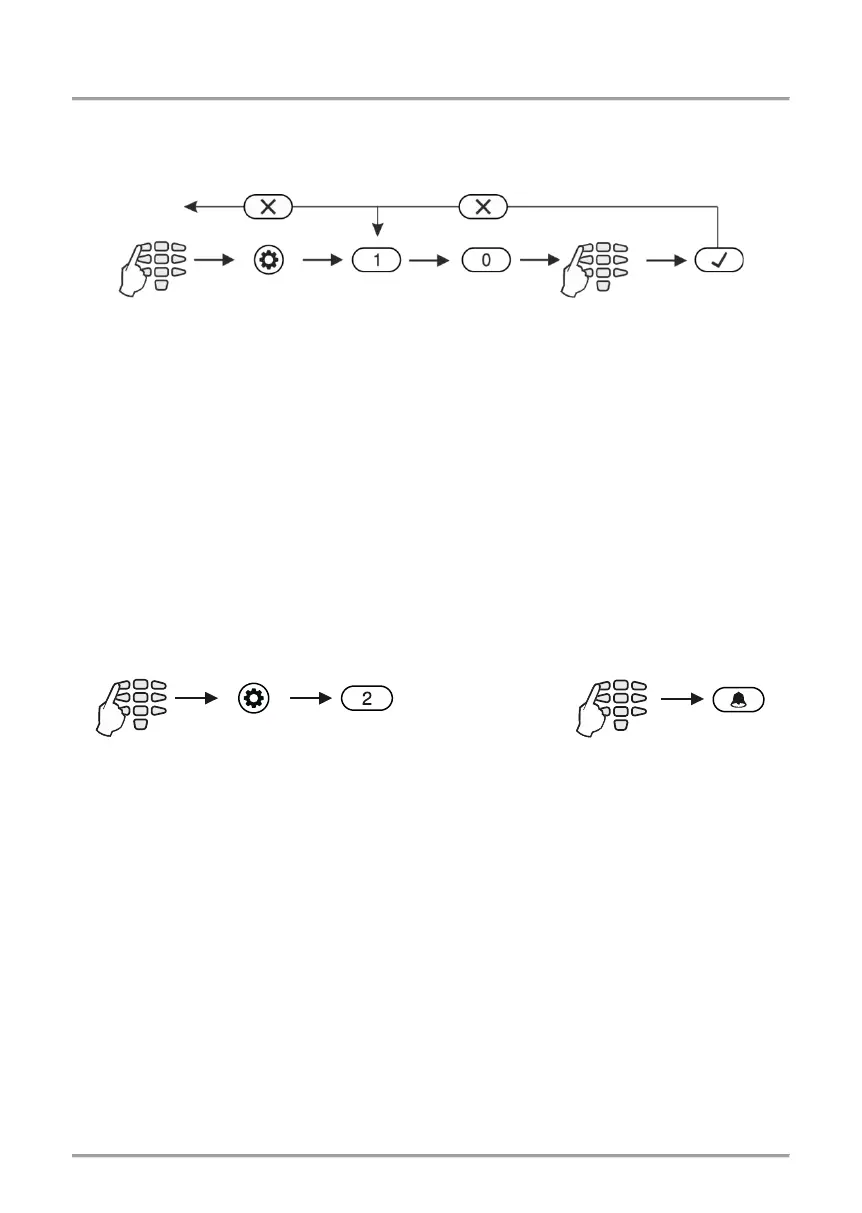
4.1 Changing own code
Every user without manager rights in the system can change only his/her own access
code. To change the code, the user needs to enter the currently valid code:
After confirming the new code with the ENTER button, if the code is accepted, the
keyboard emits a confirmation beep and will return to code entry screen. If the entered
code is already being used in the system (a valid user or ambush code), the keyboard
emits a rejection beep. For LCD keyboards there is also “Invalid” message on the screen.
The system returns to main menu or address entry screen.
Going back to the main screen is done by pressing the CANCEL button.
Note: Certain users may not be permitted to change their own code. In order for users to
be allowed to change their codes, option “PROGRAM ENBL” must be enabled in
manager’s menu 1. USERS – xx. User – 02. Options (Address 06 – option 4).
4.2 Memory LOG review by User
Viewing the memory log is done in users’ menu 2. VIEW LOG (Address 2) or by entering
a user code and pressing the MEMORY button:
The events are viewed in consecutive order, one by one, from the last to first with the help
of the arrow buttons.
On the screen of LCD keyboards a text message with the event type, consecutive number
starting from 0001 and date and hour are being displayed.
In case of using a LED keyboard to review the memory LOG file, keep in mind that the
visualization of the memory events, as the user numbers, zones numbers, area numbers
and etc., is presented in a binary form as the order is count from right to left side - see the
column “Code” of APPENDIX A, there is given the reference of the LED indication in
decimal form. The lit digits on the display form a code defining the event, which can be
checked in the Table of memory log events in the Appendix A. No information about the
date and time is available when using a LED keyboard.
By pushing button “2” additional information about the user, area, zone or device is being
displayed. Press the button “1” to return to the main display – see the examples in
Appendix A.
2-3 sec. to
delete the code
















 To Next Page