28
User´s Manual Universal Remote Control
HOW TO SET UP YOUR URC (LEARNING COMMANDS)
Your URC is factory preprograrnmed to operate your TV, VCR, SAT, DVD & CTV.
Due to the limited number of key, some minor function may not be included. You
may teach your URC with the original A/V remote control to operate any exclu-
ded function by your choice.
Besides the preprogrammed devices, you may also teach your URC to operate
other infrared controlled equipment and applicances, such as DVD players, HiFi,
air conditioners etc.
Your URC can learn and reproduce up to 120 individual commands from other
remote controls. All 4 Device Modes (TV, VCR, SAT, AUX) and 4 Secondary
Device Modes (Shift + TV / VCR / SAT / AUX) can be taught to operate additional
commands.
1.- Press a desired device mode key (e.g. TV)
2.- Hold down & on the URC together for 2 seconds until the indicator
flashes twice.
3.- Enter Magic Learn Code-0000, the indicator will flash twice, and your URC is
ready to learn commands.
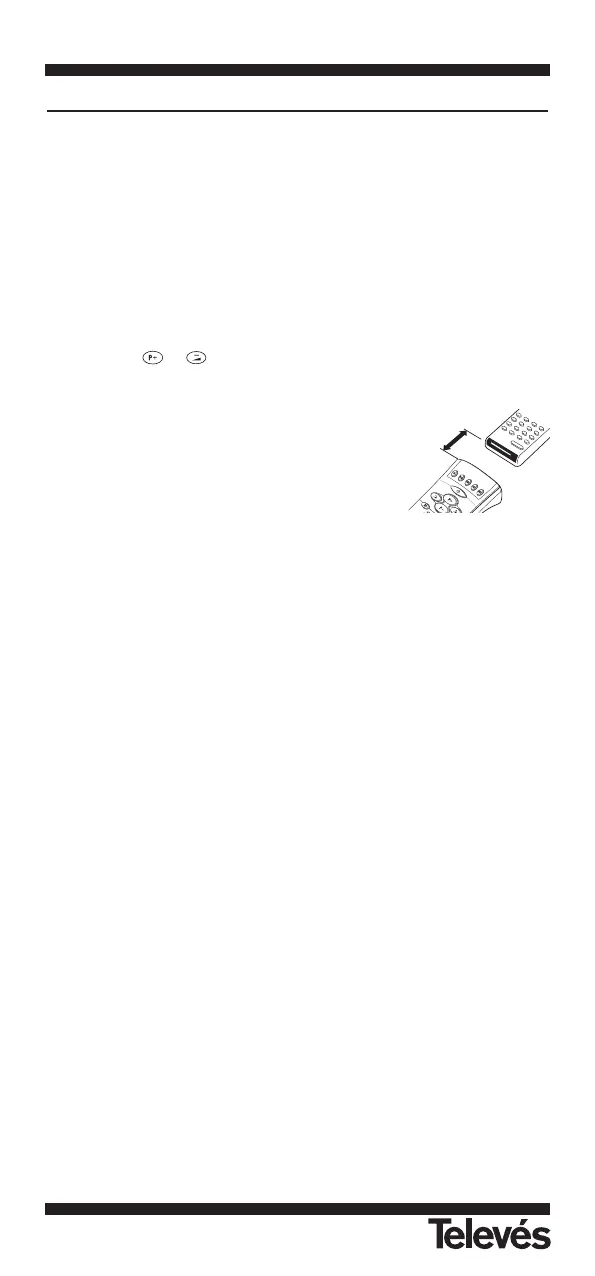
4.- Aim your A/V remote control to the URC on a flat
surface, with 5-8 cm apart. Make sure your A/V
remote control is with fresh batteries.
5.- Press and release a desired key on the URC you
want to hold the command. Now, the indicator will
light up.
6.- Press and hold the corresponding key on your A/V remote control to transfer
the command. The indicator will light up when receiving signal. If the indica-
tor does not light up, you have to adjust and align both remotes, and try step
6 again.
7.- When the indicator flashes twice and turns off, the command has been
transferred successfully and you can release the key on the A/V remote
control. If the indicator flashes 6 times, it shows error in learning process.
Adjust the position of both remote control and repeat steps 5 to 7 again.
8.- Repeat steps 5 to 7 to transfer other signals into next function key. When you
finish the whole device mode, press the same device mode key (e.g. TV)
again to store your setting.
Teaching a Command into the Secondary Function
In step 5 above, press “SHIFT” followed by the corresponding key (See ADVAN-
CED OPERATION-Secondary Function), the indicator will light up, and the URC
is ready to receive the signal.
Simply repeat the above procedures to learn signals with other device modes.
Teaching a dual signal
lf you found a learned command work for your A/V equipment only occasionally,
your original remote control may contain dual signals. Try the following steps to
reprogramme this command:
1.- Follow steps 1 to 4 of HOW TO SETUP YOUR URC (LEARNING COM-
MANDS)".
2.- Press and release a desired key on the URC you want to hold the command.
The indicator will light up.
3.- Press and hold the corresponding key on your A/V remote control to transfer
the command. The indicator will light up when receiving the signal.
4.- When the indicator flashes twice and turns off, the first signal has been
transferred successfully and you can release the key on the A/V remote
control.
5.- Press and release the same key on the URC again. The indicator will light up
again.
6.- Press and hold the same corresponding key on your A/V remote control until
the indicator of URC flashes twice and turns off, the dual signal command
has been transferred successfully.
7.- Repeat steps 2 to 6 of this procedure to transfer other signals if there is any.
8.- When finished, press the same device mode key again to store your setting.


 To Next Page