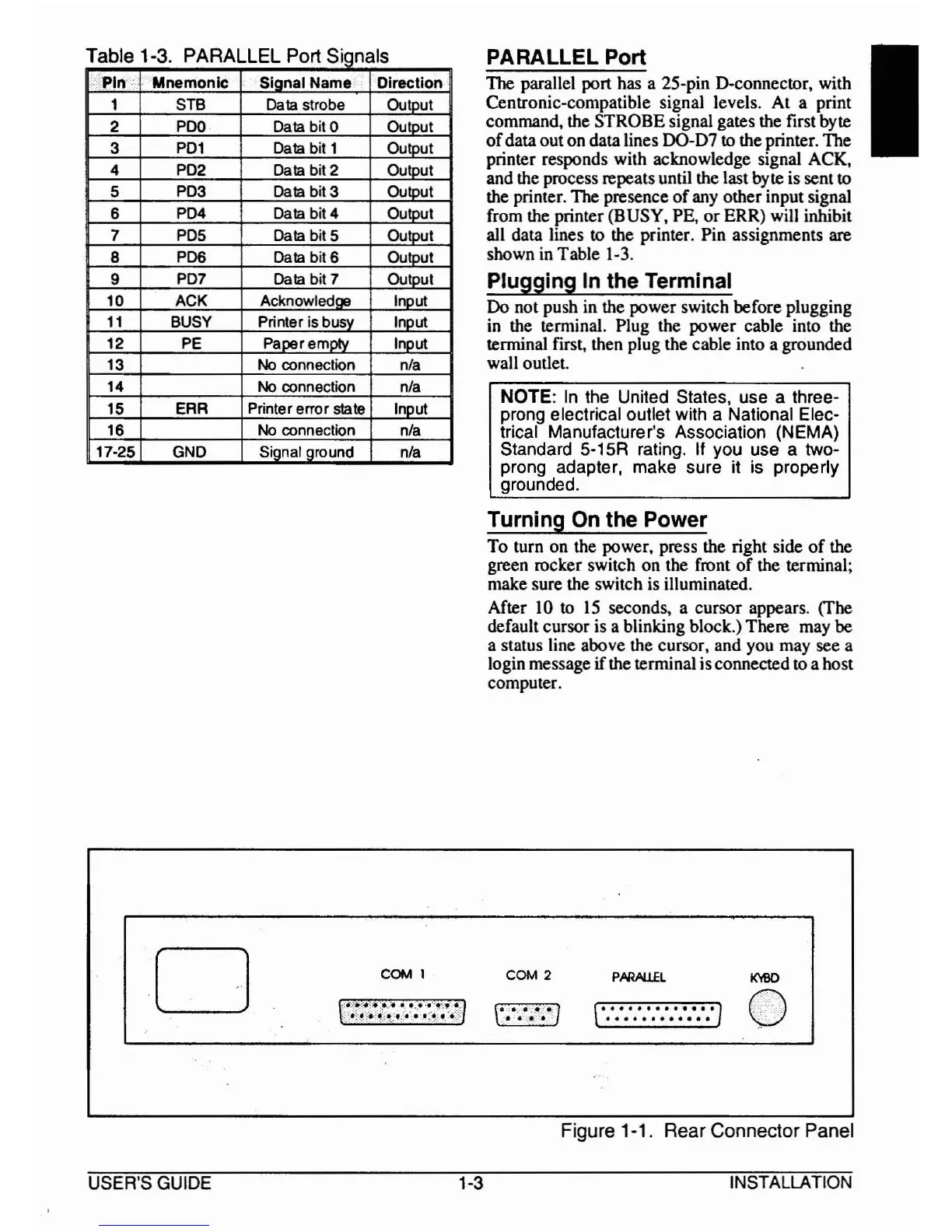
Table 1·3. PARALLEL Port SiQnals
Pin:··
Mnemonic
Sianal Name Direction
1
STB Data strobe Cutout
2
PDQ
Data bit 0 Cutout
3
PD1
Data bit 1 Outout
4
PD2 Data bit 2
Outout
5
PD3
Data bit 3 Cutout
6
PD4 Data bit 4 Outout
7
PD5
Data bit 5 Cutout
8 PD6 Data bit 6 Cutout
9
PD7 Data bit 7 Cutout
10
ACK Acknowledae Inout
11
BUSY
Printer is busy
Inout
12
PE Paoeremolv Inout
13
No
connection
nla
14
No
connection
nla
15
ERR Printer error
state Inout
16
No
connection
nla
17-25
GND
Sianal around
nla
PARALLEL Port
TIle parallel port has a 25-pin D-connector, with
Centronic-compatible signal levels. At a print
command, the STROBE signal gates the first byte
of
dataout on data lines DO-D7 to the printer. The
printer responds with acknowledge signal ACK,
and the process repeats until the last byte is sentto
the printer.
TIle presence
of
any other input signal
from the printer (BUSY, PE, or ERR) will inhibit
all data lines to the printer. Pin assignments are
shown in Table 1-3.
Plugging In the Terminal
Do not push in the power switch before plugging
in the terminal. Plug the power cable into the
terminal first, then plug the cable into a grounded
wall outlet.
NOTE:
In
the United States, use a three-
prong electrical outlet with a National Elec-
trical Manufacturer's Association (NEMA)
Standard 5-15R rating. If you use a two-
prong adapter, make sure it is properly
grounded.
Turning On the Power
To
turn on the power, press the right side
of
the
green rocker switch on the front
of
the terminal;
make sure the switch is illuminated.
After 10 to
15
seconds, a cursor appears. (The
default cursor is a blinking block.) There may be
a status line above the cursor, and you may see a
login message
if
the terminal is connected to a host
computer.
I
o
COM 1
.:'~:::,*:::;::~
;~.,~
,t
.•
:.
:
......
:~::'.,:
~).:::!\~::~;:
~.:.::
•.
:
.•
",'
;:~.~
•..
~::':
COM 2
PARAUEL
K'f9D
t'::::::::::::]
()
USER'S GUIDE
1-3
Figure 1·1. Rear Connector Panel
INSTALLATION



 To Next Page