IA
I
({
r
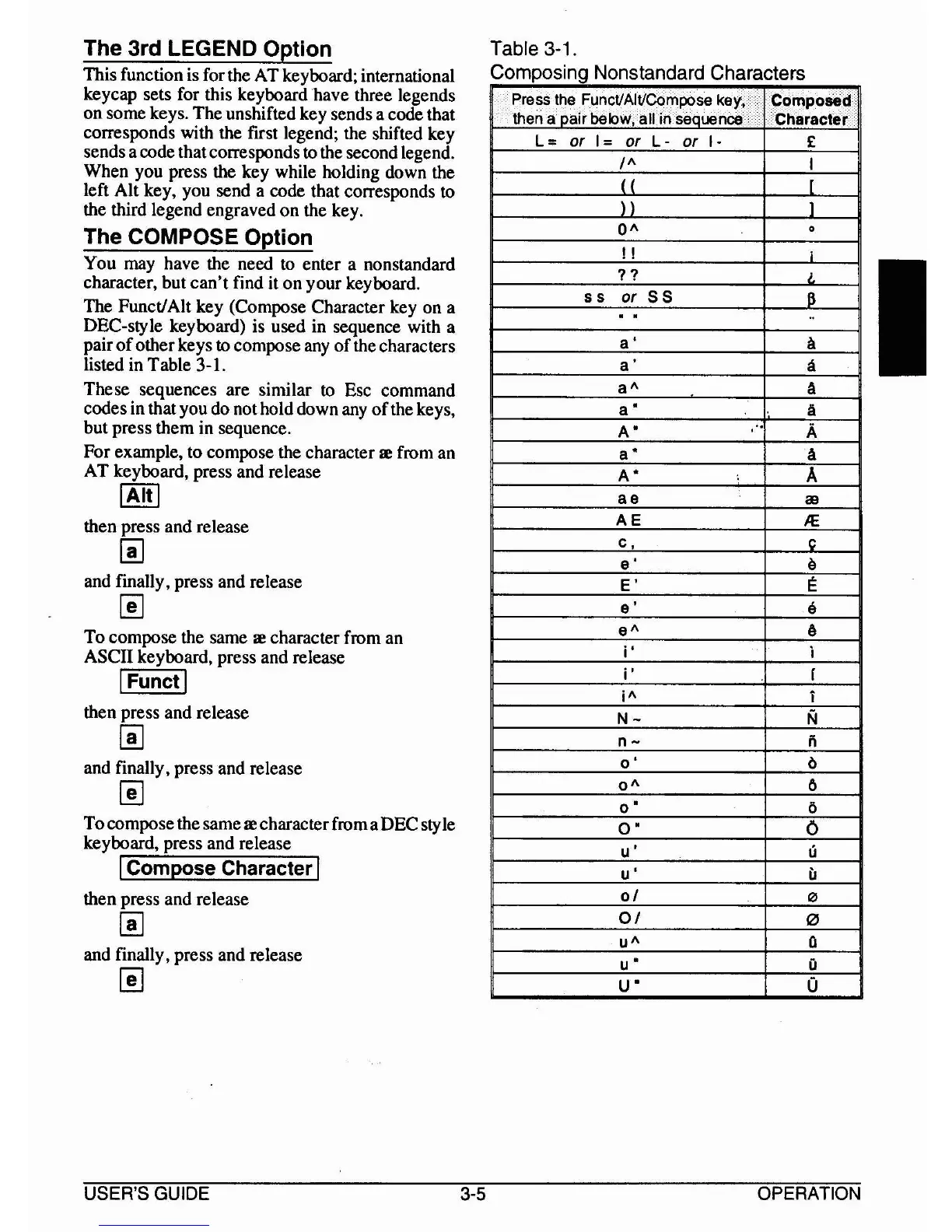
Table 3-1.
Composing Nonstandard Characters
Q
o
Q
o
ii
o
o
o
i
I
J
6
a
a
A
Ii
A
A
A
lB
JE
c
e
E
e
6
OA
!!
11
5S
or
55
a'
a'
a
A
a"
A"
a"
A"
ae
AE
c,
e'
E'
e'
e
A
i'
i'
i
A
N-
o-
0'
OA
0"
0"
u'
u'
01
01
u
A
u"
U"
Press the FunctJAltJCompose key, .
Composed
then a nair below, all in seauence
Character
L =
or
I -
or
L -
or
I·
£
The 3rd LEGEND Option
This function is for the AT keyboard; international
keycap sets for this keyboard have three legends
on some keys. The unshifted key sends a code that
corresponds with the first legend; the shifted key
sends a code thatcorresponds
to the second legend.
When you press the key while holding down the
left Alt key, you send a code that corresponds
to
the third legend engraved on the key.
The COMPOSE Option
You may have the need to enter a nonstandard
character, but
can't
find it
on
your keyboard.
The Funct!Alt key (Compose Character key on a
DEC-style keyboard) is used in sequence with a
pair
of
otherkeys to compose any
of
the characters
listed in Table 3-1.
These sequences are similar
to
Esc command
codes in that you do nothold down any
of
the keys,
but press them in sequence.
For example, to compose the character
Ie
from an
AT keyboard, press and release
IAltl
then press and release
~
and finally, press and release
~
To compose the same
Ie
character from an
ASCII keyboard, press and release
I
Functl
then press and release
~
and finally, press and release
~
Tocompose the same
Ie
characterfroma DEC
sty
Ie
keyboard, press and release
ICompose Character I
then press and release
~
and finally, press and release
~
USER'S GUIDE
3-5
OPERATION



 To Next Page