01
SET UP YOUR
TELSTRA GATEWAY MAX
Important: Before starting to set up your gateway, ensure that you have received
your order completion email.
For the best
Wi-Fi
coverage, place your Telstra
Gateway Max with the stand provided
,
in a location that is central to where you will
use your
devices.
Step 1: Connecting the cables
Your Telstra Gateway Max connects to your existing telephone socket.
Before you connect your Telstra Gateway Max,
you will
need to disconnect
your telephone by unplugging it from the wall socket.
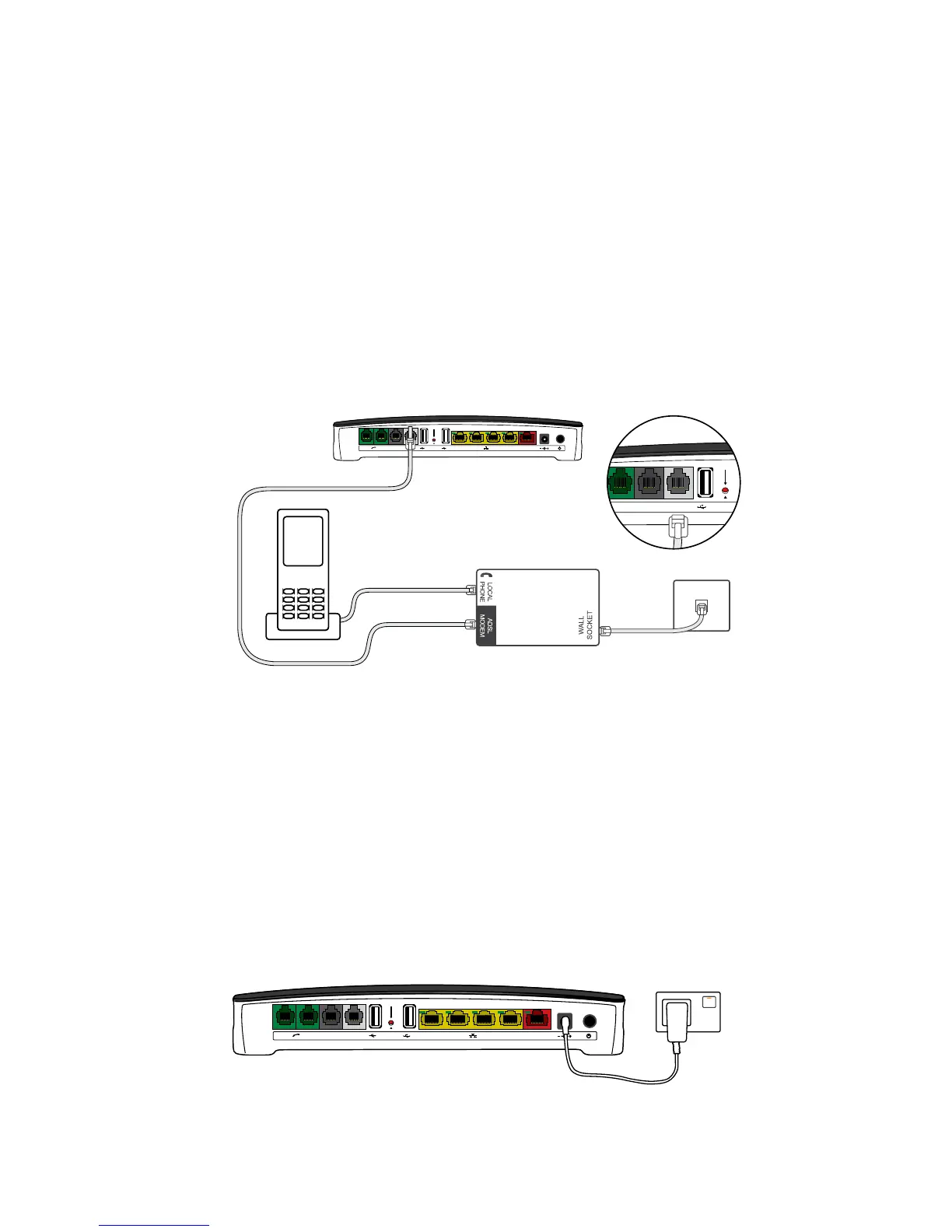
1. Connect the filter to the wall socket.
2. Connect your telephone to the filter, to the port labelled ‘LOCAL PHONE’.
3. Connect the other end of the ADSL modem cable to the grey DSL port on the
back of the Telstra Gateway Max.
PSTN DSL
Step 2: Powering on
1. Connect one end of the power cable to the gateway and the other
end to a power outlet.
2. Turn on your Telstra Gateway Max.
3. Allow up to 3 minutes for start-up. The LED lights on the front of
the Telstra Gateway Max will flash.
4. Check that the Status LED light is solid green before proceeding.
Gateway Max
Power
PSTN DSL



 To Next Page