Need help?
Do you have a question about the Teltonika FMC125 and is the answer not in the manual?
Determines if timestamp is included in RS232 TCP packets, affecting Codec usage.
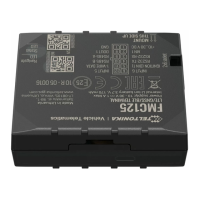
The FMC125 is a versatile device designed to establish communication links with external devices, such as a PC, using text messages. This communication can be facilitated through either RS232 or RS485 interfaces, making it adaptable to various setups. A core function of the FMC125 is to route any incoming data string from the RS232 or RS485 port directly to a server, provided an active link is maintained. This capability is crucial for real-time data transmission and monitoring from external sources.
A key aspect of the FMC125's operation is its adherence to specific data formats for message exchange. All messages exchanged between the FMC125 device and the server must be packed in Codec.12 format. This ensures standardized and reliable data transfer. For establishing a TCP link, the Hercules utility is recommended, and for sending messages from an external device to the server via the FMC125, a Terminal application is used.
To configure the FMC125 for TCP Ascii mode, several parameters need to be set within the device's configurator. Users must specify settings for either RS232 or RS485, depending on the port being utilized. These settings are found in the global parameters window. For RS232, the Baudrate can be selected from any available option, and the Mode must be set to TCP Ascii. The Message Timestamp parameter is another important configuration. When enabled, it dictates that Codec 13 is used for data sending, which includes a timestamp in the RS232 TCP packet. If disabled, Codec 12 is used, omitting the timestamp. The RS485 interface is also suitable for Ascii TCP Link mode, offering flexibility in connection types.
Establishing a link between the FMC125 device and a server requires setting the Domain and Target Server Port within the device's working profile, specifically in the GPRS data sending Settings section. Once these parameters are correctly configured, the settings can be saved to the FMC125 device.
For testing purposes, a PC can act as both the server and the external device. After configuring the FMC125 and connecting it to the external device, the Hercules utility is initiated on the server side to handle message sending and receiving. It's important to note the physical connections: the external device's RX cable should connect to the FMC125's TX cable, and the external device's TX cable to the FMC125's RX cable.
Within the Hercules application, users select the TCP Server section. Here, the server (PC) port is entered, and the "Listen" button is pressed. The "Client connection status" field will indicate a successful connection between the server and the FMC125 device. Messages intended for the FMC125 device are written in the "Send" field, ensuring they are packed in Codec.12 format.
When sending messages from the server to an external device via Hercules, the message must first be packed in Codec.12 format. This packed message is then pasted into the "Send" field in Hercules. It's crucial to uncheck the HEX format box if the text is already in HEX format. After pressing the "Send" button, the message will appear in the "Sent data" field (Terminal), confirming its transmission. If the message is successfully sent to the FMC125, it can be verified in the Terminal window.
To connect the FMC125 to the computer for sending data, a Port ½ cable is used. One end connects to the RS232 RX/TX cables on the FMC125 device, and the USB side connects to the computer. Users must identify the correct COM Port for the Port ½ cable in the device manager and select it in Hercules before pressing "connect."
For sending data from an external device to the server, a Terminal application is used. Users type the desired text into the Terminal and press "send." The received data can then be verified on the server in Hercules. When checking received data, especially if it contains special characters, it's important to ensure that ASCII Names are marked.
In terms of message handling, the Message Timestamp parameter plays a role in determining whether a timestamp is included in the RS232 TCP packet sent to the server. If this parameter is enabled, Codec 13 is used for data transmission, which incorporates the timestamp. Conversely, if disabled, Codec 12 is used, and no timestamp is included. This provides flexibility in data logging and analysis based on specific application requirements.
The FMC125's design emphasizes robust communication and data integrity, requiring messages to be packed in Codec.12 format for exchange between the device and the server. This standardization ensures that data is consistently interpreted and processed. The use of Hercules and Terminal applications for testing and interaction highlights the device's compatibility with common diagnostic and communication tools, making it accessible for configuration and troubleshooting.
Overall, the FMC125 is engineered to facilitate reliable text-based communication between external devices and a server over RS232 or RS485 interfaces. Its configurability, adherence to specific data formats, and compatibility with standard utilities like Hercules make it a practical solution for various data transmission needs, particularly where real-time monitoring and controlled data exchange are critical. The detailed setup procedures ensure that users can establish and maintain stable communication links effectively.
 General
| Purpose | Car |
|---|---|
| Product color | Black |
| SIM card slot | Yes |
| Electronic compass | No |
| Battery life (max) | - h |
 Weight and Dimensions
| Weight | 55 g |
|---|

 To Next Page