2
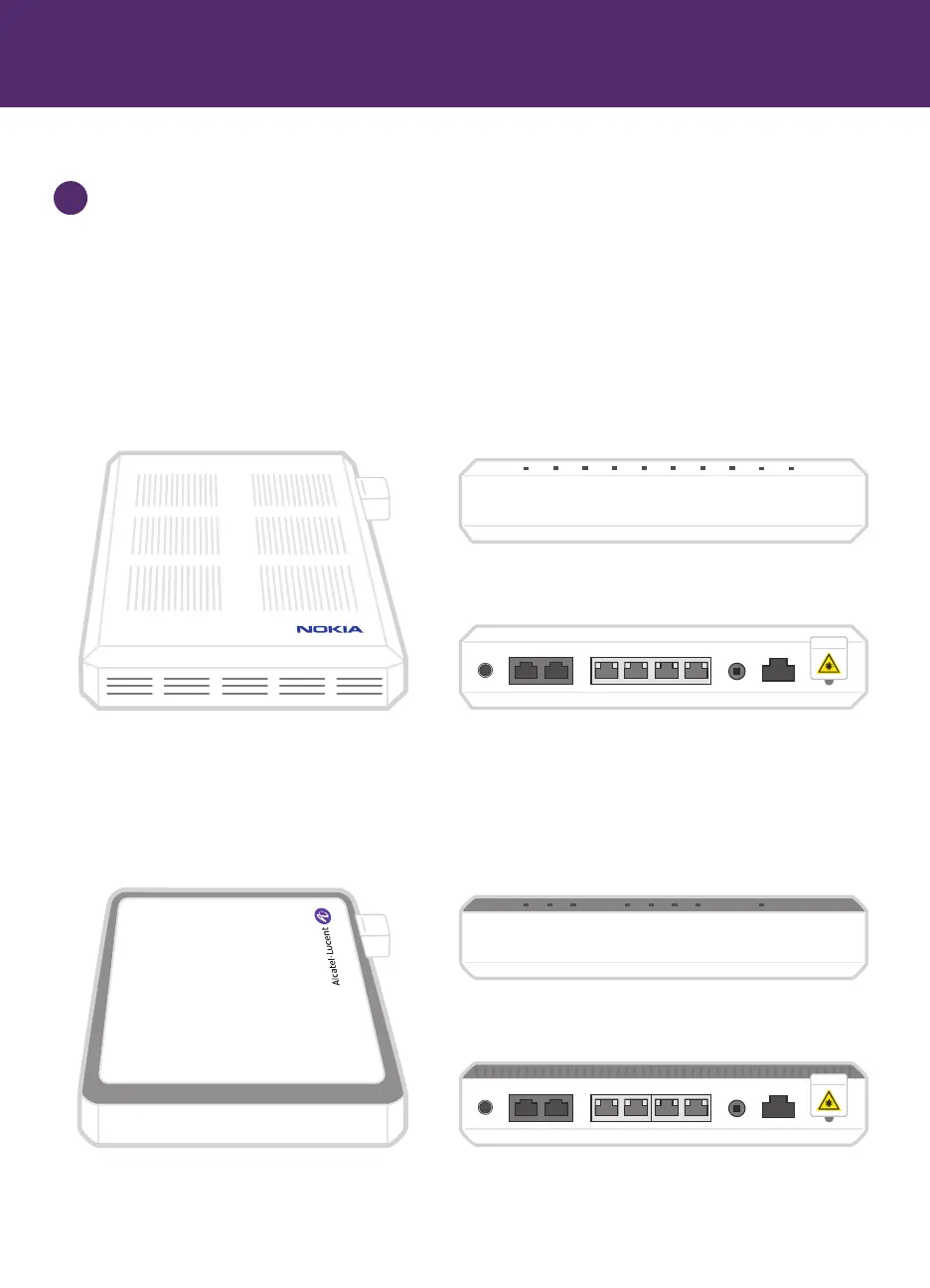
POTS 1 POTS 2 LAN 1 LAN 2 LAN 3 LAN 4 ON/OFF POWER
POWER
WAN
ALARM
LAN 1
LAN 2
LAN 3
LAN 4
VOICE
Alcatel Fibre Terminal
Front view
Back view
POTS 1 POTS 2 DATA 1 DATA 2 DATA 3 DATA 4 ON/OFF POWER
PWR
BTRY
FAIL
DATA1
DATA 2
DATA 3
DATA 4
NTWK
MGMT
POTS
Nokia Fibre Terminal
Front view
Back view
Step 1: Locate and identify the Fibre Terminal
Locate the Fibre Terminal in your home. The Fibre Terminal is generally located in one of the
following places:
■ Where fibre comes into the home, often in a communications panel, basement, or garage
■ With other network connections (electricity, phone, cable, etc.), near an electrical or phone jack
■ A central location in your home, often near where a TV or home phone might be connected
1



 To Next Page