www.temcoline.com
DIGITAL PID CONTROLLER
27
13. Details explanation of primary function
Before the PID temperature controller can be used for the first time, the P, I, D
values must be tuned. The auto-tuning function finds the optimal value by tuning
automatically according to the load factor and other conditions.
Please make sure that the controller is tuned before using it for the first time, by defining
the set values in the most frequently used range and running auto-tuning.
When
auto-tuning begins, the "auto-tuning command lamp" will flash every 0.5
second and will turn off upon completion of the tuning process.
Please refrain from operating the keys while auto-tuning is in progress.
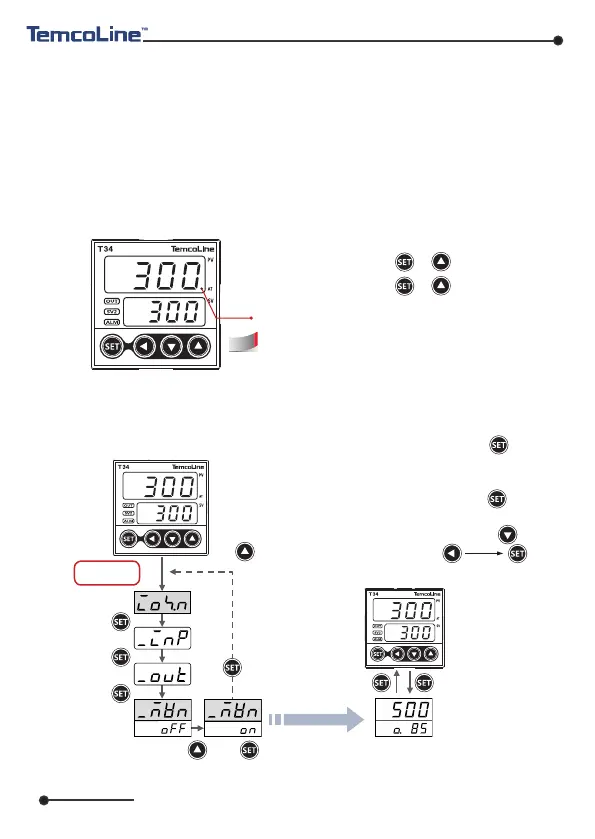
1) Auto tuning (AT) function
AT command lamp (flash every 0.5sec.)
※ Do not use auto tuning under below Process.
-
Rapid control Process such as Flow, input control.
-
Process which should not ON/OFF output even a temporary.
-
Process which should not over load at control.
2) Manipulated Variable [%] (Mvn) check mode
Refer to P18,
I/ O se t mo d e
〈 In condition of Mvn=ON 〉
Mvn display screen
(Present Mvn Out = 85%)
“Mvn [%] check function” displays the control output
[%], which can be viewed by pressing the “ ” key
while operating in default drive mode and is shown
as a percentage of the control output (0~100[%]) in
the SV display.
In this mode, pressing the “ ” key alternates
between showing the SV and the Mvn values, and
changes to the SV value can be made by ” “ or “ “.
If required, set in the order of .
Refer to P18,
I/O Set Mode
Operation mode
"Mvn [%] check function" displays the control output
[%], which can be viewed by pressing the " " key
while operating in default operation mode and is shown
as a percentage of the control output (0~100[%]) in
the SV display. In this mode, pressing the " " key
alternates between showing the SV and the Mvn values,
and changes to the SV value can be made by " " or
" ". If required, set in the order of
.
AT operation start : + 0.5 second
AT stop by perforce : + 0.5 second
“Mvn [%] 확인기능”은 제어 출력량[%] 보기 기능으로
기본운전 모드에서 키를 눌렀을 때, “SV”표시 부에
제어출력량( 0~100 [%] ) 이 표시되는 기능 입니다.
이 모드일 때, 키를 누름으로 서 SV ↔ Mvn 값이 교
대로 표시되고, 설정 값(SV) 변경은 or 필요 시
순으로 설정합니다.
save
Change
Save



 To Next Page