SERVICE AND TECHNICAL SUPPORT MANUAL Gas Furnace: (F/G)9MAC
Specifications subject to change without notice.
8 440 04 4201 01
To lock the furnace in Minimum Heat:
1. Turn SW1−2 ON at the furnace control. Set up switch
SW4−2 must be OFF.
2. Connect a jumper across R and W/W1 at the thermostat
terminals at the furnace control.
3. Allow the burners to ignite and the blower to turn on.
4. Allow the supply temperature to stabilize and verify the
proper rise range.
If the temperature rise is too high or too low in Minimum Heat:
1. Remove jumpers from R and W/W1.
2. Wait until the blower off delay is completed.
3. Turn 115 VAC power off.
4. Check the position of Set up switch SW1−3. When set to
ON, airflow is raised 18% for Minimum Heat and for
Intermediate Heat. Factory default position is OFF.
5. Turn 115 VAC power on.
6. Re−check Minimum Heat Temperature Rise
To lock the furnace in Intermediate Heat:
7. Connect a jumper across R and W/W1 at the thermostat
terminals at the furnace control.
8. Allow the burners to ignite and the blower to turn on.
9. Allow the supply temperature to stabilize and verify the
proper rise range.
If the temperature rise is too high or too low in Intermediate
Heat:
1. Remove jumpers from R and W/W1.
2. Wait until the blower off delay is completed.
3. Turn 115 VAC power off.
4. Check the position of Set up switch SW1−3. When set to
ON, airflow is raised 18% for Minimum Heat and for
Intermediate Heat. Factory default position is OFF.
5. Turn 115 VAC power on.
6. Re−check Minimum Heat Temperature Rise .
To lock the furnace in Maximum Heat:
7. Connect a jumper across R and W/W1 and W2 at the
thermostat terminals at the furnace control.
8. Allow the burners to ignite and the blower to turn on.
9. Allow the supply temperature to stabilize and verify the
proper rise range.
If the temperature rise is too high or too low in Maximum Heat:
1. Remove jumpers from R and W/W1.
2. Wait until the blower off delay is completed.
3. Turn 115 VAC power off.
4. Check the position of Set up switch SW1−4. When set to
ON, airflow is raised 9% for Minimum Heat , 7% for
Intermediate Heat and 15% for Maximum Heat. Factory
default position is ON.
5. Turn 115 VAC power on.
6. Re−check Minimum Heat Temperature Rise.
After the temperature rise has been verified:
1. Remove jumpers from thermostat terminals.
2. Allow the blower off delay to complete.
3. Turn Set up switches SW1−2 and SW4−2 to the OFF
position.
4. Install blower door.
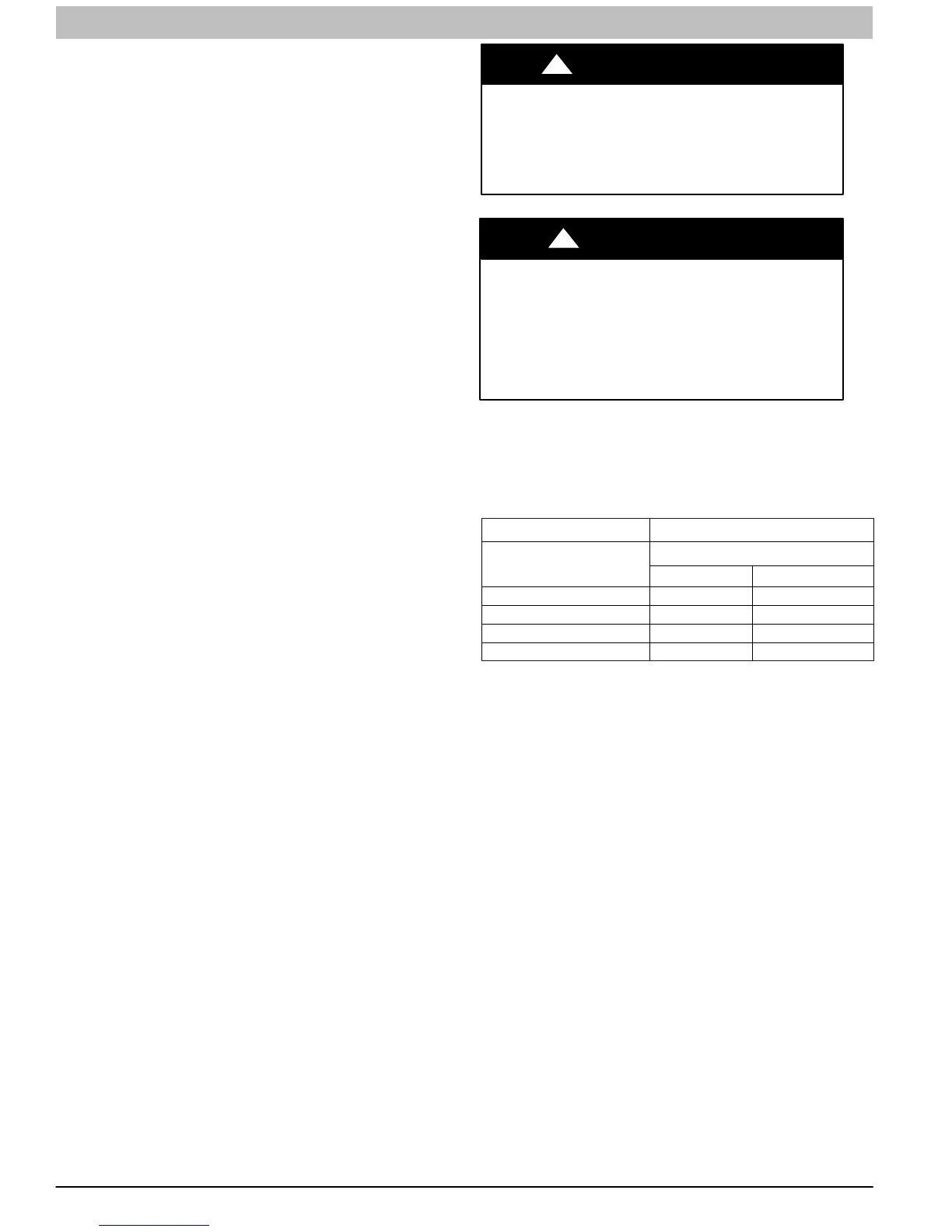
FIRE HAZARD
Failure to follow this warning could result in personal
injury, death, and/or property damage.
Reinstall manifold pressure tap plug in gas valve to
prevent gas leak.
!
WARNING
FURNACE OVERHEATING HAZARD
Failure to follow this caution may result in reduced
furnace life.
Recheck temperature rise. It must be within limits
specified on the rating plate. Recommended
operation is at the mid−point of rise range or slightly
above.
CAUTION
!
Adjust Blower Off Delay (Heat Mode)
a. Remove blower door if installed.
b. Turn Dip switch SW−7 or SW−8 ON or OFF for
desired blower off delay. (See Table 2, Figure 3 and
Figure 4)
Table 2 Blower Speed Taps
DESIRED HEATING MODE
BLOWER OFF DELAY
(SEC.)
SETUP SWITCH POSITION
SW1-7 SW1-8
90 OFF OFF
120 ON OFF
150 OFF ON
180 ON ON
Adjust Cooling Airflow − Single Stage and
High Stage Cooling
The ECM blower can be adjusted for a range of airflow for Low
Speed or High Speed cooling. See Table 4 − Air Delivery −
CFM (With Filter). Depending on the model size, the cooling
airflow can be adjusted from 1.5 tons to 6 tons of nominal
cooling based on 350 CFM ton.
The cooling airflow is adjusted by turning Setup switches
SW2−1, SW2−2 and SW2−3 either ON or OFF. Select the
required airflow from Table 4. Table 4 is based on 350 CFM per
ton. For other CFM per ton set−up switch selections, see
Figure 4 or Figure 15.
NOTE: 6 ton airflow will truncate at 2200 CFM on applicable
models. For a complete explanation of cooling airflow, refer to
the section titled “Sequence of Operation.”
Adjust Continuous Fan Airflow/Low Speed
Cooling Airflow
The ECM blower motor can be adjusted for continuous fan
speeds different than heating or cooling fan speed. See
Table 4 − Air Delivery − CFM (With Filter). Select the required
continuous fan airflow from Figure 4 and Table 4.
The continuous fan speed is also the fan speed for low speed
cooling when furnace is used with a 2−speed cooling unit.
Adjust the Continuous Fan CFM to match the airflow required
for low speed cooling. Select the required airflow from Figure 4
and Table 4. For airflow at 400 CFM per ton, turn Setup SW1−5
ON (See Figure 4 and Table 4). The airflow selected for low
speed cooling will also be the airflow used for continuous fan.



 To Next Page