EasyManua.ls Logo

Ten-Tec PARAGON - Page 18

Ten-Tec PARAGON
36 pages
Print Icon
To Next Page IconTo Next Page
To Previous Page IconTo Previous Page
Loading...
To
set
the
time
in
the
24
hour
clock,
first
press
the
DISP
key
until
TIME
is
displayed.
Next
press
the
SHIFT
key,
then
the
SET
key
and
you
will
be
prompted
by
four
underscores
for
the
time
entry.
Enter
the
hours
and
minutes
digits
as
desired.
If
youenter
less
than
four
digits
you
must
press
the
ENTER
key
again
to
exit
the
SET
routine.
When
you
exit
via
the
ENTER
key,
all
unfilled
digits
will
be
cleared
to
zero.
The
clock
will
begin
running
again
upon
pressing
the
ENTER
key
or
entering
the
last
of
the
four
digits.
3-3.3
DATE
SET
(until
DATE
is
displayed)
ма
To
set
the
date,
first
press
the
DISP
key
until
DATE
isdisplayed.
Then
press
the
SHIFT
key
followed
by
the
SET
key
and
the
day
of
the
month
will
be
blanked,
leaving
only
the
month.
Use
the
UP
or
DOWN
arrow
keys
to
select
the
correct
month,
then
press
ENTER.
Now
only
the
day
of
the
month
will
be
dis-
played.
Again
use
the
UP
or
DOWN
arrow
keys
to
select
the
correct
day.
When
you
are
finished
press
the
ENTER
key.
Me
ТАН
FREQUENCY
10
Hz
DIGIT
(OA)
отот]
+000
PARAGON
OFFSET
TAG
С
Јов]
Смс
СМЕС)
421580
257
CHANNEL
MEMORY
NUMBER
WES
ГГ
RE]
Чо
1580
125
LOCKED
CHANNEL
3-34
SYSTEM
VERSION
NUMBER
The
instructions
for
the
PARAGON
micro-
processor
are
contained
in
an
EPROM.
Be-
cause
of
this
design,
updates,
improvements
and
new
features
may
readily
be
implemented
by
simply
changing
the
software.
By
pressing
the
SHIFT
key
and
then
holding
down
the
ENTER
key,
the
TAG
display
will
show
the
version
number
for
the
software
in
your
sys-
tem.
(EXAMPLE:
VER
3-2)
3-3.5
SYSTEM
RESET
SWITCH
The
RESET
switch
is
accessible
through
a
hole
located
on
the
right
side
of
the
PARAGON.
This
switch
is
connected
to
the
microproces-
sor
and
will
cause
a
system
reset
when
pressed.
If
the
PARAGON
ever
malfunctions
and
the
keypad
and/or
tuning
knob
no
longer
operate
properly,
pressing
the
RESET
switch
will
usually
correct
the
problem.
NOTE;
Pressing
the
RESET
switch
will
clear
ALL
MEMO-
RIES
and
will
also
clear
the
clock
and
date
infor
mation
p
230
ТІМЕ
ТОМЕ
UM
DATE
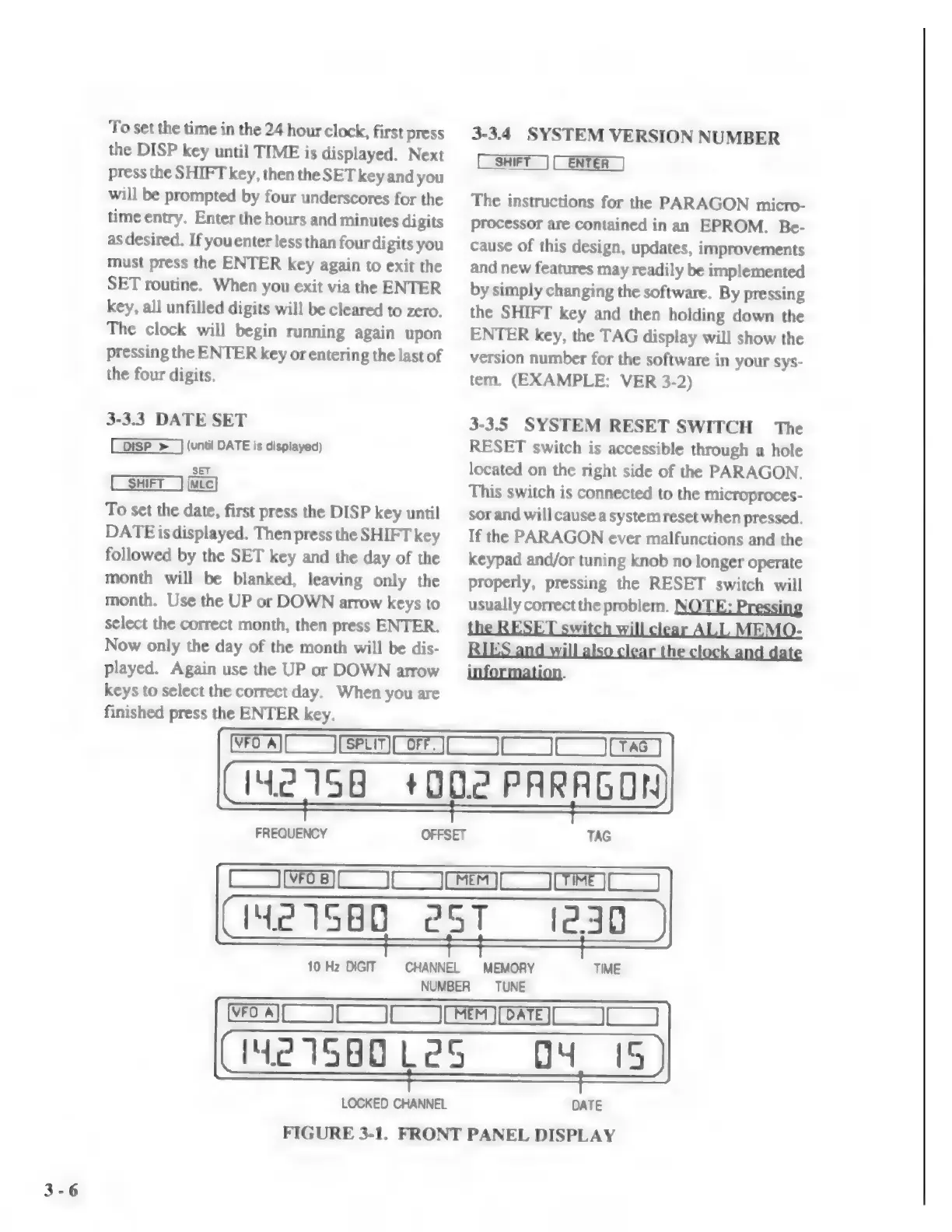
FIGURE
3-1.
FRONT
PANEL
DISPLAY

Related product manuals