Important Note: If you elect not to clear the slot after the confirmation request appears,
do not press ‘C’ a second time. In a couple of seconds, the display will revert back to the
current menu setting and the operation will be halted.
2. Clearing Sequential Channels: To clear sequentially- numbered slots in rapid
succession, select the lowest-numbered channel in the group with the Edit Knob and
press ‘C’ twice, in rapid succession. When the next-higher channel entry appears in the
Memory/Scan window, press ‘C’ twice, again. Continue this procedure until all channels
in the sequence are empty. All channels are cleared when the receiver is reset (See
section 4-37).
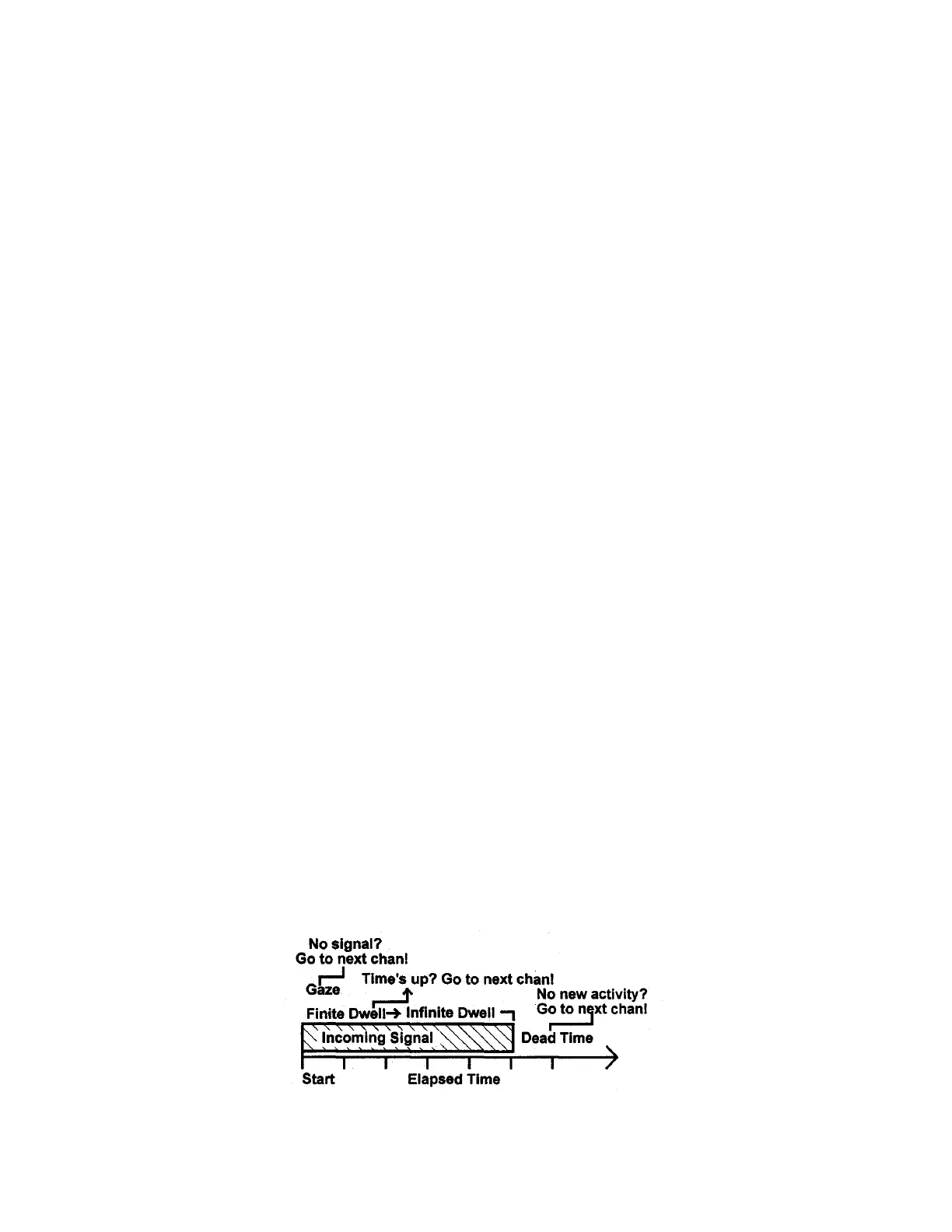
4-34 SCAN MODE Primer: The following terms and concepts are used when setting
up PScan and MScan parameters. Programming will be easier if you understand each:
1. Finite Dwell: Finite Dwell is the time interval (in seconds) the receiver will remain
on frequency after locking onto a signal. The Finite Dwell feature is especially useful
when scanning a band containing many continuous-carrier AM signals. In this mode, the
scanner locks onto the incoming carrier for a specified period of time, then quits the
channel and resumes searching for another signal. Dwell is adjustable from 0.1 to 29
seconds.
2. Infinite Dwell: Infinite Dwell means the receiver will remain on the frequency for as
long as the squelch is held opened by a signal. Infinite Dwell is especially useful when
scanning two-way intermittent push-to-talk communication. When set for Infinite Dwell,
the scanner locks onto the signal for as long as its there.
3. Dead Time: Dead Time is the time interval (in seconds) the receiver will remain on a
frequency after the incoming signal either goes off-air or fails below the Squelch
threshold. This function is especially useful when anticipating a two-way reply, or when
it may be necessary to bridge signal fading and pauses in SSB speech. Dead time is
programmable from 0.1 to 29 seconds.
4. Gaze Time: Gaze Time is the interval the receiver will wait for activity to appear on a
dead frequency before moving on to the next. Lengthening this parameter is useful when
CW, SSB, or pulse- type data signals cause short activity gaps. Gaze Time is
programmable from 0.01 to 29.9 seconds.
The relationship between Dwell, Dead, and Gaze Time is shown here:
4-19


 To Next Page