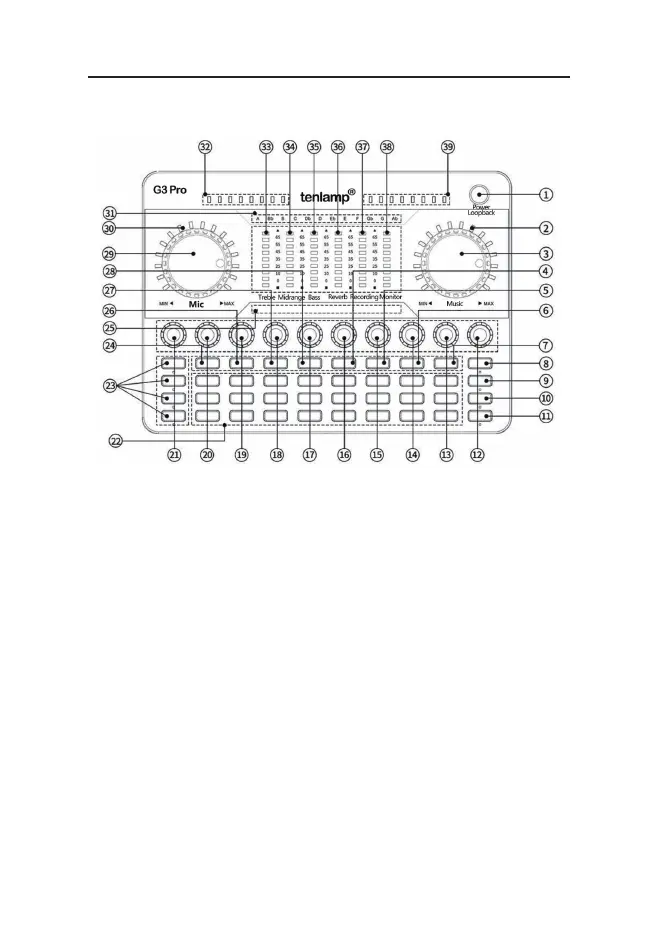
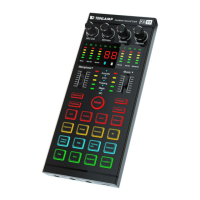
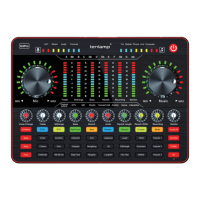
3.2 G3 Pro Audio Console Panel Definition
4
1.Power/Loopback button: Long press for two seconds to power on/off, while working, short
press to turn on/off the "Loopback" function;
2. Music level indicator breathing light: when the music volume is adjusted, it indicates the
current volume level, and when it is static, it is the breathing light display.
3. Music knob: adjust the input volume of accompaniment music.
4. Monitor button: Turn on/off the function of monitoring microphone sound through headphones
5. Denoise button: Turn on/off the noise reduction function of the microphone, and control the
pickup range of the microphone.
6. E-tones button: short press to switch the electronic tone, long press to turn off the electron-
ic tune, LCD corresponds to 12 kinds of electronic tone cycle display.
7. Mode button: Short press to cycle through the eight sound scene modes: Original sound,
KTV, MC, Studio, Concert hall, Anchor, Game, Interactive.
8. Vocal-off button: When turned on, Eliminate 85% the singer’ s vocals volume in the accom-
paniment song.
9. Dry/wet recording/status light: the default is to listen to the wet sound and recording wet
sound mode【when recording audio, the sound that is heard in the monitor headphones is the
processed sound (such as reverb, mixing), and the actual sound recorded is post-processed
vocal recording】; when the status light is on, it is listening to the wet sound and recording
dry sound mode 【when recording audio, the sound that is heard in the monitor headphones
is the processed sound (such as reverb, mixing), but the actual recording is the dry sound
without any processing】
G3 Pro audio console user manual


 To Next Page