3
The G3 sound card is a digital audio interface with mixer and sound card, a one-stop
workstation for live streaming, podcast, recording and other content creations. Built-in
high-performance digital DSP reverberation processing, supports high-definition digital
recording, 3 interesting voice changers, 5 preseted reverb modes, PC digital transmis-
sion,dual mobile phone live streaming, BT wireless accompaniment, real-time earphone
monitoring. Provides XLR to 3.5mm microphone interface inputs, 12 steps electronic music
tunes, interesting atmosphere sound effects. Suitable for live stream studios, podcast
studios, personal live streaming, recording, chatting, singing...
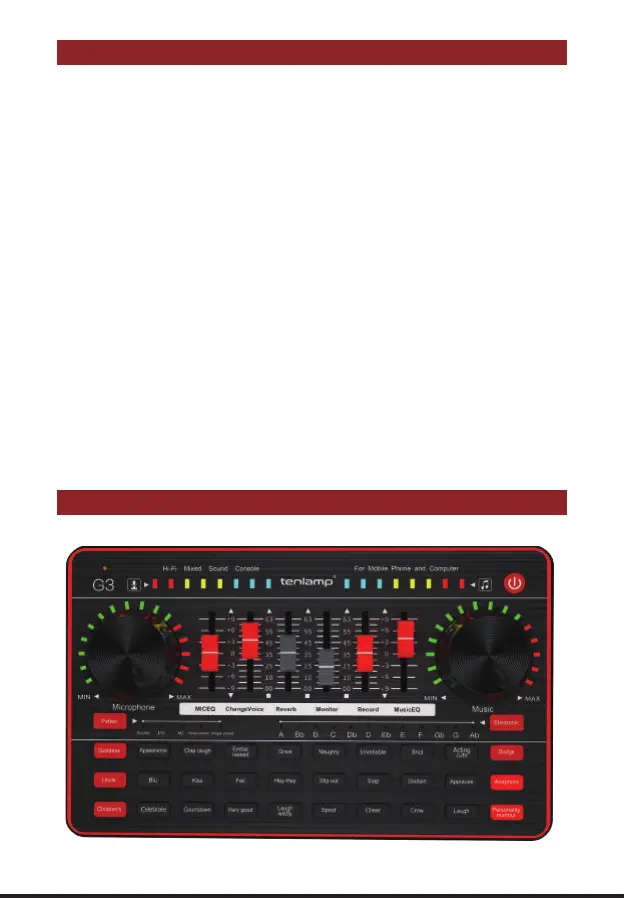
PRODUCT OVERVIEW
PRODUCT APPEARANCE
It works well on smartphones, tablets and computers, including Android, iOS, Window
and macOS, Linux . It is plug-and-play with no extra driver required.
It offers channels of
audio mixing and easy connections to microphones, smartphones, and other audio sources;
uses advanced engineering that allows the user to control the sound levels in real time and add
vocals effect and interesting sound effect, avoid to laborious post-production and editing.
It is so easy and intuitive to use that you can start into streaming or podcasting within
minutes, and focus on providing valued content to interact with your audiences, entertain your
community rather than being distracted by the complicated operations.
G3 provides one comprehensive solution from audio recording to the mixing of recorded
audio, integrates audio input collecting, processing & optimizing and output controlling.
The built-in DSP digital audio processor can help tune your voice in real-time, makes it
possible to change your voice and add more funny sound effects to your podcast or
streaming, which will make your content creation more entertaining.
Realtec High Definition Audio
Realtec High Definition Audio


 To Next Page