5
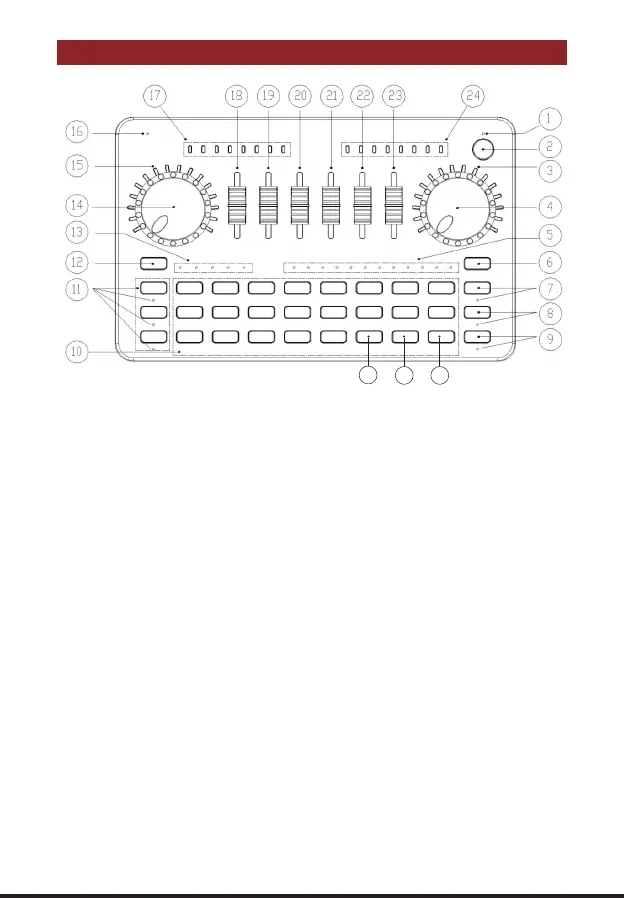
G3 BUTTONS FUNCTION DEFINITION
1. Charging indicator light:
The Red indicator is on during charging, and the indicator will be off when fully charged.
2. Power on/off button:
Long press the button 2 seconds to power on/off the sound card, After power on, short press to
turn on/off PC "Loopback" function; Loopback function is used for inputting audio from PC via
PC/Charging OTG port; Loopback ON: the audio resources inside PC(music, video, game,
web pages,ect audio) can be heard by audience or can be recorded; Loopback OFF: only
microphone audio can be heard by audience or can be recorded.
3. Accompaniment volume indicator and breathing lamp.
4. Music Knob:
Adjust the input volume of accompaniment music(via Music port, PC/Charging port and BT).
5. Electronic-Tone state lamp:
Cyclic indication of current electronic music tune.
6. Electronic button:
Short press to cyclically switch 12 steps electronic music tunes. Long press to turn off the
electronic music tune mode.
7. Dodge button / status light:
Turn on/off auto ducking microphone audio function. When on, the mixer automatically lower the
volume of background music while streamer speaking, recover background music volume while
streamer stop speaking.
8. Anaphora button/state lamp:
when turn on the function, G3 will eliminate 85% the singer's vocals in current accompaniment
25
26 27
Realtec High Definition Audio
Realtec High Definition Audio


 To Next Page