4
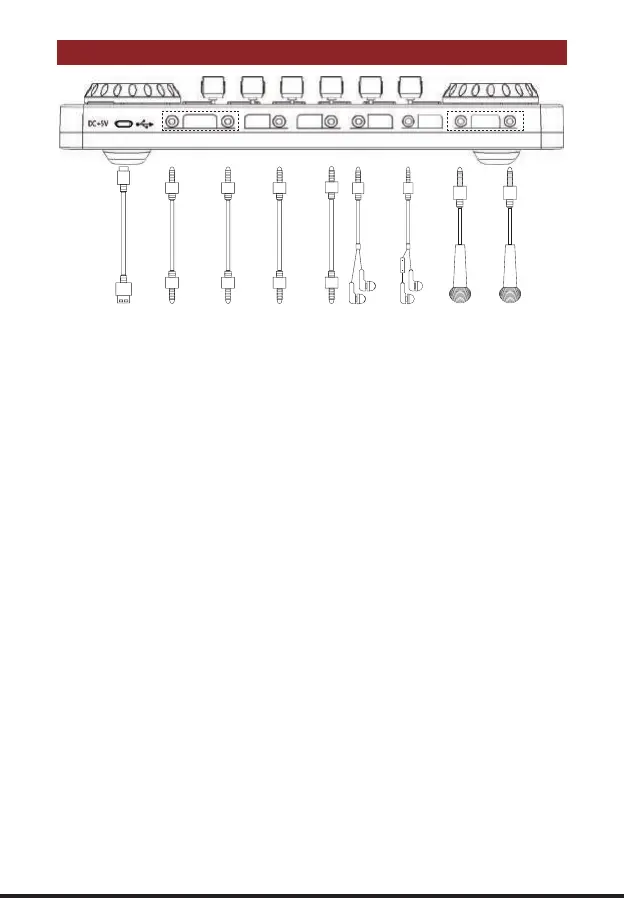
G3 PORTS CONNECTION
① ② ② ③ ④ ⑤ ⑥ ⑦ ⑦
① PC/Charging:
DC+5V; OTG port; Used for G3 charging and data digital transmission; Computer live
streaming/recording port and computer input accompaniment music port; The audio
console serves as an external audio processor for the computer/smartphone while live
streaming, recording or singing.
② Broadcast:
3.5mm TRRS main Analog Output port; The processed audio can be output to the smart-
phone, tablet, PC or other devices through a 3.5mm TRRS cable. Can live stream to multi-
ple devices at the same time. Can be connected to the desktop computer microphone jack,
laptop 3.5mm audio jack or smartphone earphone jack when live streaming.
③ Music:
3.5mm Analog input port; Connect an external audio source or devices to the audio
console via a 3.5mm audio cable, to input background music during live streaming or audio
production. When inputting background music, it can be connected to the phone head-
phone jack, desktop computer earphone jack and laptop 3.5mm audio jack.
④ Audio:
3.5mm output port; Connect audio playback device such as speakers and headphones.
⑤ Earphone:
3.5mm monitoring output port; Monitoring earphone jack, used to monitor sound of audio
console in real-time.
⑥ Headset:
3.5mm TRRS port; Used to voice input by a earphone with microphone. ALSO can moni-
tor all sound of audio console in real-time.
⑦ Microphone:
3.5mm TRS port; Connect (XLR to 3.5mm) condenser microphone that does not require
external power supply.
PC/Charging
Broadcast Music Audio
Earphone
Headset
Microphone
Realtec High Definition Audio
Realtec High Definition Audio


 To Next Page