8
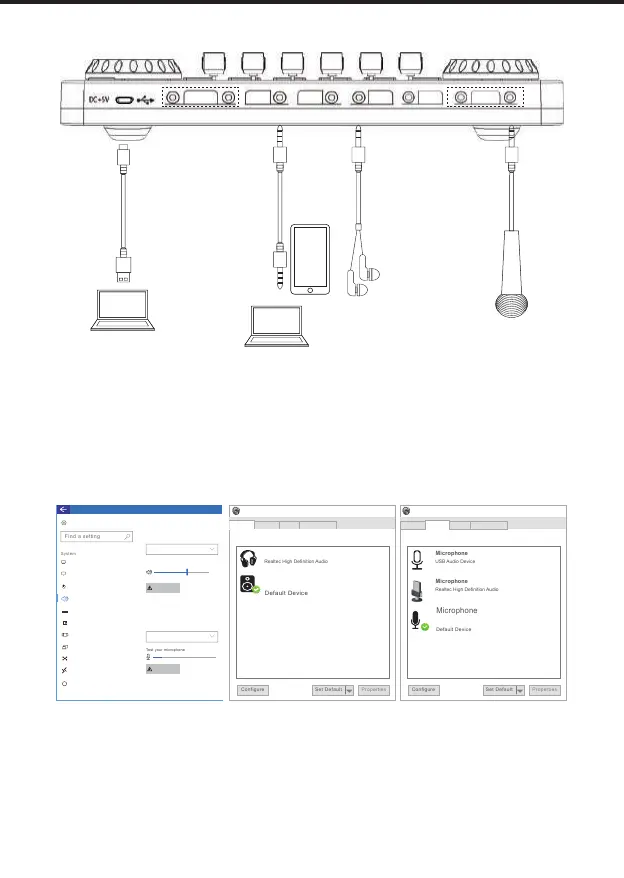
PC/Charging
Broadcast Music Audio
Earphone
Headset
Microphone
Live Streaming/Recording on PC
or
monitoring
headphone
accompaniment
streaming PC
1. Connect the music source, monitoring earphones, and mic to the mixer as shown in the above.
2. Connect the PC and the mixer by USB cable.The PC generally automatically recognize the
mixer.
3. Enter the Sound settings of PC, and set the "G3 SoundCard" as PC system default input and
output device, or playback device in "Playback" and recording device in "Recording" option, as
shown in the down
4. Set the output device on live streaming platforms, accompaniment software as G3 SoundCard
.
Please turn on "Loopback" function during PC live streaming, if want inputting the PC
internal system audio.
It is not recommended using the Broadcast ports to connect computer for live streaming or
recording.
Support live stream on computer and smartphone simultaneously.
Support two 3.5mm headphone mono monitoring simultaneously(Audio and Earphone ports).
sound
Playback
Sounds
Recording Communication
select a playback device below to modify its settings:
Headphone
Speakers
Realtec High Definition Audio
sound
Playback
Sounds
Recording Communication
select a recording device below to modify its settings:
Realtec High Definition Audio
Settings
Home
Display
Power & sleep
Storage
About
Remote Desktop
Shared experience
Projecting to this PC
Multitasking
Tablet mode
Sound
Notification & actions
Sound
G3 SoundCard
G3 SoundCard
G3 SoundCard
G3 SoundCard
Choose your output device
Choose your intput device
Microphone
Device properties
Device properties
61
i
Troubleshoot
Troubleshoot
Warm Tips
.
.
.
.


 To Next Page