8
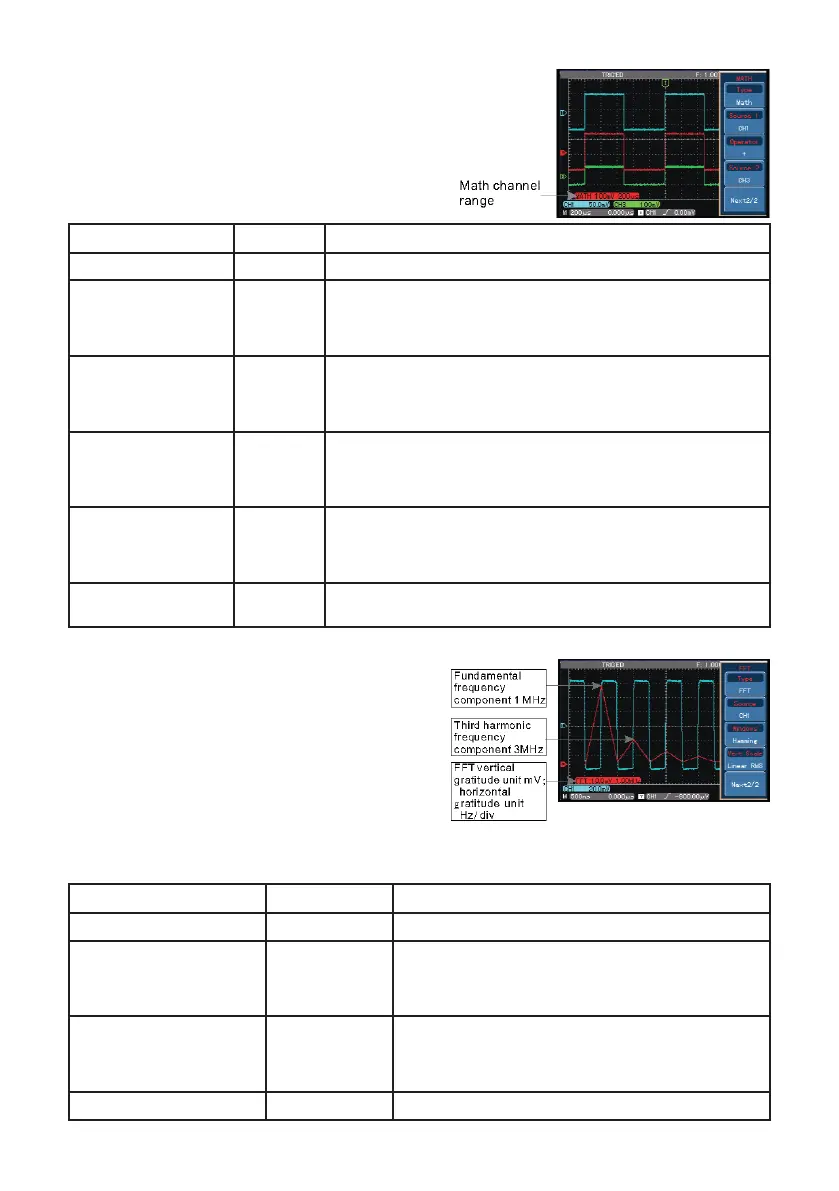
Operating Math functions
• Math functions are displays of +, -, x,
÷
and
FFT mathematical results of CH1 and CH2.
The menu options are:-
FFT spectrum analysis
• Using FFT algorithm you can convert the
domain signals (YT) into frequency domain
signals.
• With FFT you can observe the following
types of signals:
1. Measure the harmonic wave
composition and distortion of the
system.
2. Demonstrate the noise characteristics of the DC power.
3. Analyse oscillation.
Functions Menu Setup Notes
Type Math To carry out +, -, x, ÷ functions
Signal source 1 CH1
CH2
CH3
CH4
Set signal source 1 as CH1 waveform
Set signal source 1 as CH2 waveform
Set signal source 1 as CH3 waveform
Set signal source 1 as CH4 waveform
Operator +
-
x
÷
Signal source 1 + Signal source 2
Signal source 1 - Signal source 2
Signal source 1 x Signal source 2
Signal source 1 ÷ Signal source 2
Signal source 2 CH1
CH2
CH3
CH4
Set signal source 2 as CH1 waveform
Set signal source 2 as CH2 waveform
Set signal source 2 as CH3 waveform
Set signal source 2 as CH4 waveform
Compress 1/1
1/10
1/100
1/1000
Scale the waveform by any of the four ratios to chose from
X/Y offset ----- Use the MULTIPURPOSE control to adjust waveform
vertically / horizontally
Functions Menu Setup Notes
Type FFT To carry out FFT algorithm functions
Signal source
CH1
CH2
CH3
CH4
Set CH1 as math waveform
Set CH2 as math waveform
Set CH3 as math waveform
Set CH4 as math waveform
Window
Hanning
Hamming
Blackman
Rectangle
Set Hanning window function
Set Hamming window function
Set Blackman window function
Set Rectangle window function
Vertical coordinate Linear V dB Set the vertical coordinate unit to linear or V dB


 To Next Page