7
To measure AC Voltage, perform the following steps:
• Insert the red test probe into the VΩmA terminal and the black test probe into the
COM terminal.
• Turn the range selector to V
• Connect the test probes to the circuit being measured. The measured value will be
shown on LCD, which is the effective value of sine wave (mean value response).
Notes:
• DCV and ACV measurement with 72-7765A is auto range.
• If the voltage to be measured is unknown, use the maximum measuring range
(250V) and reduce the range step by step until a satisfactory reading is obtained.
(Do not adjust when connected to the circuit).
• If LCD shows “OL”, this indicates the measured value is higher than the selected
range. Select a higher range in order to obtain a measured value.
• In each range, the meter has an input impedance of about 10MΩ. This loading
effect can cause measurement errors in high impedance circuits.
• If the circuit impedance is less than or equal to 10kΩ, the error is negligible (0.1%
or less).
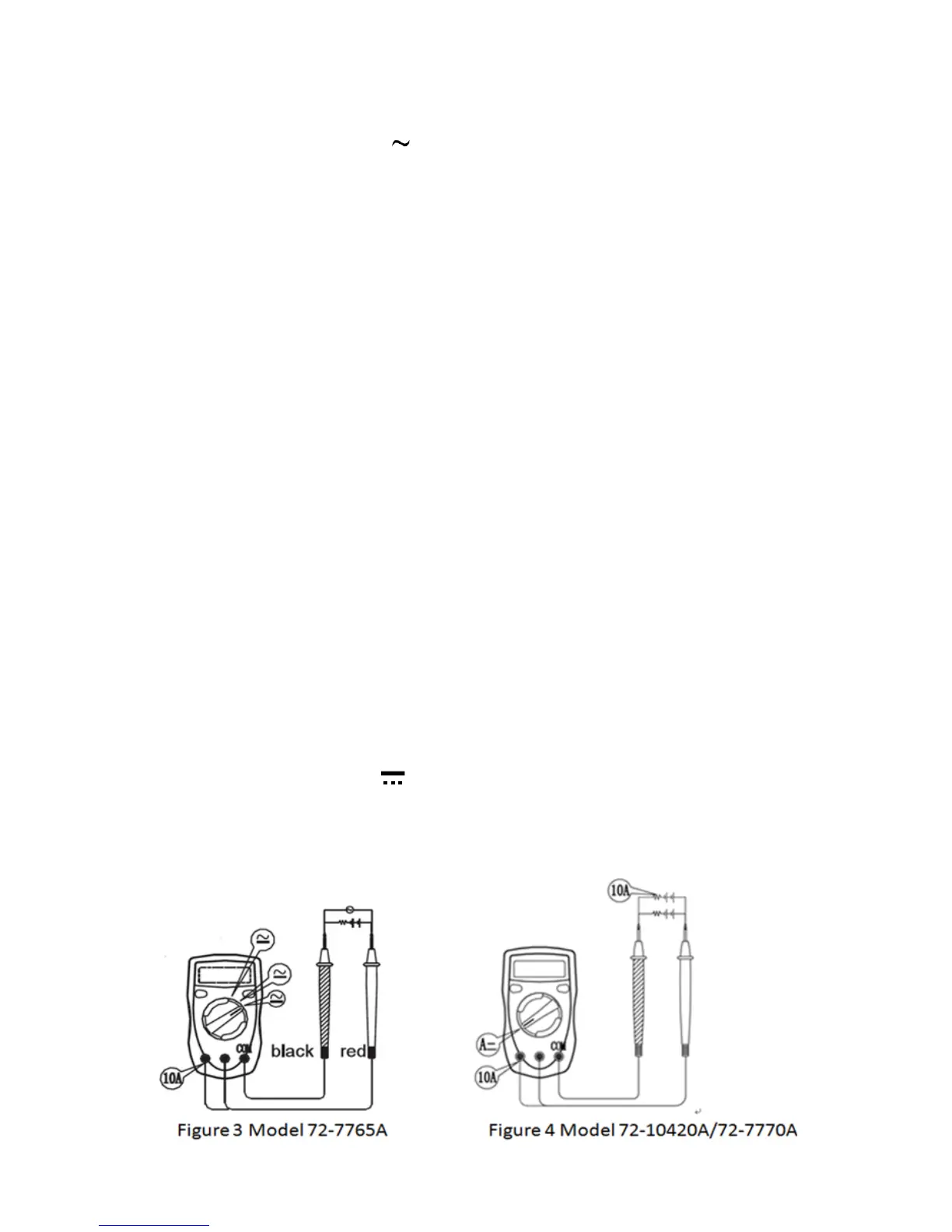
Current measurement (See Figure 3 & 4)
WARNING
• Never attempt a current measurement where the voltage between either terminal
and ground is greater than 60V.
DC current measurement
• Model 72-7765A testing range: 400μA, 4000μA, 40mA, 400mA, 4A and 10A
• Model 72-7770A/72-10420A testing range: 2000μA, 20mA, 200mA and 10A
To measure DC current, perform the following steps:
• Turn off the power and discharge all high-voltage capacitors of the circuit to be
measured.
• Insert the red test probe into the VΩmA or 10A terminal and the black test probe
into the COM terminal.
• Turn the range selector to
• Connect the red test probe to the positive electrode and the black test probe to the
negative electrode of the circuit in series.
• Turn on the circuit power. The measured value shows on the display.


 To Next Page