EasyManua.ls Logo

Tense TPM-04 - User Manual

Default Icon
14 pages
Print Icon
To Next Page IconTo Next Page
Loading...
Supports 3P4W connections.
Measures up to voltage harmonics 31st.
Measures up to current harmonics 31st.
RS485 Modbus RTU
It shows the powers of each phase (P1, P2, P3).
It shows the apparent powers of each phase (S1, S2, S3).
It shows the reactive powers of each phase (Q1, Q2, Q3 inductive and capacitive).
It shows power factors (PF) and cosφ values of each phases.
It shows the min., max. and ave. values of the phase-to-phase and phase-neutral voltages.
It shows the values of each phase (I1, I2, I3).
It shows total import and export active (ΣkWh) energy.
It shows total inductive and capacitive reactive (ΣkVArh) energy.
2x relay outputs (adjustable), 1x Digital Input
It shows voltage and current irregularity.
It show demands.
You can delete energies and demands.
The menu is password protected.
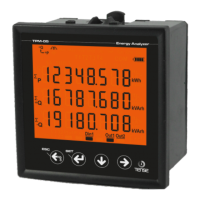
TPM-04
USER MANUAL
Tense Electric - Electronic
MADE IN TURKEY
Document Number: DK-088-2
71.5 x 61.5 Custom Design Glass LCD
Question and Answer IconNeed help?

Do you have a question about the Tense TPM-04 and is the answer not in the manual?

Tense TPM-04 Specifications

General IconGeneral
Operating Temperature0-50°C
Input TypeThermocouple
TC TypeJ, K, R, S, B, E, T, N
Display4-digit LED
Resolution0.1°C
Measurement RangeAccording to the sensor type

Summary

Connection Diagrams

Matters to Consider in Current Transformer Selection

Warnings and Safety Precautions

Device Maintenance

General Information

First Operation of the Device

Screen Presentation

Button Presentation

Progress On Screen Information

Fast Forwarding of Screen Information

Menu Structure Overview

Current Transformer Ratio Setup

Access the menu to set the current transformer ratio parameter.

Voltage Transformer Ratio Setup

Access the menu to set the voltage transformer ratio parameter.

RS485 Communication Settings

Configure RS485 remote communication parameters like Baudrate and Modbus ID.

Delete Energy and Demand Records

Option to delete recorded energy and demand data from the device.

Password Setup

Set or change the device access password.

Relay 1 Task Assignment

Assign specific functions and parameters to Relay 1.

Relay 2 Task Assignment

Assign specific functions and parameters to Relay 2.

Setting the Current Transformer Ratio

Setting the Voltage Transformer Ratio

RS485 Remote Communication Settings

Deleting Energy and Demand Records

Enter Password Value

Assigning Tasks to Relay1 and Relay2

Menu Values Table

Dimensions

Technical Specifications

Contact Information

Related product manuals