CAMERA SETUP continued
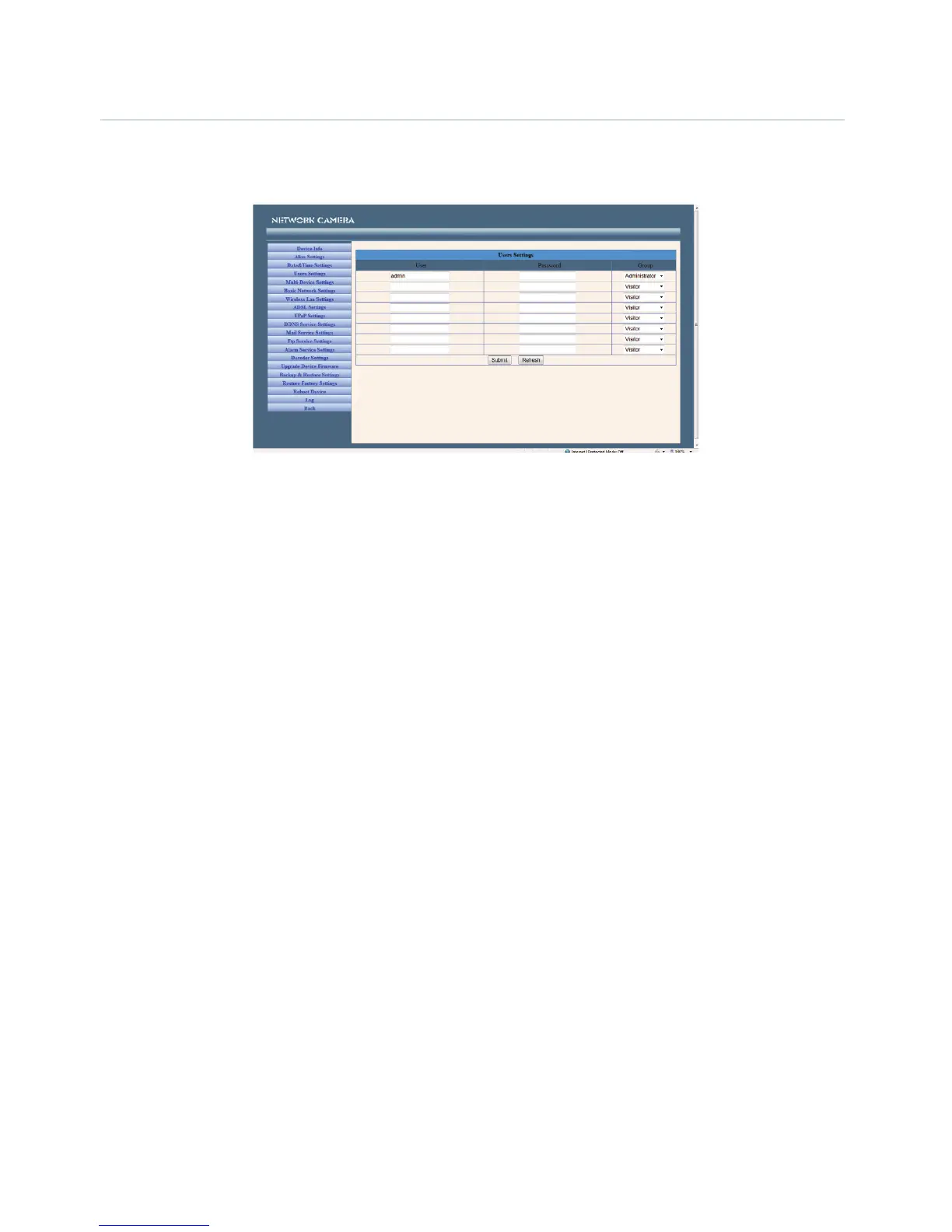
User Settings - You can configure up to 8 user names and passwords and the level of users as
Administrator, Operator or Visitor.
Administrators can:
Set Record Path - Click ‘Browse’ to choose the recording path of where video files will be saved.
Set Alarm Record Path - Click ‘Browse’ to choose the alarm recording path.
Note:
1. The default path for saving files is C:\Documents and Settings\All Users\Documents.
2. In Windows Vista, there are two points you need to notice:
• Vista’s Security level is higher than Windows XP/2000. For the ‘Set Record Path’ function, you will need to
add the add the Device IP address to IE’s ‘Trusted sites’ first. To do this go to: Tools > Internet Properties >
Security >Trusted sites > Sites > Add. In Vista, there is a prompt to add Trusted sites when the Set Record/
Alarm Record path is clicked.
• You cannot set the Windows System Root Directory as you will do for the Record/Alarm Record Path. This
prompt only pops-up in Vista.
UPnP Settings - Access this page to make sure the UPnP Status is working.
Upgrade Device Firmware - Upgrade the camera’s Firmware and device embeded web UI software on
this page.
Restore Factory Settings - Restore factory settings of the device.
Reboot Device - Reboot the device.


 To Next Page