CAMERA SETUP continued
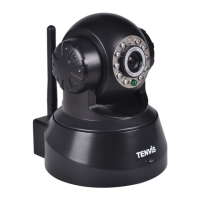
Mail Service Settings
Configure the Email addresses that will receive and send mails after an alarm is raised.
Sender - This device uses the sender mailbox to send mails.
Receiver - To receive the mail from the Sender.You can set up to 4 receiver mailbox.
SMTP Server - The SMTP server for the sender mailbox.
Need Authentication - Check the box if the email needs authentication then input the SMTP User Name &
Password.
Mail test: Set the Mail parameters then click ‘Submit’ first before sending a test email.
There are 8 possible Mail Test errors:
1. Cannot connect to the server.
2. Network Error. Please try later.
3. Server Error.
4. Incorrect username or password.
5. The Sender is denied by the server - The server needs to authenticate the user, check settings and try again.
6. The Receiver is denied by the server - Could be caused by the anti-spam privacy settings of the server.
7. The message is denied by the server - Could be caused by the anti-spam privacy settings of the server.
8. The server does not support the authentication mode used by the device.


 To Next Page