APPENDIX continued
1. Install the ‘IP Camera Tool’, ActiveX controller will be installed simultaneously (recommended).
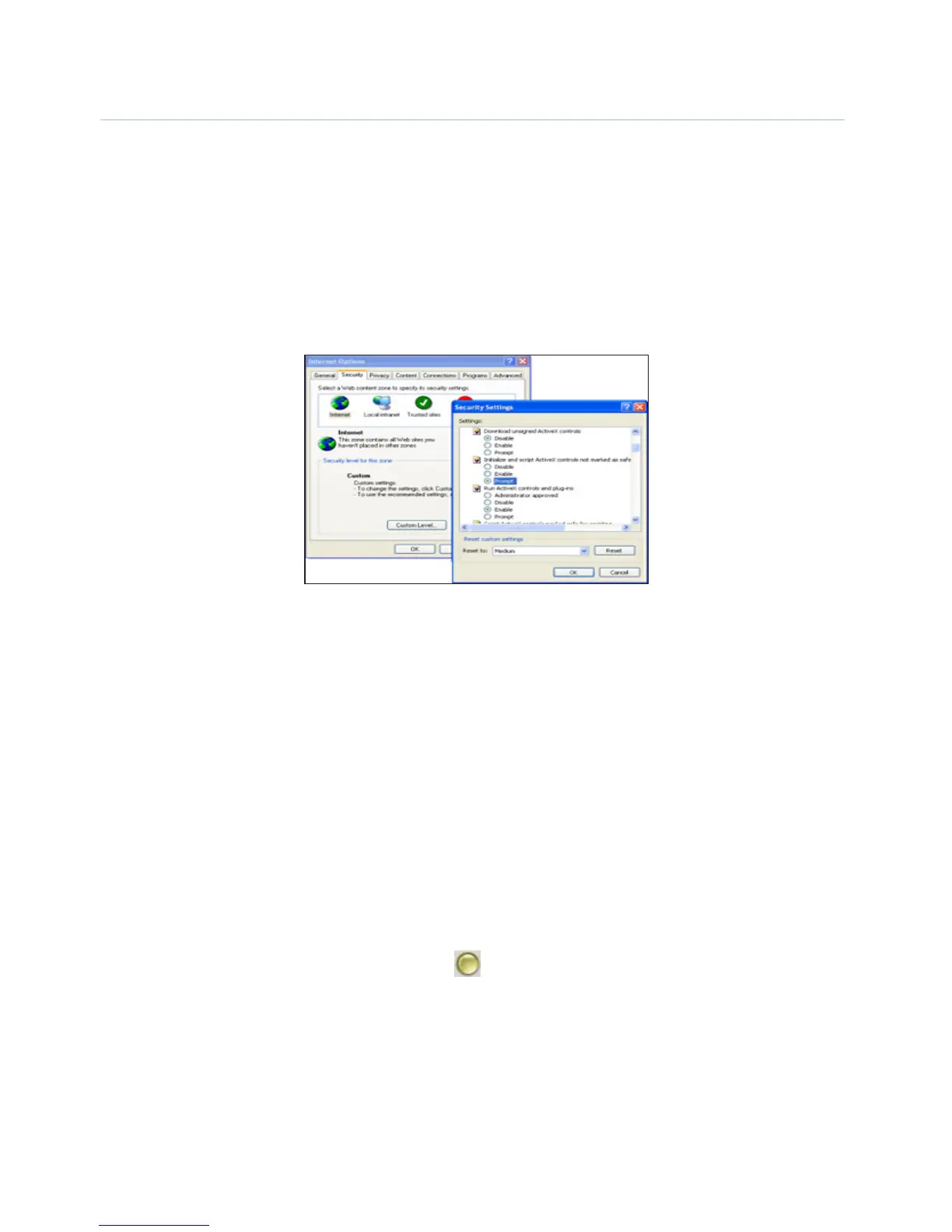
2. Download ActiveX controller and set the Security Properties of IE on the PC when you view it
for first time: Go to Tools > Internet Properties > Security > Custom Level > ActiveX control and
Plug-ins. All 3 options need to be set to ‘Enable’.
- Enable: Download unsigned ActiveX controls.
- Enable: Initialize and script ActiveX controls not marked as safe.
- Enable: Run ActiveX controls and plug-ins.
Problems with network bandwidth
The image frame rate is subjected to the following factors:
1. Network bandwidth.
2. PC performance, network environment and display preference setting (brightness, theme, etc).
3. The number of visitors (Too many visitors will slow down the image frame rate).
4. Choice of switch or hub (Use a switch for multiple IP cameras rather than a hub).
Pop up appears saying ‘Fail to connect to the device’
This prompt will only appear if using multiple cameras. Enter the Multi-Device Settings page
(login as an Administrator) to check if the Device settings are correct or not.
When one of the multiple cameras disconnects, the color changes to yellow and the pop-up
prompt “Failed to connect to the device” is displayed.


 To Next Page