CAMERA SETUP continued
Report Internet IP by Mail - Check the box so when the IP camera is powered on or the Internet IP address
changes, an email will be sent. (For example: IPCAM ‘s url is http://119.123.207.96:9002). Make sure the port
is mapped to the router correctly by UPnP or Virtual Map function.
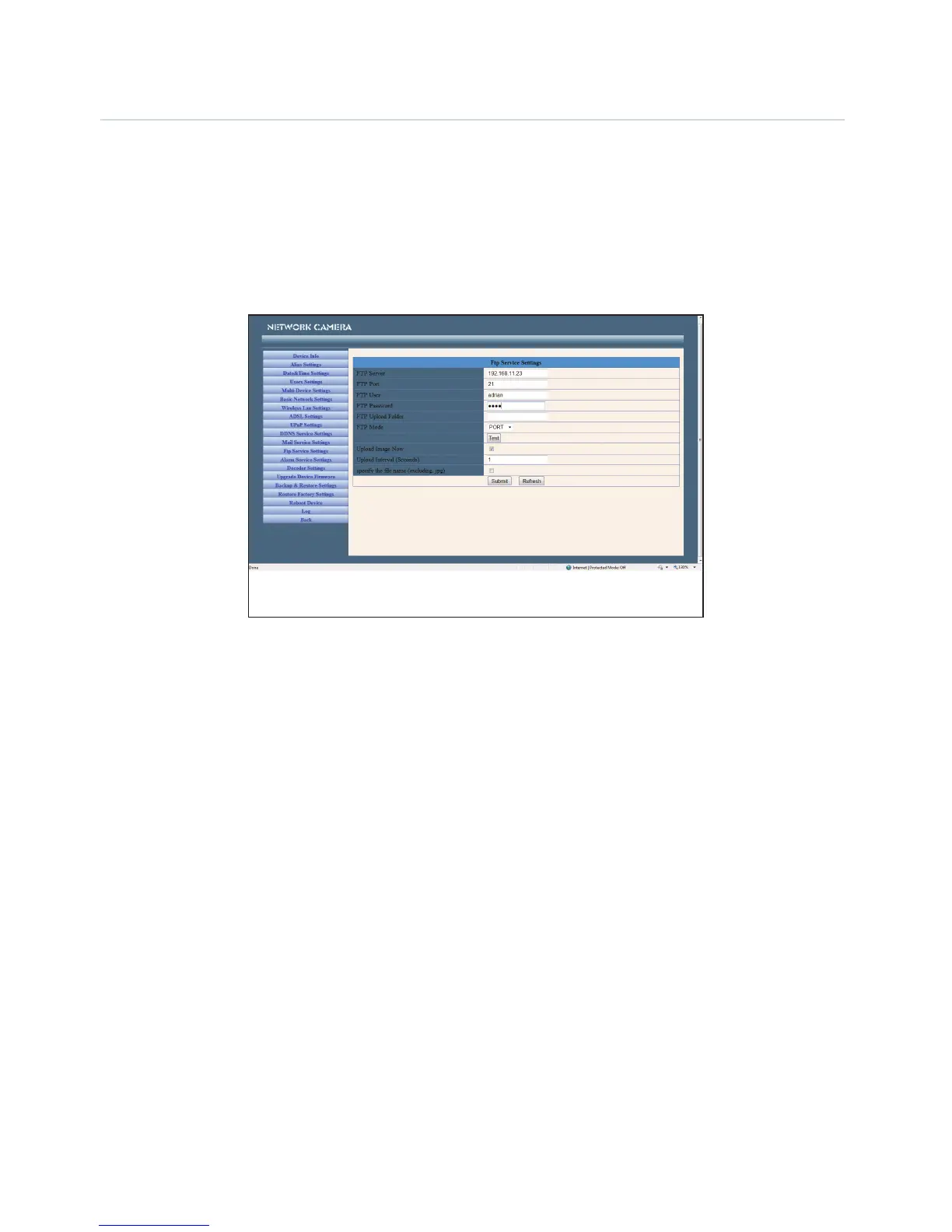
FTP Service Settings
Note: When Alarm Service Settings > Upload Image on Alarm is checked, the FTP Service takes effect.
FTP Server - The FTP server address.
FTP port - The port usually is 21.
FTP Mode - Supports standard (POST) mode and passive (PASV) mode.
Upload Image Now - Check the box to upload the image. When checked, you can input the upload interval
time in seconds.
FTP Test - Set the FTP parameters and then click ‘Submit’ before testing the FTP settings. If successful, it will
display the prompt. There are 8 possible FTP test errors:
1. Cannot connect to the server - Please check FTP Server settings.
2. Network Error. Please try later.
3. Server Error.
4. Incorrect username or password - Check the username and password.
5. Cannot access the folder - Ensure the folder exists and your account is authorized.
6. Error in PASV mode - Ensure the server supports PASV mode.
7. Error in PORT mode - PASV mode should be selected if the device is behind a NAT.
8. Cannot upload file - Ensure your account is authorized.


 To Next Page