Teo IP Phone 4104 User Guide 5
5) Message Waiting Indicator – a bright red indicator is lit
when messages are waiting, controlled by the network.
6) VOICE MAIL Key – accesses network voice mail services
(page
17).
7) MENU Key – enters and exits Setup Mode (page 19).
8) LOG Key – displays Call Log options (page 13).
9) DIRECTORY Key – displays the Call Directory (page 14).
10) INFO Key – displays version and configuration information
about the 4104 (page
18).
11) MUTE Key – mutes the microphone when using the
speakerphone or handset/headset. A red indicator on the
key is lit when mute is active (page
16).
12) SPEAKER Key – activates the speakerphone or Call
Monitoring (if enabled by your installer). A red indicator on
the key is lit when the speakerphone or Call Monitoring is in
use (page
16).
13) HEADSET Key – activates the headset. A red indicator is lit
when the headset is in use (page
17).
14) VOLUME Key – adjusts the receiver/speaker volume when on
a call; adjusts the ringer volume when on-hook (page
17).
15) Dial Pad – dials telephone numbers, and sends DTMF tones
to external equipment such as voice mail systems. The dial
pad is also used for text and number entry during setup.
16) Microphone – used for hands-free (speakerphone) calling;
located under the right front corner of the telephone.
17) Handset Jack – a jack on the underside of the telephone
connects to the included handset.
18) Headset Jack – a jack on the underside of the telephone
connects to an optional standard headset.
D
D
i
i
s
s
p
p
l
l
a
a
y
y
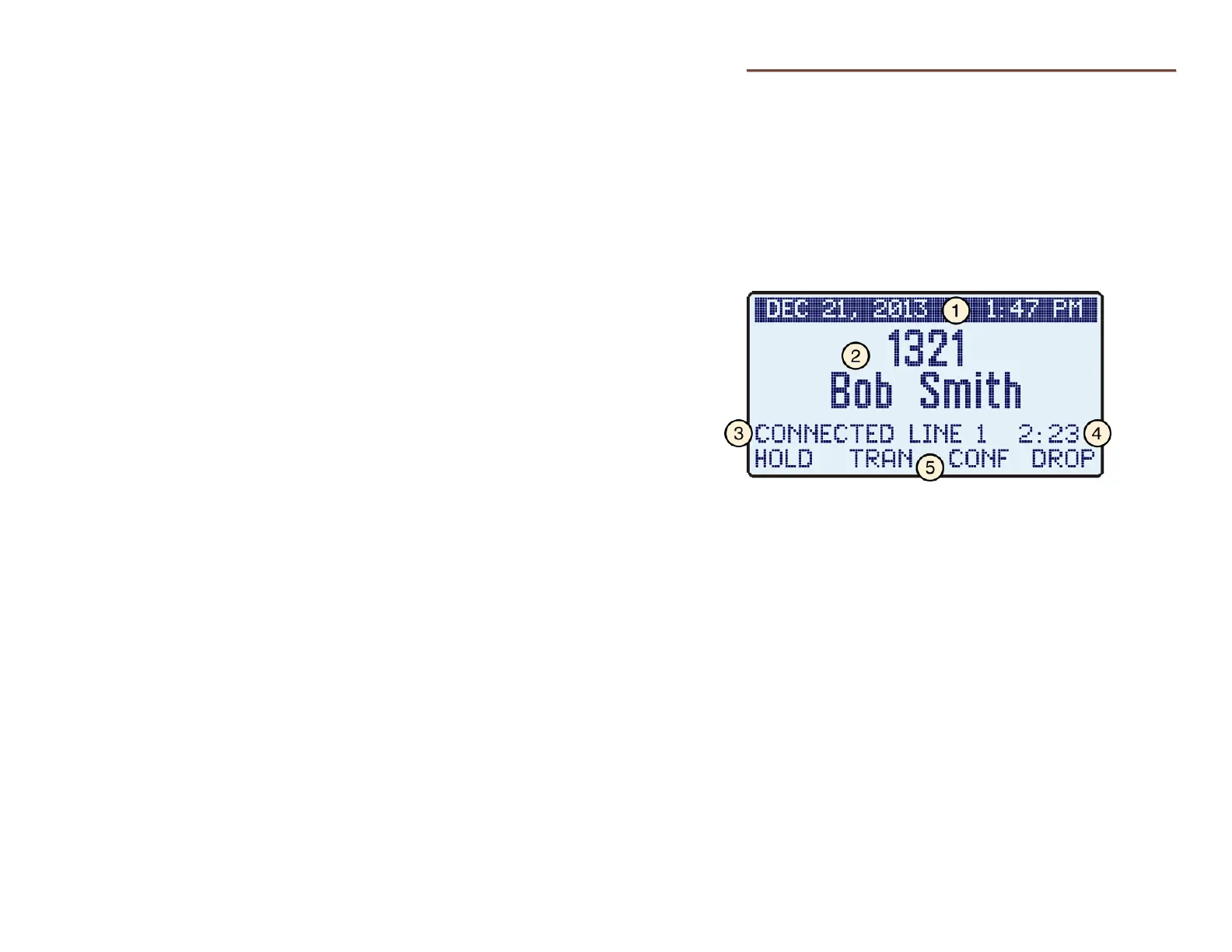
Call information, date and time, and other information are
shown on the 4104 display. The example below is a typical
display of call activity. Other information, shown throughout
this manual, is displayed when using the Call Directory, the Call
Log, the Info display, and when viewing or changing various
setup options.
The display backlight is activated by pressing a key or lifting the
handset. It will automatically turn off after two minutes.
1) Current Date and Time – are always at the top of the
display.
2) Call Information –the calling or called number, with caller ID
when available.
3) Call State – the current state of the active line appearance,
such as "CONNECTED, "DIALING…", or "CALL HELD".
4) Call Timer – the total connected time for the active call.
5) Soft Key Labels – the context-sensitive functions that are
available on the four softkeys below.



 To Next Page