1x 2pin Connector to 18W AC Adapter (Int) - 6ft
Attach four 2dBi antennas to the transmitter and ve antennas
to the receiver via the threaded RP-SMA connectors (A).
Connect the output from your video source to either the SDI or HDMI input (C or E) on the Bolt
transmitter. Connect either the SDI or HDMI output (D or L) from the Bolt receiver to the video input
on your monitor.
Connect power to the transmitter and receiver using the
included A/C adapter, or if both devices are equipped with
battery plate accessories, attach a compatible battery
(Gold or V mount).
NOTE: If mounted upright on a stand above the monitor, use a right-angle SDI adapter to relieve any
strain caused by the weight of the cable, and to avoid damaging the SDI output’s internal connectors.
1
3
2
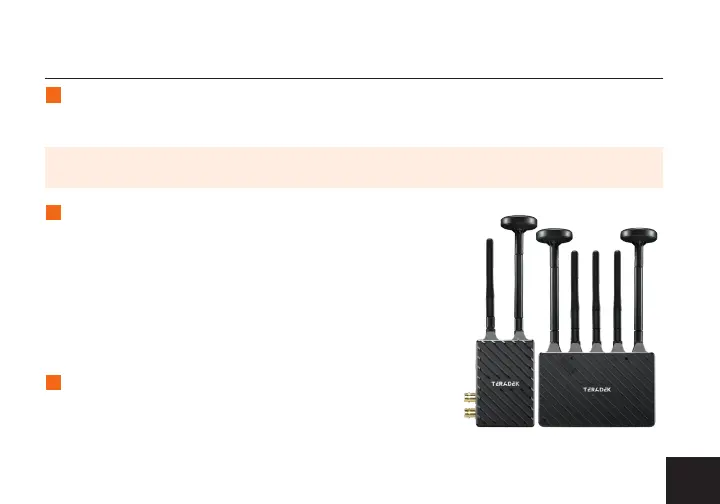
If using Horizontally Polarized “H” antennas: Attach one “H”
antenna to the connector in front of the transmitter (closest to
the front panel display), and one 2dBi antenna to the opposite
connector. Attach the three 2dBi antennas to the receiver’s
center connectors and the two “H” antennas to the left and
right connectors (see image).
POWER AND CONNECT
3


 To Next Page