9-1
9. How to handle troubles
Caution
In the event of an alarm or abnormal condition that cannot be resolved,
immediately stop the operation and contact Teral. or its service
company. Otherwise, it may lead to an accident.
Before the contact, check the status of abnormal condition and the
alarm code No., as well as information shown on the nameplate, and
then let us know the information.
9.1 Alarm handling
9.1.1 Checking the alarm description
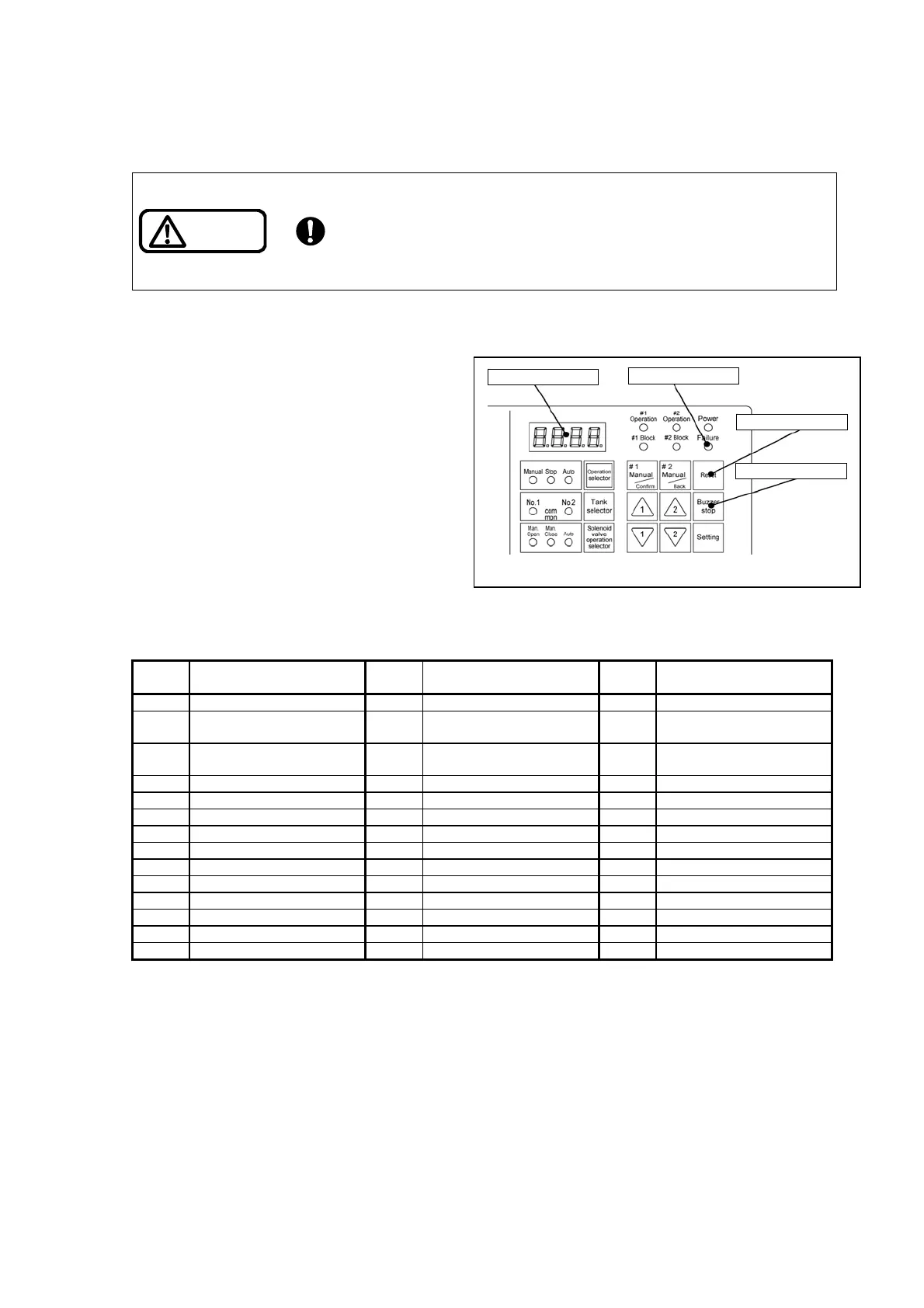
If an alarm occurs, the buzzer sounds, the
Failure indicator light on the operation panel
blinks, and the alarm code appears on the
display.
Some failures do not generate an alarm
immediately. Instead, the system takes back
and retries the action several times and
generates an alarm only if the failure still
persists.
Referring to the “Table 9-1 Alarm code table,”
identify the alarm status and eliminate the
cause.
To find out the cause of the problem, refer to
“9.2 Troubleshooting.”
If multiple alarms occur at the same time, the displayed codes are switched every two seconds.
Table 9-1 Alarm code table
Alarm
code
Description
Alarm
code
Description
Alarm
code
Description
E001 Receiver tank full E101 No.1 overload E201 No.2 overload
E002 Receiver tank low E102
No.1 discharge pressure
abnormal drop
E202
No.2 discharge pressure
abnormal drop
E003
Receiver tank dry-run
prevention
E103 No.1 electric leak E203 No.2 electric leak
E004 Electrode failure E104 No.1 high temperature E204 No.2 high temperature
E006 Start frequency failure E105 No.1 flow switch failure E205 No.2 flow switch failure
E051 Pressure transmitter 1 failure E111 No.1 overcurrent E211 No.2 overcurrent
E070 Control panel high temperature E112 No.1 overvoltage E212 No.2 overvoltage
E080 EEPROM error E114 No.1 anti-stall E214 No.2 anti-stall
E115 No.1 inverter overload E215 No.2 inverter overload
E116 No.1 open-phase output E216 No.2 open-phase output
E117 No.1 inverter overheat E217 No.2 inverter overheat
E118 No.1 communication failure E218 No.2 communication failure
E119 No.1 inverter trouble 1 E219 No.2 inverter trouble 1
E120 No.1 inverter trouble 2 E220 No.2 inverter trouble 2
9.1.2 Resetting alarms
Eliminate the cause of the problem and then press the reset switch.
If the reset switch is pressed before the cause of the problem is eliminated, the alarm cannot be reset.
If multiple alarms occur, the system resets only the alarms whose cause has been removed.
9.1.3 Stopping the buzzer
You can stop a sounding buzzer by pressing the Buzzer stop switch.
The Buzzer Stop Time setting (P200) allows you to specify whether to stop the buzzer automatically
after a specified period or to prevent the buzzer from sounding.
For the setting procedure, refer to “7.5 Parameter setting.”
Reset switch
Buzzer stop switch
Failure indicator
Display
Fig. 9-1 Control panel



 To Next Page