17
EN
TROUBLESHOOTING
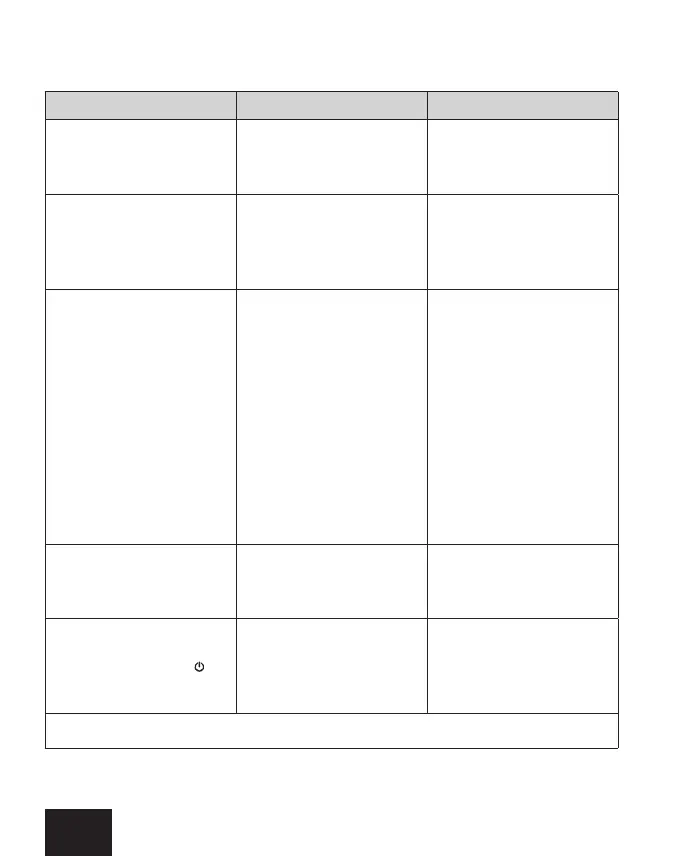
Problem Possible cause Soluon
Device is connected to
electricity, LEDs don’t
light up.
Power connecon
problem.
Check the power wire
connecon, plug and
the socket.
Heang element is not
heang, outermost LEDs
are ashing alternately.
One LED ashes longer.
Temperature sensor
damage.
Disconnect the device
completely, wait unl the
radiator cools down and
re-connect it again.
Heang element is not
heang, outermost LEDs
are ashing alternately.
Device overheated.
Check and conrm that the
heang element's output
does not exceed the rec-
ommended output of your
radiator. Check and reduce
the water temperature in
the central heang system
– must not exceed 82° C. In
electric-only version check,
if the radiator is proper-
ly lled with the heang
agent.
During operaon the blue
RGB LED comes on and o.
Heang element commu-
nicates with your mobile
device.
Heang element works
properly.
The device heats despite
turning it o with the
buton.
Electronics damaged.
Disconnect the device
completely, wait unl it
cools down and re-connect
it again.
If the problem persists please contact Your local Distributor.


 To Next Page