Safety note.
Please ensure that analog audio connections are turned off before
plugging them in. This will protect you from any possible - albeit
weak - electrical shocks, as well as protecting your speakers and
your hearing from sudden peaks.
For digital devices, be sure to at least reduce the volume of your
playback equipment.
Static noise can also occur if you connect the device to the USB
port on your computer. Be sure to lower the volume on your play-
back system accordingly.
Welcome!
We are pleased that you have chosen a TerraTec Producer Audio Interface for your
musical endeavors and would like to congratulate you on your decision. With the
PHASE 26 USB Audio System, you've purchased a sophisticated product representing
the state of the art of studio technology - and we're convinced this innovative develop-
ment will prove extremely useful to you in the coming years and, above all, provide you
with a great deal of entertainment.
We hope that this brochure is helpful to you while using the product. It is designed to
illustrate technical relationships based on practical examples from the studio environment.
However, it is designed not only for beginners, but also for those more advanced in this
complex matter: Ambitious professionals, too, will surely learn something new here and
there.
We hope you find this manual both informative and entertaining to read, and hope you
find lots of pleasure in the PHASE 26 USB System.
Sincerely,Your TerraTec Producer Team
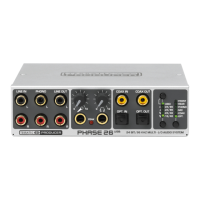
Your new audio interface: PHASE 26 USB.
PHASE 26 USB (English) 5


 To Next Page