Need help?
Do you have a question about the TerraTec PHASE 26 USB and is the answer not in the manual?
Crucial safety information and warnings regarding device usage.
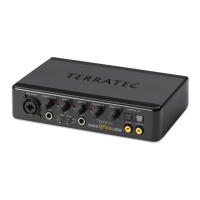
Highlights connectivity, software, and driver capabilities of the audio interface.
Explains the different modes of operation and their configurations.
Details supported Windows versions and system requirements for installation.
Step-by-step installation process for the Control Panel and device drivers.
Specific instructions for installing the PHASE 26 USB drivers on Windows 2000.
Specific instructions for installing the PHASE 26 USB drivers on Windows XP.
Setting the device as the preferred audio output for Windows system sounds.
Procedure for updating the device's firmware using the Windows Control Panel.
Details supported MAC OS versions and system requirements for installation.
Steps for installing ASIO drivers on OS9 and CoreAudio/MIDI on OS X.
Procedure for updating the device's firmware on MAC OS X.
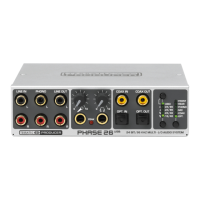
Detailed description of all input and output ports on the audio interface.
Explains the specifications and ports for the analog audio outputs.
Details the various analog input types and their selection methods.
Covers S/PDIF connectivity, sample rates, and synchronization for digital audio.
Describes the MIDI port functionality and connection types.
Explains MME Wave and ASIO drivers available for Windows.
Details USB and ASIO settings configurable within the Control Panel.
Explains ASIO resolution, latency, and priority settings for performance.
Features for direct monitoring and output routing within the Control Panel.
Specifics and usage of the MIDI driver for data transfer.
Discusses WDM capabilities like interpolation and kernel streaming.
Information on MAC OS 9 and OS X driver implementation.
Adjusting individual output levels and stereo linking of channels.
Configuring input monitoring and direct monitoring options.
Special monitoring features and RIAA filtering for the phono input.
How to perform device firmware updates using the Control Panel.
Accessing system information and customizing the interface appearance.
Guide to connecting turntables and using the integrated phono preamp.
Tips for optimal recording levels, settings, and editing vinyl.
Software functions for cleaning, declicking, and preparing vinyl recordings.
External links for further information on vinyl, recording, and technology.
Detailed specifications of the audio interface hardware.
List of supported operating systems and driver types.
Minimum and recommended system configurations for PC and MAC.
 General
| Type | Audio Interface |
|---|---|
| Connectivity | USB |
| Sample Rate | Up to 96 kHz |
| Bit Depth | 24-bit |
| Phantom Power | Yes |
| USB | USB 2.0 |
| Audio Inputs | 2 x XLR/TRS combo |
| Driver | ASIO, WDM |
| Software | Included recording software |
| Audio Outputs | 2 x TRS |

 To Next Page