-4-
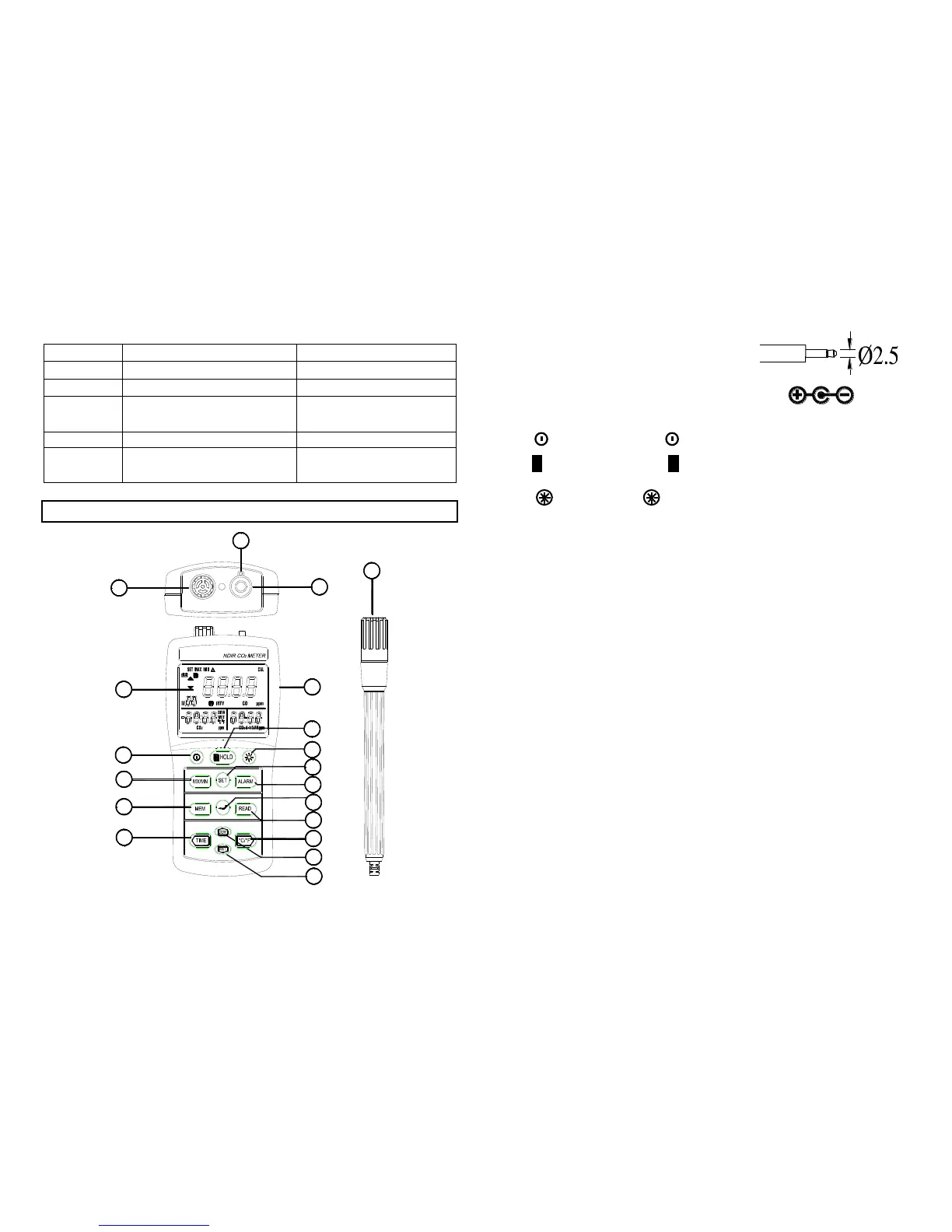
1). Display.
2). Gas exhaust.
3). RS232
4). Gas inlet connector.
5). AC adapter socket (9V, 300mA).
6). Power key : Press power key to turn the meter on or off.
7). H HOLD key : Press H HOLD key to freeze or unfreeze
the display reading.
8). key : Press key to turn the backlight on or off.
9). MX/MN Key:Press MX/MN key to enter MAX/MIN mode and
cycle through the CO
2
maximum (MAX) / minimum (MIN) /
current(△) reading, maximum reading with stamp time, minimum
reading with stamp time and current reading with time.
Press key to exit the MAX/MIN mode.
10). SET key :
Press SET key one time to enter real-time setting mode.
Press SET key two times to enter auto datalogging
interval time setting mode.
Press SET key three times to enter clear manual
memorized data mode.
Press SET key four times to enter clear auto datalogged
memorized data mode.
In the alarm mode, press SET key to enter alarm Hi/Lo
limit value setting mode.
11). ALARM key : Press ALARM key to turn on or off the
alarm function.
12). MEM key : Manual memorizes data.
13).
(Enter) key : Press key can exit MX/MN mode,
real-time setting mode, alarm setting mode and manual
memory data reading mode.
-5-



 To Next Page