When the cooking cycle is over: will appear in the display.
BASIC MICROWAVE COOKING
The oven will ‘beep’ three times, and then at regular intervals.
Open the oven door. Place the food in the centre of the oven on
the turntable. Close the door.
$Wait a short time and then open the door and remove the
cooked food. Close the door. The oven will reset to the clock time.
Procedure: Select the microwave power: Select the cooking
time: Start the cooking process.
If you want to leave the food in the oven to perhaps carry out a
further procedure, you will need to manually reset the oven .
Method:
$Press the STOP/CANCEL button to reset the oven.
$Press STOP/CANCEL to clear any previous setting
$Press the POWER button to select a microwave power. The
During Cooking:
MICRO indicator lights to show the microwave function.
To interrupt cooking :
$Rotate the TIME/MENU knob to set a cooking time
$Open the oven door or press STOP/CANCEL once.
$Push the TIME/MENU (START) knob. The ‘COOK’ indicator on
To resume cooking:
the display will light
$Close the door (if open); press the TIME/MENU knob.
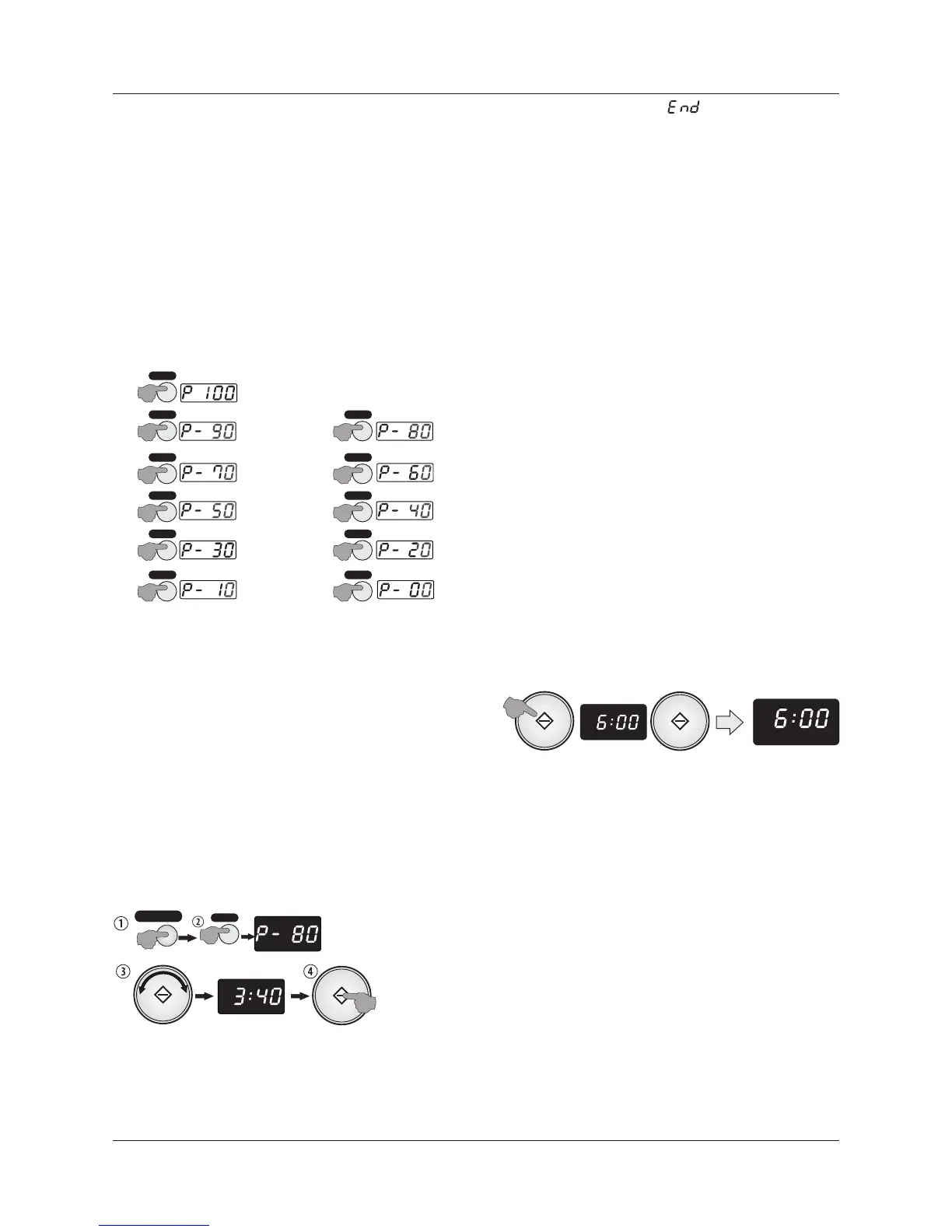
1: Set the microwave power level
To cancel a program:
$Press POWER repeatedly to select the power setting
$ Press STOP/CANCEL twice
$
$To check the power setting during cooking:
$ Press POWER once.
EXPRESS COOKING
Express cooking is a very good way of rapidly heating small
portions of food, or easily adding a small amount of cooking time
to finish dishes that are slightly undercooked.
By pressing the START button repeatedly you can program the
oven for Express cooking at FULL power(100%) power.
$The oven will start 2 seconds after you stop pressing the
START button so be prepared!
Points to remember with the Express cooking program
$Each press of the START button increases the time increases
the time in 30 second intervals.
2: Set the cooking time
10 minutes is the maximum time you can program.
$Rotate the TIME/MENU knob clockwise to increase the time
$Express Cooking always takes place at full power.
$Rotate the knob anticlockwise to decrease the time
Example: To express cook food for 6 minutes
Rotating the knob alters the cooking time as below:
0 - 5 minutes: Each click alters the time in 10 second intervals.
5 - 10 minutes:. Each click alters the time in 30 second intervals.
10 - 30 minutes: Each click alters the time in1 minute intervals.
30 - 95 minutes: Each click alters the time in 5 minute intervals.
The maximum cooking time is 95 minutes. Once the 95:00 mark is
reached, rotating the TIME/MENU knob clockwise will start the
time cycle again from :10 (10 seconds).
To reduce the time, turn the knob anticlockwise .
Example: Cook food for 3minutes 40 seconds at 80 % power:
$Open the oven door. Place the food in the centre of the oven
on the turntable. Close the door.
$Then:
ZERO Microwave Power
X1
100% FULL Microwave Power
90% (High)
X2
80%
X3
X4
70% (Med-High)
60%
X5
50% (Med)
40%
X6
X7
10% (Low)
X11
0%
X10
20%
X9
X8
30%
(Med-Low
Defrost)
X12
MICRO
2 SEC
TI ME R
CODE
MICRO MEM
TI ME R
MICRO
CODE
ENTER COOK TIME
Page 6
POWER
POWER
POWER
POWER
POWER
POWER
POWER
POWER
POWER
POWER
POWER
POWER
X3
STOP/CANCEL
ENTER COOK TIME
ENTER COOK TIME
MICRO
TIME


 To Next Page