BASIC CONVECTION COOKING MICROWAVE AND CONVECTION COOKING
$Open the oven door. Place the food in the centre of the oven This oven has four pre-programmed settings that make it easy to
on the turntable. Close the door. cook automatically with both convection heat and microwave.
This feature is particularly useful for roasts, etc.
$Press STOP/CANCELto clear any previous setting
$Press the CONVECTION button to select oven temperature
There are four settings selected by repeatedly pressing the
MICRO+CONVECTION button.
The CONV indicator lights to show that convection is on.
$Rotate the TIME/MENU knob to set a cooking time
$Press the TIME/MENU knob to start.
The ‘COOK’ indicator on the display will light
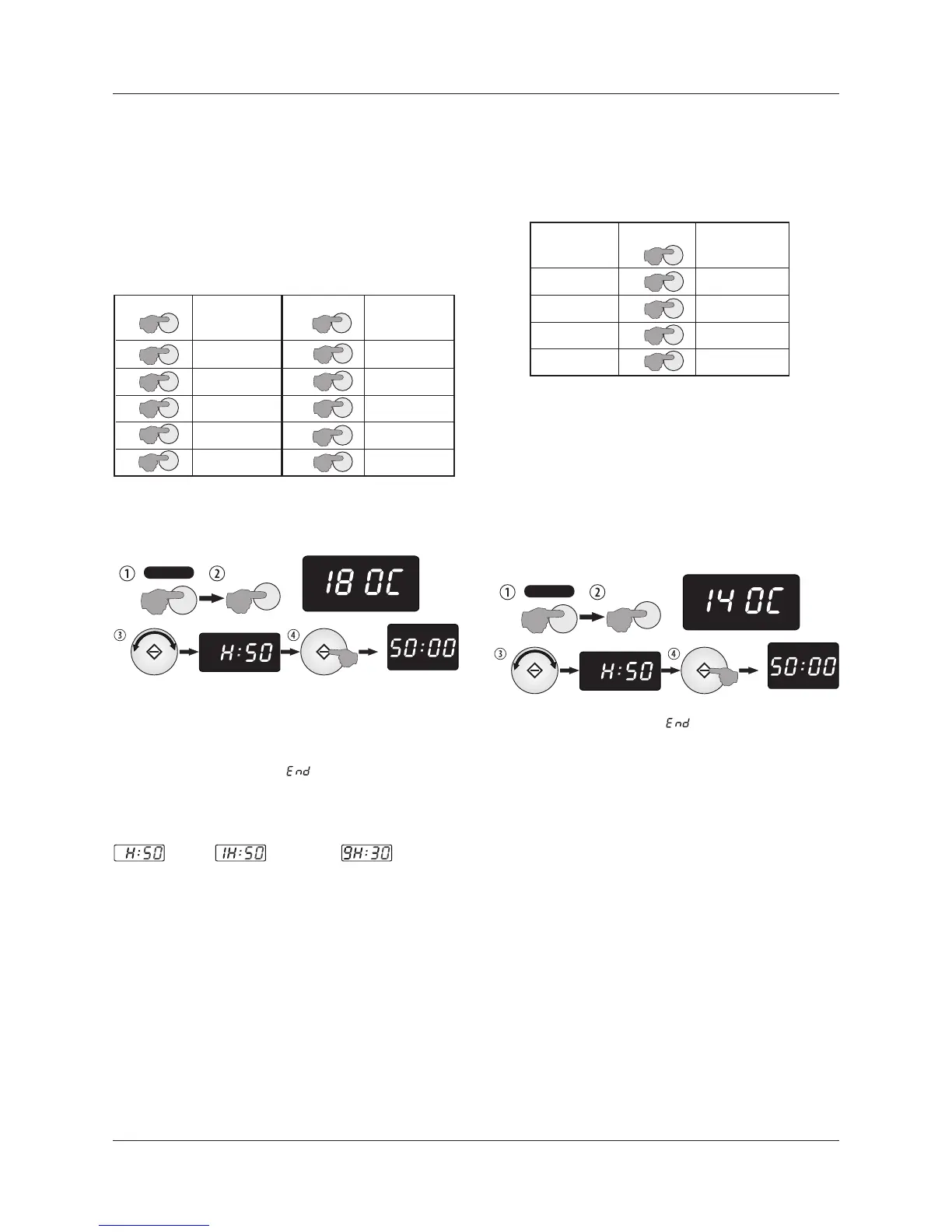
This oven can be programmed for ten cooking temperatures:
The maximum cooking time is 9 hours and 30 minutes
Example: To set a Comb3 cooking program taking 50 minutes
$Open the oven door. Place the food in the centre of the oven
on the turntable. Close the door.
$Press STOP/CANCEL to clear any previous setting.
$Press the MICRO+CONVECTION button three times to select
the correct oven temperature
Example: Cook at 180ºC for 50 minutes.
The CONV and MICRO indicators light showing combi convection is on.
$Open the oven door. Place the food in the centre of the oven
$Turn the TIME/MENU knob to H:50
on the turntable. Close the door.
$Press the TIME/MENU knob to start.
$Then:
The maximum convection cooking time is 9 hours, 30 minutes.
When the cooking cycle is over: will appear in the display.
To check the temperature during cooking:
The oven will ‘beep’ three times, and then at regular intervals. Open
$Press the CONVECTION button once
the door or press STOP/CANCEL before starting a new cooking cycle.
When the cooking cycle is over: will appear in the display.
The oven will ‘beep’ four times, and then at regular intervals. Open
the door or press STOP/CANCEL before starting a new cooking cycle.
Convection Oven Time Displays
PREHEATING AND COOKING IN THE OVEN
To combine preheating and convection cooking in one process:
$Press CONVECTION as above to select the temperature.
$Press the TIME/MENU knob to start.
One beep sounds and ‘PREH’ flickers in the display.
The oven will preheat for up to 30 minutes
When the oven reaches the programmed temperature: The
oven emits steady beeps and the PREH light glows steadily.
$Open the oven door. Place the food in the centre of the oven
on the turntable (use oven gloves!). Close the door.
$Rotate the TIME/MENU knob to select the required time.
$Press the TIME/MENU knob to continue convection cooking.
Oven
Temperature
200 ºC
190 ºC
180 ºC
170 ºC
160 ºC
X2
X3
X4
X5
X1
PRESSES
X6
X7
X9
X8
X10
Micro
150 ºC
140 ºC
130 ºC
120 ºC
110 ºC
Oven
Temperature
Convection
PRESSES
50 min.
1 hr, 50 min. 9 hr, 30 min.
X2
X3
X4
X1
PRESSES
200ºC
170 ºC
140 ºC
110 ºC
Oven
Temperature
Combination
COMB 1
COMB 2
COMB 3
COMB 4
Page 8
STOP/CANCEL
X2
T IM E R
GRILL MICRO
ENTER COOK TIME
CONV
TI ME R
CONV
TI ME R
CONV
COOK
CONVECTION
ENTER COOK TIME
STOP/CANCEL
X3
T IM E R
GRILL MICRO
ENTER COOK TIME
CONV
TI ME R
CONV
TI ME R
CONV
COOK
MICRO+
CONVECTION
ENTER COOK TIME
MICRO
MICRO
CONVECTION
MICRO+
CONVECTION
MICRO


 To Next Page