9
ENG
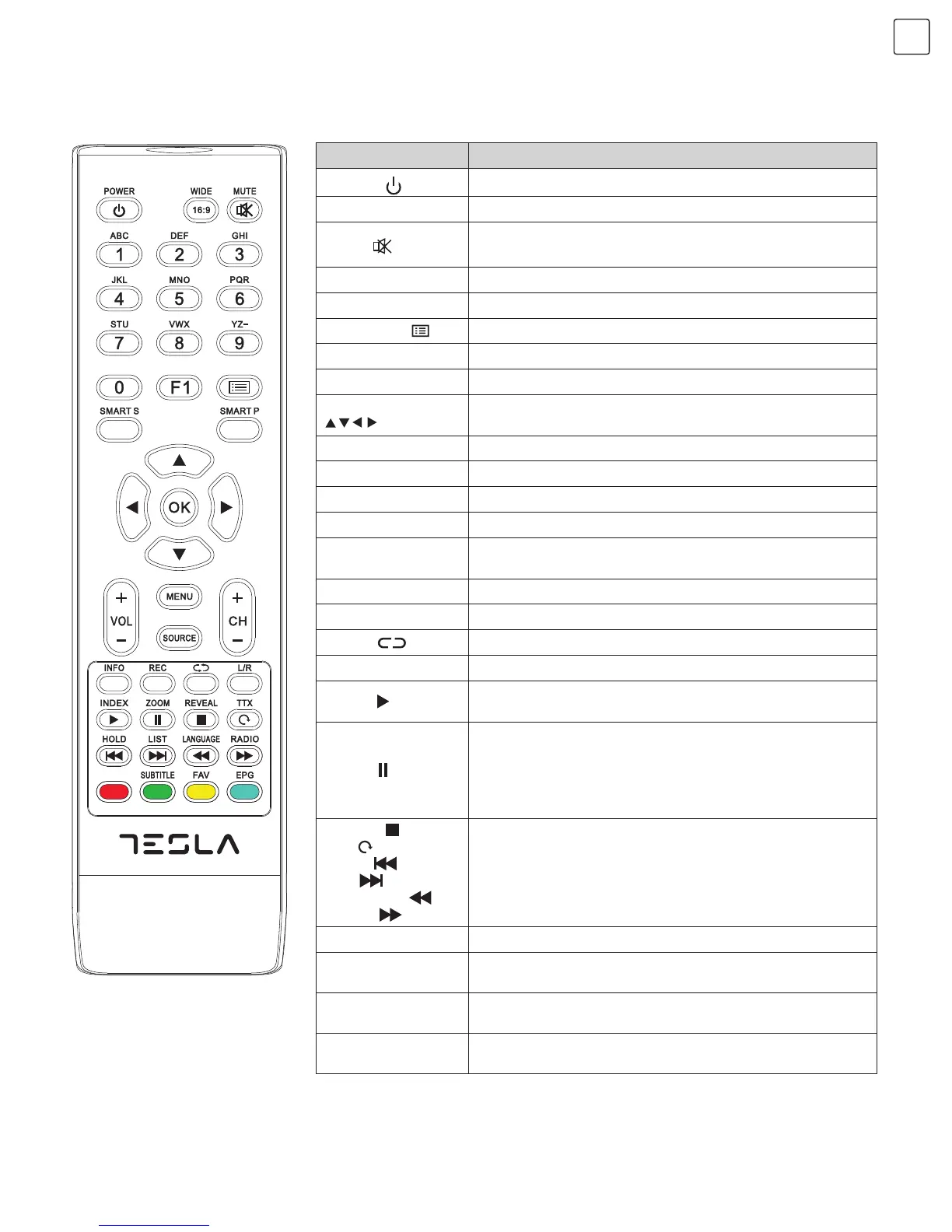
Remote Control Key Instruction
Note: Appearance of the remote control can differ from the one shown in the figure. Adjust the provided information to
match the actual remote control.
Name Function Description
POWER (
)
Switching the receiver in and out of standby mode.
WIDE (16:9)
Switching picture ratio.
MUTE ( )
Switching off sound when viewing programme.
Numerical
Entering numbers.
F1 Picture freeze on or off.
Channel list ( )
Searching through channel list.
SMART S Smart sound mode selection.
SMART P Smart image mode selection.
Cursor key
(
, , , )
Moving cursor up/down/left/right across menu items or
change date of EPG.
OK Confirmation of current settings.
VOL+/VOL- Press to adjust the volume.
MENU Press this key to display menu.
SOURCE Press this key to display signal source selection menu.
CH+/CH-
Channel changing keys. Changing different pages of
current channel EPG.
INFO Displaying current programme information.
REC Programme recording.
Return ( )
Press this key to return to the last channel watched.
L/R Selecting NICAM mode (in ATV signal source)
INDEX ( )
In DTV mode, press “INDEX” key to display a list of
recorded programmes.
ZOOM ( )
In DTV mode, press “ZOOM” key to zoom aspect ratio
if there is a graphic display; if there are no graphic
displays and USB port is connected to memory, press
this key to delay broadcast of currently played television
programmes.
REVEAL ( ),
TTX (
),
HOLD (
),
LIST (
),
LANGUAGE (
),
RADIO (
)
For teletext operation or USB operation.
Red key Muti-function red key.
SUBTITLE
(Green key)
Teletext green key or displaying subtitle message if current
channel has subtitle option.
FAV (Yellow key)
Teletext yellow key or Favourite key used for setting or
displaying your favourite programmes.
EPG (Blue key)
Teletext blue key, or showing the Electronic Program Guide
of current channel during no-menu state.


 To Next Page
 Loading...