16
ENG
Time-shift option
EPG option
Hotel Function (optional)
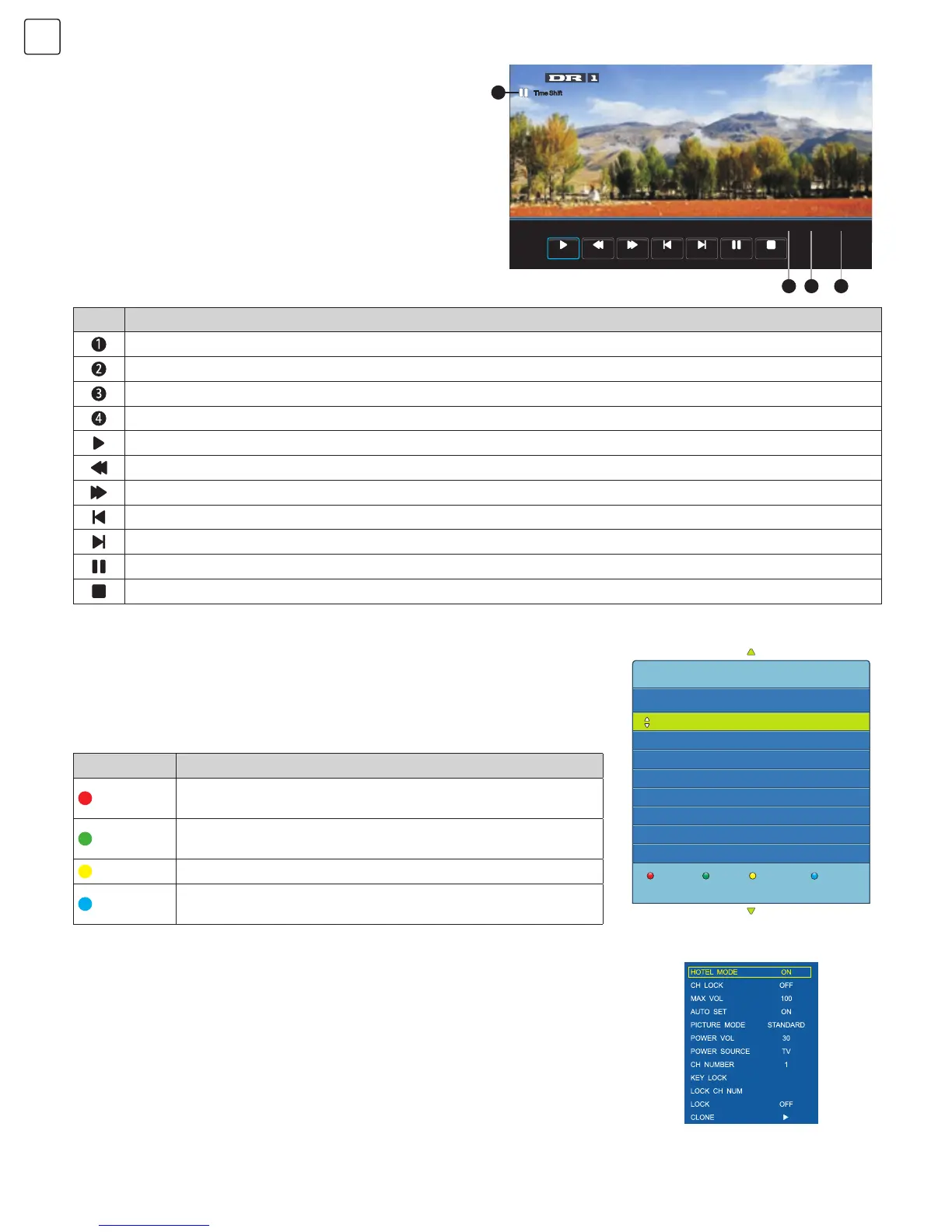
In DTV mode, press “ZOOM” key. Time-shift option
menu will be displayed on the screen (Fig. 16) and the
programme will be in suspended state. Press “INDEX”
key to resume the programme. Press “REVEAL” key to
stop and quit time-shift. When user leaves programme for
a short time, time-shift function can suspend and cache
the playing programme to a U disc. The programme
can be resumed when user decides to play it.
In DTV mode, press “EPG” key and EPG option menu will be displayed on the
screen (Fig.17). User can perform the following operations with the red, green,
yellow, and blue multifunction keys.
Press “MENU” key on the remote control to display the main TV menu and
then press “4578” on the remote control to display the hotel function menu.
Press “Up/DOWN” key to enter the menu and select the item you want to
adjust. Then press “Left/Right” key to adjust the value or state (Fig. 18).
[00:00:00/00:00:08/01:20:00]
14:23
Play FB FF FB 30S FF 30S Pause Stop
Time Shift
3
4
2
1
Fig. 16
Fig. 17
Fig. 18
Icon Description
Indicates that the programme is in suspended state.
Indicates the Current programme time.
Indicates the time when the programme was suspended.
Indicates the longest cache time that a U disc can provide.
Play: Select this icon. Press "OK" key to play the video or set A-B repeat.
FB: Select this icon. Press "OK" key to fast back. Press "INDEX" key to play normally.
FF: Select this icon. Press "OK" key to fast forward. Press "INDEX" key to play normally.
FB 30s: Select this icon. Press "OK" key to play backward 30 seconds.
FF 30s: Select this icon. Press "OK" key to play forward 30 seconds.
Pause: Select this function. Press "OK" key to play or pause.
Stop: Select this icon. Press "OK" key to stop and quit the display window.
Icon Description
Record
Press the red key to enter the sub-menu. You can choose the
time of the programme you want to record.
Info
Press the green key to display the detailed information about
the programme.
Schedule
Press the yellow key to see your previous settings.
Remind
Press the blue key to set the time when you want to be
reminded about the programme you want to see.
PROGRAMME GUIDE
TIME
Record
Info
Schedule Remind
MENU:Return
31 Aug
14:23
1 DR1
2 DR2
3 Tegnsprogstol...
4 TV 2 (Fyn)
No Information
Folk og fae (32)
Ingen tegnsprogstolkning
Vild med dig
ON
D


 To Next Page
 Loading...