13
ENG
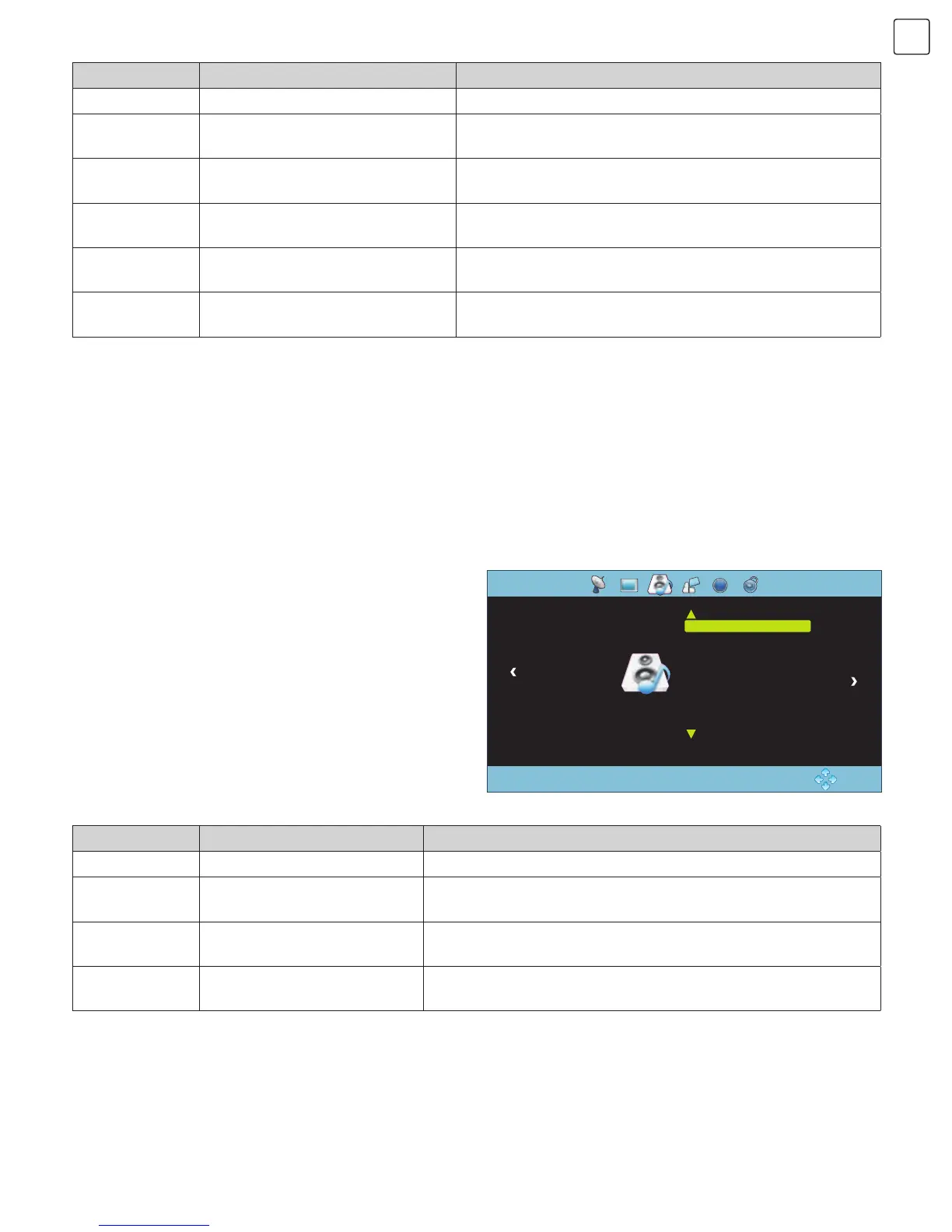
Press “MENU” key and CHANNEL menu will be
displayed on the screen. Press “t/u” key to select
SOUND (Fig.10), then press “/” key to select the
item you want to adjust or set.
Sound Mode: Press “OK” key to enter Sound Mode
submenu. Press “/” key to select item you want to
adjust or set.
Surround Sound: Press “OK” key to enter Surround Sound submenu. Press “/” key to select surround sound mode:
Off, Surround, SRS Trusurround XT.
AD Switch: Press “OK” key to enter AD Switch submenu. Press “t/u” key to select ‘’On’’ or ‘’Off’’. If you select
‘’On’’, you can adjust AD volume by pressing “t/u” key (only available in DTV).
SOUND
Fig. 10
OK: Enter
MENU: Return
Sound Mode Music
Surround Sound Off
AD Switch Off
SOUND
Item Function Description
Picture Mode Selecting picture mode “Standard”, “Soft”, “User Dynamic” four modes.
Contrast Adjusting contrast of whole picture Increasing analogue value increases Contrast;
Decreasing analogue value decreases Contrast (0~ 100).
Brightness Adjusting brightness and black
level of whole picture
Increasing analogue value increases brightness;
Decreasing analogue value decreases brightness (0~ 100).
Saturation Adjusting colour depth of images Increasing analogue value increases green;
Decreasing analogue value increases purple (0~100).
Sharpness Adjusting sharpness of whole
picture
Increasing analogue value increases definition;
Decreasing analogue value decreases definition (0~100).
Tint Adjusting tint of whole picture Increase the analogue value to improve the depth;
Decrease the analogue value to reduce the depth (0 ~100).
Item Function Description
Sound Mode Selecting Sound Temperature “Standard”, “Music”, “Movie”, “User” five modes.
Treble Adjusting treble value
Increasing analog value increases treble;
Decreasing analog value decreases treble (0~100).
Bass Adjusting bass value
Increasing analogue value increases bass;
Decreasing analogue value decreases bass (0~100).
Balance
djusting balance between left
and right speaker
Increasing analogue value decreases left volume;
Decreasing analogue value decreases right volume (L50 ~R50).
Note: Tint can be adjusted only in NTSC system.
Color Temperature: Press “OK” key to enter Colour Temperature submenu. Press “t/u” key to select colour
temperature mode: Standard, Warm, Cool.
Aspect Ratio: Press “OK” key to enter Aspect Ratio submenu. Press “/” key to select aspect ratio mode: Auto, 4:3,
Full, Film, Subtitle, PC Mode.
Noise Reduction: Press “OK” key to enter Noise Reduction submenu. Press “/” key to select Noise Reduction
mode: Off, Low, Middle, High.


 To Next Page
 Loading...