To operate Keep Climate On, Dog, or Camp:
1. Make sure the Battery's charge level is at
least 20%.
2. Engage Park. The Keep Climate On, Dog,
and
Camp settings are available only
when Model 3 is in Park.
3. If necessary, adjust the climate settings.
4. On the climate controls screen, touch
Keep Climate On, Dog, or Camp.
NOTE: You can also control Dog and
Camp from the mobile app, by swiping up
from the gray bar on the Climate screen.
The climate control system attempts to
maintain your climate settings until you shift
out of Park or manually turn it
o. Avoid
using Keep Climate On, Dog, or Camp when
the battery charge is low. If the Battery's
charge level drops below 20%, the Tesla
mobile app attempts to repeatedly send you
notifications reminding you to check on
anything that you have left in
Model 3.
NOTE: Software updates cannot be
performed when Keep Climate On, Dog, or
Camp is active.
NOTE: The intrusion sensor (if equipped)
automatically disables when Keep Climate On,
Dog, or Camp is active. However, you can
override this behavior and keep the intrusion
sensor enabled. To do so, touch
Controls >
Safety > Tilt/Intrusion after enabling Keep
Climate On, Dog, or Camp. However, note that
keeping the intrusion sensor enabled while
Keep Climate On, Dog, or Camp is active can
trigger an alarm event as a result of air
movement inside the cabin.
WARNING:
Never leave a child
unattended in your vehicle.
WARNING:
Check local laws for any
restrictions on leaving pets
unattended in your vehicle.
WARNING:
You are responsible for the
safety of your dog or pet. Never leave
them in Model 3 for long periods of
time. Constantly monitor the vehicle
temperature and their well-being.
Make sure you have sucient cellular
coverage on your phone and time to
return to the vehicle, if necessary.
WARNING:
In the unlikely event that
your climate control system needs
service or is not working as expected,
avoid using Keep Climate On, Dog,
and Camp. Never rely on your vehicle
to protect something irreplaceable.
WARNING:
You can adjust and
monitor the climate control system
remotely using the mobile app.
However, if you use the mobile app to
turn o the climate control system,
Keep Climate On, Dog, and Camp stop
operating.
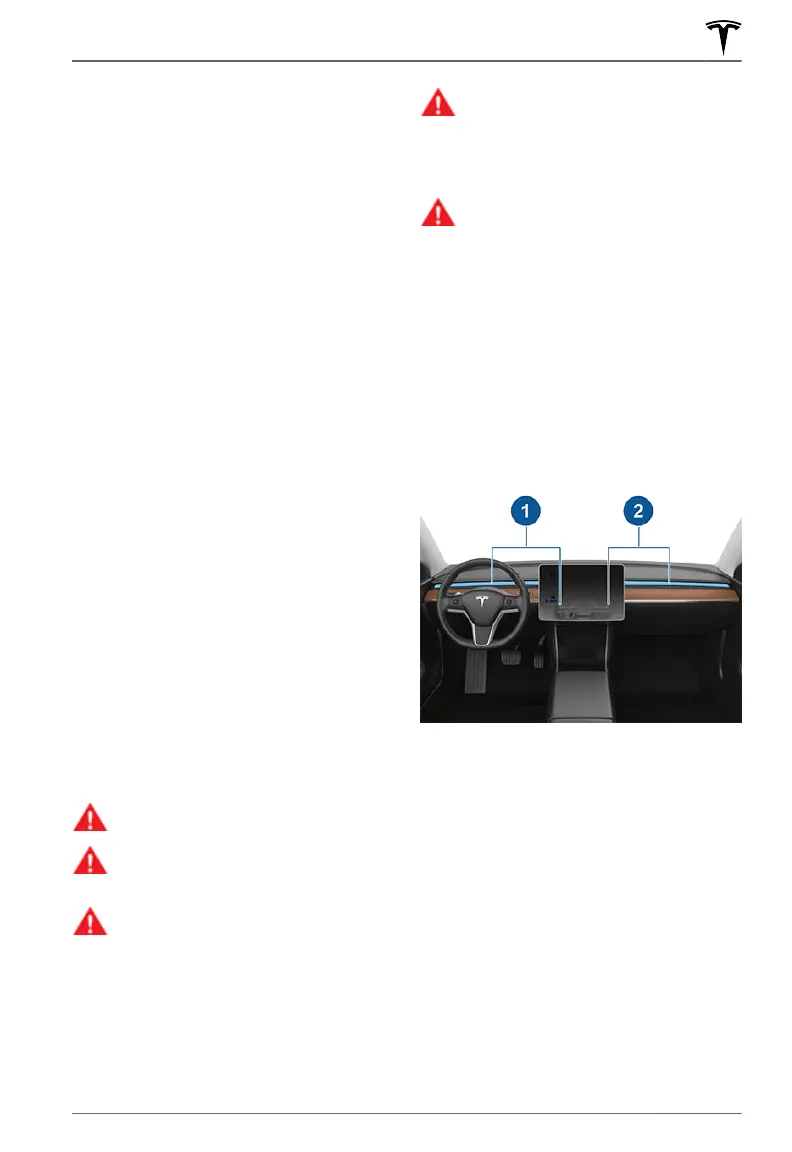
Adjusting the Front Vents
Model 3 has a unique horizontal face-level
vent that spans the width of the dashboard.
Using the touchscreen, you can pinpoint
exactly where you want to direct the air
flowing from this vent when heating or
cooling the front cabin area.
1.
Driver vent and controls
2. Passenger vent and controls
When the face-level vent is on you can adjust
the direction of the air
flow from each vent.
To adjust the direction of the air flow, simply
touch the radiating air waves from the
corresponding vent on the touchscreen. The
air
flows in a single stream when centered or
splits into mirrored air streams when air is
directed outward or inward from the center of
the vent.
NOTE: When you split a vent into two
separate air
flows, the air flow in each
direction is not as strong as when all air is
flowing in a single direction.
Climate Controls
149Using the Touchscreen















 To Next Page