6 Using the manifold
14
6 Using the manifold
6.1. Preparing for measurement
6.1.1. Switching the instrument on
> Press [ ].
Zeroing the pressure sensors
Zero the pressure sensors before every measurement.
✓ All connections must be pressureless (ambient pressure).
> Press for 2 seconds key [P=0] and execute zeroing.
6.1.2. Connecting the temperature sensor
Surface temperature sensor
An NTC temperature sensor (accessory) must be connected for
measuring the pipe temperature and for automatic calculation of
superheating and subcooling.
Deactivating the surface compensation factor for insertion and
air temperature sensor
A surface compensation factor has been set in the measuring
instrument to reduce the measuring errors in the main field of
applications. This reduces measuring errors when using surface
temperature sensors.
1. Press [Set] repeatedly until T
fac
is displayed.
2. Press [▲] or [▼] to set T
fac
to Off.
3. Press [Set] to continue through the settings menu until the
measurement/home view is displayed.
- T
fac
is shown on the display if T
fac
is disabled.
Connecting the refrigerant hoses
Before each measurement check whether the refrigerant
hoses are in flawless condition.
✓ The valve actuators are closed.
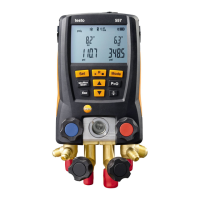
1. Connect the refrigerant hoses for low-pressure side (blue) and
high-pressure side (red) to the measuring instrument.
2. Connect the refrigerant hoses to the system.


 To Next Page