25
The humidity probes 0636.9740 and 0636.9715 as well as 0635.1540 can be calibrated using the
hand-held instrument (no buttons on probe). All other humidity probes are adjusted using buttons.
Please also consult the 0973.1820 Instruction manual on the 0554.0660 control and adjustment
set.
Confirm in the main menu with under PROBES - CALIBRATION
. Place the humidity probe in the
respective calibration container and start the calibration at the points (11.3%RH / LiCl or
75.3%RH / NaCl) by pressing the appropriate function button.
The required value, the current reading and the remaining calibration time are shown on the display.
If the current reading is stable you can carry out the calibration ahead of time using the middle
function button. Repeat the calibration at the second calibration point.
Note! PROBE - R
ESET
cannot reverse calibration.
Calibration
Humidity measurement
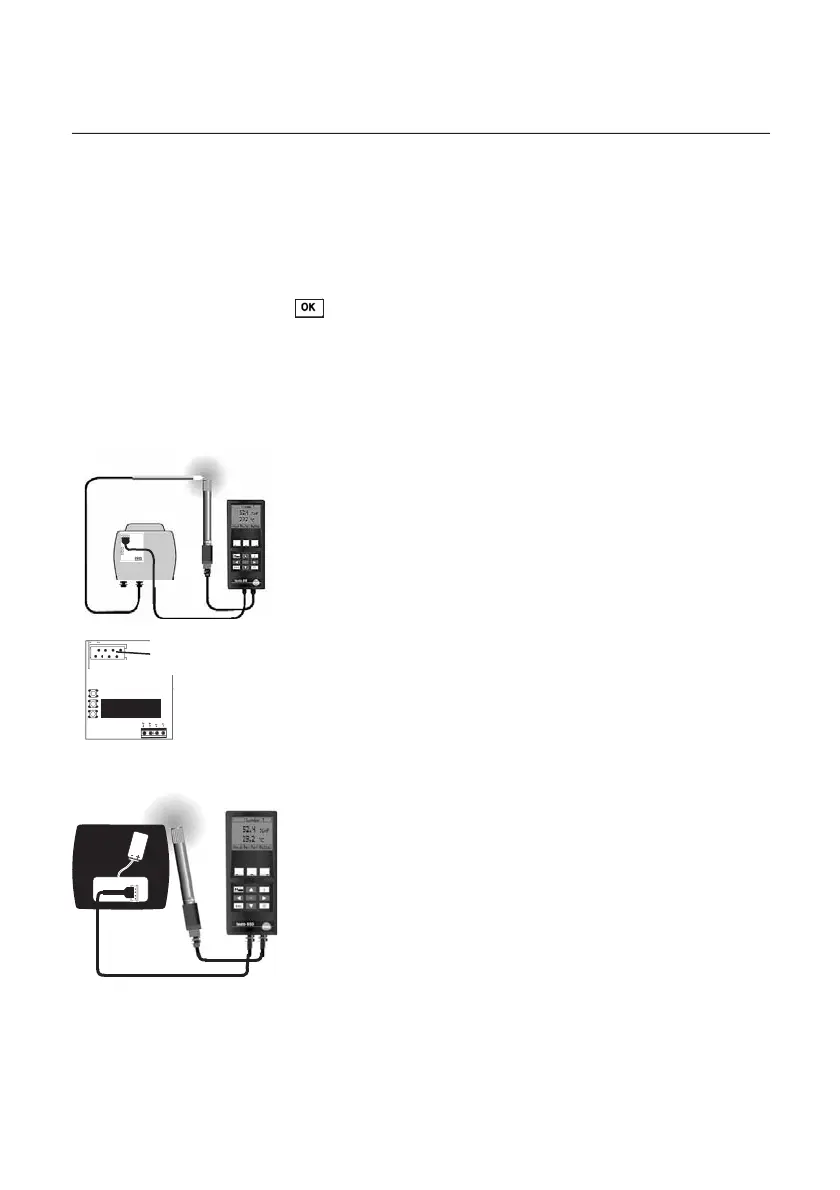
Calibrating testo hygrotest 600/650 with reference instrument
testo 650/400: Requirements:
- testo 650 hand-held instrument or testo 400, V1.22 or newer
- Transmitter board from Version V 1.18 (visible on the largest
IC component)
- Calibration connection cable (0409 0214)
- Connection cable for probes (0430.0143 or 0430.0145)
- Reference humidity temperature probe (0636 9741)
Connect transmitter to probe socket 1 and a reference probe to
probe socket 2 in the instrument. The humidity and temperature
value is adjusted to the reference probe via the menu item
“Probe” - ”Probe adjustment”.
Humidity adjustment is deleted via ”Probe reset”. Temperature
adjustment is retained.
Adaptation time: min. 30 minutes, at constant temperature.
V 1.18
Micromatch
plug-in connection
Calibrating testo 608-H2 with reference instrument
testo 650/400: Requirements:
- testo 650 or testo 400, V2.0 or newer
- Calibration connection cable (0699 4235 / 10)
- Connection cable for probes (0430.0143 or 0430.0145)
- Reference humidity temperature probe (0636 9741)
Remove battery from
testo 608-H2 battery compartment but do
not disconnect.
Attach calibration cable to micromatch plug-in connection.
Insert correctly.
Connect calibration cable to probe socket 1 of the testo 650/400.
Connect reference humidity temperature probe to the right probe
socket of testo 650/400.
The humidity value is adjusted to the reference probe via the “Probe”
- ”Probe adjustment” menu item.
Humidity adjustment is deleted via ”Probe reset”.
Adaptation time: min. 30 minutes, at constant temperature.



 To Next Page