36
Automatic storing
Function button “Send”
All current readings are transmitted to your PC as ASCII
files including unit via the RS232 interface once the Send
button is pressed. The data can be displayed, saved and
printed using the HyperTerminal program.
Thanks to this function, readings can be transmitted to a
PC without having to start a measurement program. The
data does not come in regular cycles but asynchronous
i.e. each location comes with the date and time of the
measurement. The time intervals between the different
measurements can vary.
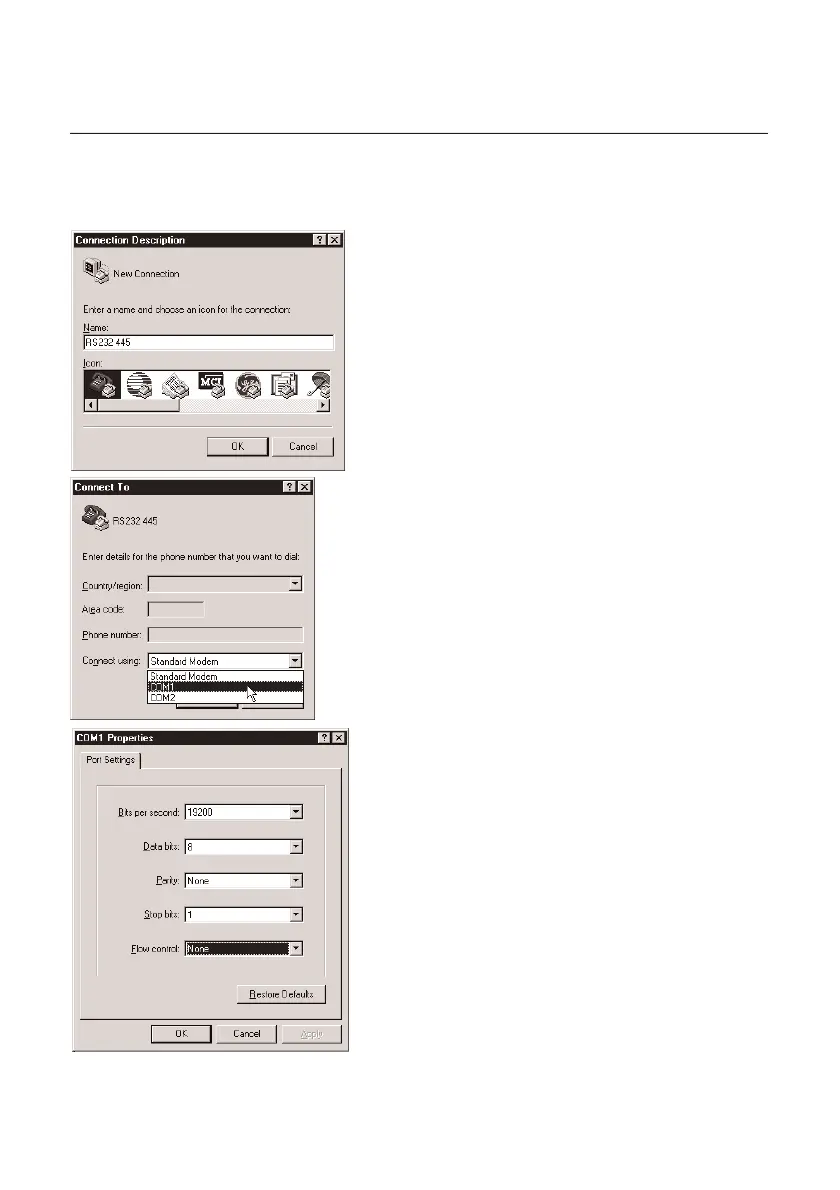
Calling up the HyperTerminal program:
Normally, you will find the program in “Programs” -
“Accessories”. Once you have called up the program, you
will have to enter a name for the connection (e.g. RS232
445), then you will have to define the COM interface, to
which the interface is connected. The next step involves
defining the COM interface settings. Select the following:
19200 bits/second, 8 data bits, no parity, 1 stop bit and
no log.



 To Next Page