EN
12
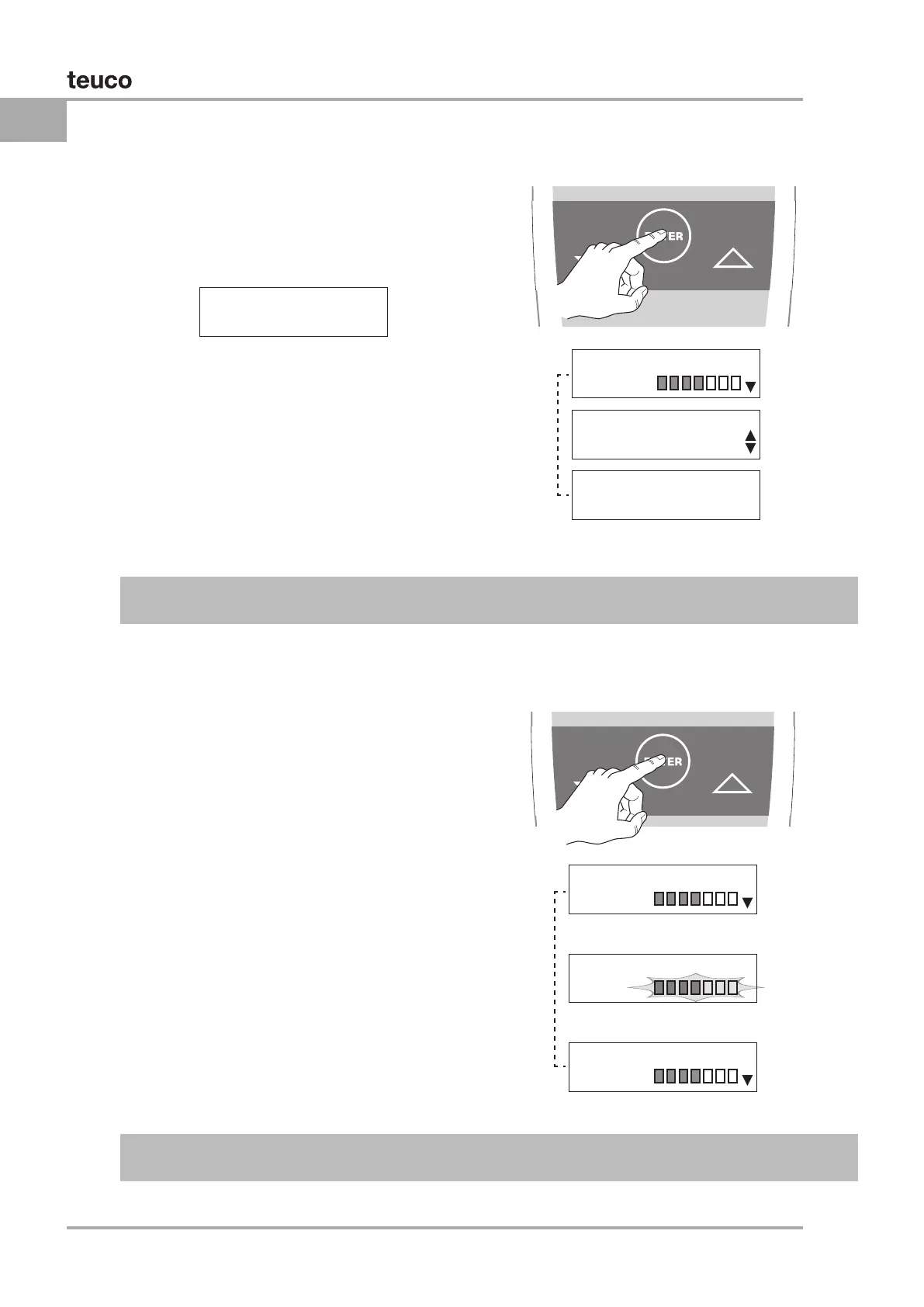
With the WHIRLPOOL in operation, the user can:
Change the duration of the Whirlpool session
Press “ENTER”
the display will show the Whirlpool menu. Select
buttons.
30 36
o
C 20:30
WHIRLPooL
WHIRLPooL
ARIA
WHIRLPooL
PULSAToR N
WHIRLPooL
TIMER 30M
WHIRLPooL
MYHYDRo
WHIRLPooL
MYHYDRo
WHIRLPooL
MYHYDRo
Whirlpool menu
AUTOCONFIRM: If no button is pressed for 5 seconds while the Whirlpool menu remains active, the
display reverts to the massage currently selected.
WHIRLPOOL SETTINGS
Display indicating
Whirlpool in progress
PERSONALIZING THE WHIRLPOOL
Press “ENTER” the display will show the whirlpool
the power of the massage.
display will revert to the Whirlpool menu.
Whirlpool menu
Whirlpool menu
AUTOCONFIRM: If no button is pressed for 5 seconds while the MYHYDRO menu remains active, the
current setting AUTOCONFIRMS and the display reverts to the Whirlpool menu.


 To Next Page